
TL;DR:
- AI automates rule-based, recurring tasks to help solo founders scale without hiring additional staff.
- Proper workflow documentation and incremental testing are essential for successful AI implementation.
Using AI to replace employees is defined as automating specific recurring, rule-based tasks with AI-powered tools so you never need to hire a human to do them. This is not about eliminating people wholesale. It is about identifying the work that eats your week and handing it to a machine that never calls in sick. The industry term for this is AI workforce automation, and it is the core strategy behind how solo founders are now scaling without hiring. Successful AI integration can produce a 40–80% revenue increase per employee and 2–3x output within 9–12 months. That number should stop you in your tracks. Yoursolobusiness was built to help you get there without a payroll.
How to use AI to replace employees: which tasks qualify
Not every task belongs on an AI automation list. The ones that do share three traits: they repeat weekly, they follow clear rules, and they eat significant time.
Here is where AI replacement works best for solo founders:
- Content drafts and rewrites. AI writers replace junior copywriters for blog posts, email sequences, and social captions. You review and approve; the AI does the first draft.
- Scheduling and calendar management. AI scheduling tools replace virtual assistants who used to play email ping-pong to book meetings.
- Lead qualification. AI-powered CRM workflows replace the sales coordinator who sorted hot leads from cold ones.
- Basic customer service. AI chatbots handle FAQs, order status questions, and intake forms around the clock.
- Resume and applicant screening. When you do hire, AI pre-screens applications against your criteria before you read a single resume.
The MIT Sloan research on workflow restructuring makes a critical point: AI delivers maximum value when you redesign workflows to cluster AI-friendly tasks into continuous sequences, not when you bolt automation onto a broken process. That means you cannot just drop a chatbot into chaos and expect results.
AI also replaces what researchers call “middle-layer” roles: the glue work, data entry, and triage tasks that consume hours without producing real output. Those are your best targets.
Pro Tip: Keep humans in the loop for high-judgment calls. Sales strategy, creative direction, and relationship management are roles AI should support, not own.
How to audit your workflows and find automation opportunities
The audit is where most solopreneurs get their first real shock. When you sit down and list every recurring task you do each week, you typically find 60–100 items. That number is not an exaggeration. Workflow audits consistently surface this volume for solo founders who thought they were “pretty efficient.”
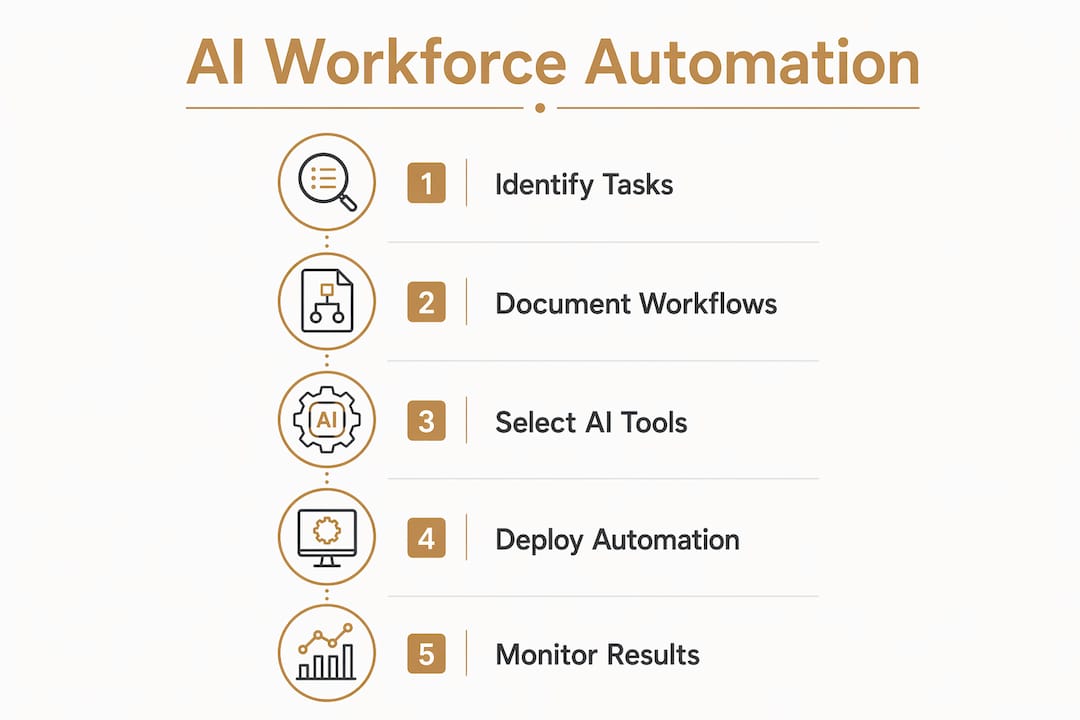
Here is a step-by-step process to find your best AI automation candidates:
- List every recurring task. Spend 30 minutes writing down everything you do weekly, biweekly, and monthly. Include the tiny stuff: sending invoices, posting to LinkedIn, answering the same three client questions.
- Score each task on two dimensions. Rate time cost (how many hours per week) and rule clarity (how clearly can you explain the steps to a new hire). High scores on both dimensions mean high automation potential.
- Document the process in writing. AI amplifies existing systems, but poorly documented processes cause automation projects to fail. Write out every step, every exception, every edge case before you touch a tool.
- Connect your data sources. A successful AI employee system needs a context layer (your business knowledge), real-time data access, and automated workflows working together. Link your CRM, inbox, and calendar to the AI tools you deploy.
- Run a parallel test for 5–7 days. Before you turn off the human process, run the AI alongside it. Supervised parallel runs let you catch errors and refine outputs before the AI operates on its own.
Pro Tip: Build your automation list in a simple spreadsheet with four columns: task name, weekly hours, rule clarity score (1–5), and tool candidate. Sort by combined score and start at the top.
What AI tools replace common employee roles

This is the practical part. Each category below maps a specific employee role to the AI tools that replace it in a solo business context.
AI writers and editors (replacing junior content creators)
AI writing tools handle first drafts of blog posts, email newsletters, product descriptions, and social content. You provide the brief and the angle; the AI produces a working draft in minutes. Your job shifts from writing to editing, which is faster and higher-value. Tools like ChatGPT, Claude, and Jasper all operate in this space. The ChatGPT for small business use case is especially strong for solopreneurs who need consistent content output without a content team.
Scheduling AIs (replacing virtual assistants)
AI scheduling tools eliminate the back-and-forth of booking meetings. They connect to your calendar, share availability, and confirm appointments without you touching your inbox. Recruitment data shows that scheduling time drops from days to minutes with AI automation. That same efficiency applies to client onboarding calls, discovery sessions, and check-ins. Tools like Calendly with AI features and Motion handle this role well.
AI chatbots (replacing basic customer service)
A well-configured chatbot handles your most common client questions 24 hours a day. It covers pricing FAQs, intake forms, project status updates, and support ticket triage. You build it once with your business knowledge baked in, and it runs without you. This replaces the part-time customer service role that many solopreneurs outsource to a VA.
CRM-integrated AI workflows (replacing sales coordinators)
AI-powered CRM tools score leads, send follow-up sequences, and flag hot prospects for your personal attention. You stop manually sorting your pipeline and start spending time only on leads that are ready to buy. Tools like HubSpot’s AI features and Pipedrive’s automation layer handle this function at a price point solo founders can afford.
Here is a quick reference for role-to-tool mapping:
| Employee role replaced | AI tool category | What it handles |
|---|---|---|
| Junior copywriter | AI writing tool | Drafts, rewrites, social content |
| Virtual assistant | AI scheduling tool | Calendar, booking, reminders |
| Customer service rep | AI chatbot | FAQs, intake, triage |
| Sales coordinator | CRM AI workflow | Lead scoring, follow-up sequences |
| Applicant screener | AI hiring tool | Resume filtering, criteria matching |
Common mistakes when replacing employees with AI
The biggest mistake solo founders make is trying to automate everything at once. That approach fails every time. Incremental, task-by-task automation builds a sustainable AI workforce. Deploying a single mega-agent to run your entire business is a recipe for expensive chaos.
Watch out for these specific pitfalls:
- Using AI for judgment calls it cannot make. Large language models excel at language tasks but do not reliably perform deterministic scoring or decision-making. Never let AI make final hiring decisions, contract approvals, or pricing calls without human review.
- Skipping negative constraints. System-level guardrails outperform prompt instructions alone. Setting explicit negative constraints in your workflows prevents the AI from taking actions you did not intend.
- Automating undocumented processes. If you cannot explain a task clearly to a new hire, you cannot automate it. Document first, automate second.
- Ignoring bias in AI hiring tools. Stanford research finds that AI hiring tools recommend white candidates at higher rates due to algorithmic bias. Audit every AI-assisted hiring output regularly and keep humans in the final decision role.
- Removing human oversight too soon. The transition period is not optional. Human supervision during AI deployment is the step that separates successful automation from expensive mistakes.
“The golden rule is to use LLMs only for language generation tasks, never for judgment or scoring decisions. Probabilistic models create scoring inconsistency and legal risks without human oversight.” – Hubert.ai
Treat your AI workforce the way you would treat a new hire in their first month. Check their work, give feedback, and only give them more responsibility once they have earned it.
Key takeaways
AI workforce automation works best when you identify high-recurrence, rule-based tasks, document them clearly, and deploy AI tools incrementally with human oversight at every stage.
| Point | Details |
|---|---|
| Target rule-based tasks first | Focus on recurring tasks with clear steps: content drafts, scheduling, lead qualification, and customer FAQs. |
| Audit before you automate | List all weekly tasks, score them by time cost and rule clarity, and document every step before touching a tool. |
| Map tools to roles | Match each AI tool to a specific employee role it replaces, from AI writers to CRM workflows. |
| Keep humans in final decisions | Never use AI for judgment calls like hiring decisions, pricing, or contract approvals without human review. |
| Build incrementally | Automate one task at a time and run parallel tests for 5–7 days before removing the human process. |
What I actually learned building my AI workforce
I mapped out my weekly tasks about two years ago and found 74 recurring items. That was a gut punch. I had been telling myself I was running lean, but I was actually spinning my wheels on a never-ending to-do list of low-value work.
The first thing I automated was content drafts. I used an AI writing tool to produce first drafts of my weekly posts, which cut my writing time by more than half. Then I tackled scheduling. One AI scheduling tool replaced about four hours of inbox management per week. Those two wins alone gave me back a full workday every week.
The tools I found indispensable were AI writers for content, an AI scheduling tool for client bookings, and a CRM with built-in automation for lead follow-up. Together, they replaced the work of a part-time VA, a junior writer, and a sales coordinator. I did not hire any of those people. I did not need to.
The lesson that surprised me most: patience matters more than the tools. I ran parallel tests for every automation before I trusted it. I caught errors I never would have found otherwise. Rushing that step is the fastest way to send a client a broken email sequence or a draft that reads like it was written by a confused robot.
If you are skeptical, I get it. The AI hype is loud and most of it is not aimed at people like us. But the business automation strategies that work for solopreneurs are not complicated. They are just specific. Start with one task, document it, automate it, and watch what happens to your week.
– Jay
Your next step toward an AI-powered solo business
If you are ready to stop doing work that a machine can handle, the Yoursolobusiness AI Toolkit is the place to start. It covers the exact tools Jay uses to run a one-person business at team-level output, with honest notes on what each tool replaces and what it costs.

You will also find a full step-by-step automation guide for solo founders who want to build their AI workforce from scratch in 2026. No fluff, no theory. Just the systems that work for people running a business alone. The solopreneurs who move on this now are the ones who will look back in a year and wonder how they ever worked any other way.
FAQ
What does it mean to use AI to replace employees?
Using AI to replace employees means automating specific recurring tasks with AI tools so you no longer need a human to perform them. It targets rule-based, high-volume work like content drafts, scheduling, and customer FAQs.
Which employee roles can AI fully replace for a solopreneur?
AI fully replaces roles built around repetitive, rule-based tasks: junior content creators, scheduling VAs, basic customer service reps, and lead qualification coordinators. High-judgment roles like sales strategy and creative direction still require human input.
How long does it take to see results from AI workforce automation?
Successful AI integration produces measurable output gains within 9–12 months, with revenue per employee rising 40–80% according to organizational research. Most solopreneurs notice time savings within the first two weeks of their first automation.
Is AI bias a real risk when using AI in hiring?
Yes. Stanford University research found that AI hiring tools recommend white candidates at higher rates due to algorithmic bias. Always audit AI-assisted hiring outputs and keep a human in the final decision role.
Do I need technical skills to build an AI workforce as a solo founder?
No technical background is required for most AI tools available to solopreneurs today. The critical skill is process documentation: you must be able to explain a task clearly in writing before any AI tool can handle it reliably.