
TL;DR:
- Business automation helps freelancers reclaim non-billable hours by automating repetitive tasks like invoicing and client onboarding. Implementing targeted workflows with AI and no-code tools can significantly increase income and productivity in a short time. Starting small and focusing on high-impact tasks results in steady, long-term business growth.
Business automation for freelancers is the practice of using AI and no-code tools to handle repetitive tasks, so you spend more hours on work that actually pays. Freelancers lose 30–40% of their working hours to non-billable tasks like invoicing, proposals, and follow-ups. That translates to 10–15 hours every week that never show up on a client invoice. The good news is that most of those hours are recoverable. The right freelance workflow automation setup can shift you from spinning your wheels on admin to doing the high-value work that grows your income.
What are the key freelance tasks that benefit most from automation?
The tasks that eat your week alive are almost always the same ones. Client onboarding, proposal drafting, invoice chasing, social media posting, and email follow-ups are the usual suspects. Each one feels manageable on its own. Together, they become a never-ending to-do list that crowds out billable work.
Here is where automation delivers the fastest wins:
- Client onboarding: Automated intake forms, welcome emails, and contract delivery can replace a full hour of back-and-forth per new client. Tools like Zapier or Make can trigger a welcome sequence the moment a form is submitted.
- Proposal drafting: AI assistants like Claude or ChatGPT generate first-draft proposals in minutes using a saved prompt template. You review and personalize rather than starting from scratch every time.
- Invoicing and payment follow-up: Automated payment reminders sent at 7, 14, and 21 days keep cash flowing without awkward manual nudges. Average outstanding invoices run $5,000–$10,000 for many freelancers, and automation cuts that number significantly.
- Email communication: Pre-written sequences for common scenarios (project kickoff, revision requests, project close) save 20–30 minutes per client interaction.
- Social media management: Scheduling tools batch your content creation into one focused session per week instead of daily interruptions.
- Content creation: AI tools draft blog posts, newsletters, and LinkedIn updates from a short brief, cutting production time by more than half.
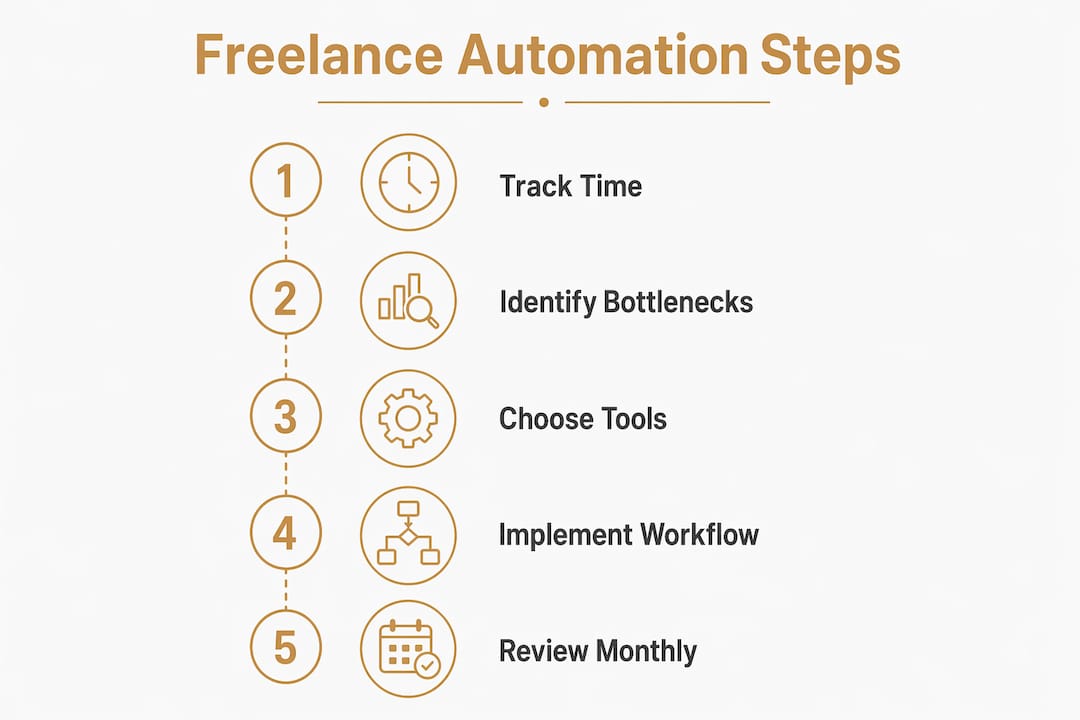
Pro Tip: Start by tracking your time for one week before you automate anything. You will quickly see which tasks repeat most often. Those are your highest-priority automation targets.
How can freelancers set up automation workflows practically?

The biggest mistake freelancers make is jumping straight to tools without mapping their workflow first. Workflow mapping before implementation prevents you from automating a broken process and just making it break faster. Spend 30 minutes sketching out each step of your client lifecycle on paper before you touch a single platform.
Once you have that map, follow these steps:
- Pick one bottleneck. Invoice chasing is the single best starting point for most freelancers. It is painful, repetitive, and completely automatable in under two hours.
- Choose your integration layer. Zapier and Make are the two most widely used no-code connectors. Both link Gmail, Google Calendar, payment processors, and invoicing tools without writing a line of code.
- Set up your first workflow. Connect your invoicing tool to your email so that overdue invoices trigger a reminder sequence automatically. Initial setup typically takes 2–4 hours to configure forms, templates, and payment links end to end.
- Test in 30-minute blocks. Run the workflow with a test client record. Check every trigger and output. Adjust the tone of automated emails so they sound like you, not a robot.
- Add one workflow per week. After invoice automation is stable, layer in client onboarding. Then proposal drafting. Slow and steady prevents system fatigue.
- Evaluate all-in-one vs. modular. An all-in-one platform handles invoicing, contracts, and scheduling in one place. A modular setup connects your existing tools through Zapier or Make. Connecting existing tools is often faster and less disruptive than migrating to a new platform.
Pro Tip: Avoid the double-entry trap. Use quote-to-invoice software that converts an approved quote into an invoice with one click, preserving all line items and terms. Re-typing data between documents is a hidden time sink and a source of scope disputes.
Which tools offer the best value for freelance automation in 2026?
The freelancer productivity tools market ranges from free to $199 per month, and the right choice depends on where your biggest time drain lives. Here is how the main categories break down.
Invoicing and payments: Automated invoicing platforms range from $0 to $199 per month and include automatic payment reminders, recurring billing, and late-fee rules. Look for platforms that also handle quotes so you avoid double entry.
AI writing assistants: Claude and ChatGPT are the two most practical tools for proposal drafting and client communication. Both accept saved prompt templates, which means you can generate a project proposal outline in under five minutes once your template is dialed in.
No-code integrators: Zapier and Make connect virtually every tool in your stack. Zapier is more beginner-friendly. Make offers more complex logic at a lower price point for high-volume workflows.
Quote-to-invoice tools: Quote-to-invoice software keeps quotes and invoices as a single linked record, enabling one-click conversion and eliminating transcription errors. This one feature alone can prevent scope disputes that cost far more than any subscription fee.
Here is a quick comparison of the two main approaches to building your automation stack:
| Approach | Best for | Pros | Cons |
|---|---|---|---|
| All-in-one platform | Freelancers starting fresh | Single login, integrated data, simpler setup | Higher monthly cost, less flexibility |
| Modular integration | Freelancers with existing tools | Lower cost, best-of-breed tools, flexible | More setup time, multiple logins |
Many freelancers find that connecting their existing email and calendar through a no-code integrator beats migrating to a complex CRM. Avoiding closed systems also reduces the risk of a single point of failure taking down your entire workflow. The solopreneur productivity workflow at Yoursolobusiness walks through exactly how to configure this kind of modular stack.
What pitfalls should freelancers avoid when automating?
Automation is not a one-time install. That is the most common misconception, and it leads to frustration when the first workflow does not perform perfectly out of the box. Iterative testing in short blocks is the only way to get AI tools to mimic your professional style accurately. Expect to refine your email templates and proposal prompts over several weeks before they feel truly “you.”
The second big pitfall is automating a broken process. If your client onboarding is confusing when done manually, automating it just delivers that confusion faster and at scale. Fix the process first, then automate it.
Pro Tip: Resist the urge to automate everything at once. Pick the one task that costs you the most time each week and get that workflow running smoothly before adding another. Three well-tuned automations beat ten half-built ones every time.
Automation also does not replace strategic thinking. It handles your CEO, CFO, and operations tasks so you can focus on the work only you can do. The goal is not to remove yourself from your business. The goal is to remove yourself from the parts of your business that do not require your brain.
Pro Tip: Review your automated workflows once a month. Clients change, your services evolve, and an outdated onboarding sequence can create confusion. A 20-minute monthly audit keeps everything current.
How does automation impact freelancer productivity and income?
The income impact of automated client management is real and measurable. Solopreneurs using AI-powered automation have reported monthly income growth from $4,000 to $35,000 within six months by scaling output without hiring staff. That kind of growth comes from reclaiming non-billable hours and redirecting them toward client work.
“The goal of business automation is not just efficiency. It is freeing freelancers to act as the CEO, CFO, and operations lead of their own business, by automating the tasks that do not require their unique expertise.”
Freelancers who automate their full pipeline, from onboarding through invoicing and follow-up, report spending less than one billable hour per month on admin. That is a shift from 10–15 lost hours per week to almost zero.
| Workflow area | Before automation | After automation |
|---|---|---|
| Invoice chasing | 3–5 hours per week | Under 30 minutes per month |
| Client onboarding | 1–2 hours per new client | 10 minutes review only |
| Proposal drafting | 2–3 hours per proposal | 30–45 minutes with AI assist |
| Admin total | 10–15 hours per week | Under 2 hours per week |
Those recovered hours, redirected at even $50 per hour, represent $500–$750 in additional weekly earning potential. At $150 per hour, the math becomes life-changing. The systems that support this kind of productivity are not complicated. They just require intentional setup.
Key Takeaways
Business automation for freelancers is the fastest path to reclaiming billable hours, with the right stack reducing admin from 15 hours per week to under 2.
| Point | Details |
|---|---|
| Start with one bottleneck | Automate invoice chasing first; it delivers fast ROI with minimal setup complexity. |
| Map before you automate | Sketch your client workflow on paper before touching any tool to avoid automating broken processes. |
| Use quote-to-invoice tools | One-click quote conversion eliminates double entry, transcription errors, and scope disputes. |
| Test in short blocks | Refine AI-generated emails and proposals in 30-minute sessions until they match your voice. |
| Modular beats monolithic | Connecting existing tools through Zapier or Make is faster and more flexible than migrating to a new platform. |
Why I think most freelancers are automating in the wrong order
When I first started automating my solo business, I made the classic mistake. I went straight for the shiny tools before I understood my own workflow. I spent a weekend setting up a complex CRM, only to realize I was solving a problem I did not actually have. The real time drain was invoice chasing and proposal writing, not contact management.
The moment I focused on those two tasks, everything changed. I set up automated payment reminders and a Claude-powered proposal template in one afternoon. Within two weeks, I had reclaimed nearly a full day per week. That time went straight into client work and, eventually, into higher-value projects I had been putting off for months.
What I have learned is that the productivity toolkit for solopreneurs does not need to be elaborate. It needs to be targeted. The freelancers I see struggle with automation are almost always trying to do too much at once. They build complex multi-step Zapier workflows before their basic invoicing is even automated.
My honest advice: give yourself permission to start embarrassingly small. One automated reminder email is a win. One AI-drafted proposal template is a win. Stack those wins week by week, and six months from now you will barely recognize your workday.
— Jay
Resources from Yoursolobusiness to help you automate faster
Yoursolobusiness was built for freelancers and solopreneurs who want to run a leaner business without hiring a team. If this article got you thinking about where to start, the Ultimate Productivity Toolkit for Solopreneurs is the right next step. It covers seven strategies and ten tools, field-tested by Jay, that you can plug into your workflow right now.

The solopreneur productivity workflow guide goes deeper on setup, showing you how to configure your automation stack for 30% faster results. Both resources are practical, specific, and built around the same no-fluff philosophy you just read. Head over to Yoursolobusiness and put your first automation win on the calendar this week.
FAQ
What is business automation for freelancers?
Business automation for freelancers is the use of AI and no-code tools to handle repetitive tasks like invoicing, client onboarding, and follow-up emails automatically. The goal is to reclaim non-billable hours and redirect them toward higher-value client work.
How long does it take to set up freelance automation?
Initial setup of a core automation workflow, including invoicing reminders and client onboarding, typically takes 2–4 hours to configure. Most freelancers see time savings within the first week of going live.
What is the best first task to automate as a freelancer?
Invoice chasing is the highest-impact starting point because it is repetitive, time-consuming, and fully automatable with tools like Zapier connected to your invoicing platform. Automated reminders at 7, 14, and 21 days improve cash flow without any manual effort.
Do I need a CRM to automate my freelance business?
No. Connecting your existing email and calendar through a no-code integrator like Zapier or Make delivers faster results than migrating to a complex CRM. Most freelancers benefit more from targeted automations than from a full platform overhaul.
How does automation affect freelancer income?
Freelancers who automate their full client pipeline report spending under one billable hour per month on admin. Those recovered hours, redirected to client work, can add hundreds to thousands of dollars in weekly earning potential depending on your hourly rate.