
For most solo webmasters, Rank Math is the smarter default: it packs more free features, including redirects and 404 monitoring, into a lighter price tag. Choose Yoast SEO instead if you write a lot of content yourself and want the most detailed readability coaching available. Either way, switching later isn’t a big risk. Both plugins support migration tools that carry your metadata across.
TL;DR:
- Rank Math’s free features include redirects, 404 monitoring, and expanded schema, which Yoast places behind its premium paywall.
- Yoast provides a more detailed and prescriptive readability analysis that acts as a personal writing coach, unlike Rank Math’s simpler content score.
- Rank Math’s free schema tools support a wider range of content types and are better suited for out-of-the-box rich results, especially for local businesses and online stores.
- Migrating from Yoast to Rank Math is low-risk using the built-in import tool, but site owners should verify sitemap and schema accuracy afterward.
- Management costs favor Rank Math for multiple sites due to flat multi-site pricing, whereas Yoast’s premium fees scale with each additional site.
Yoast vs Rank Math: Feature Set, Free vs Paid
The free version gap between these two plugins is the first thing you’ll notice, and it’s not subtle. Rank Math’s free tier bundles redirect management, a 404 monitor, schema markup for multiple content types, and Google Search Console integration, features that Yoast typically reserves for its Premium tier, according to independent comparisons.
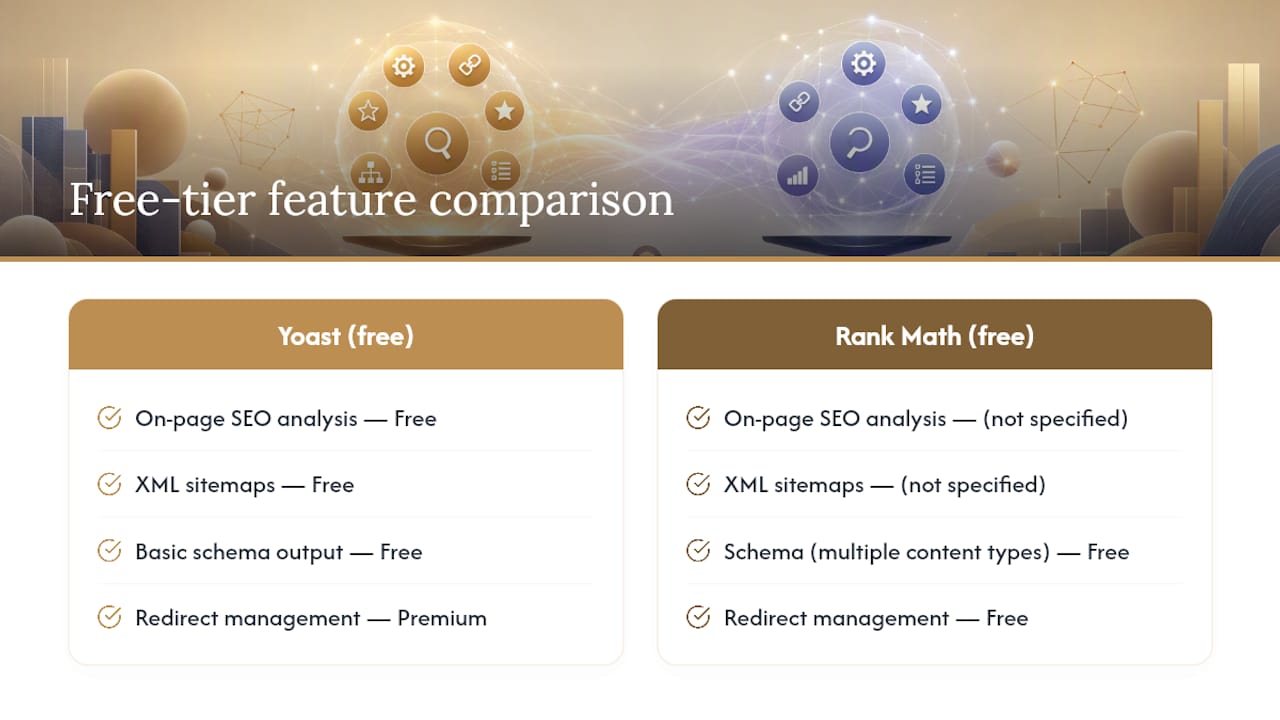
Yoast’s free version covers the essentials well: on-page SEO analysis, XML sitemaps, and basic schema output. But if you want redirects, internal linking suggestions, or multiple focus keyphrases per post, you’re looking at Yoast Premium, which runs as an annual subscription per site.
Zapier’s comparison confirms this pattern holds across most usage scenarios: Rank Math simply gives away more in its free tier, while Yoast keeps a tighter, more curated free experience and pushes advanced tools behind a paywall.
That doesn’t make Yoast worse. It makes Yoast’s free tier feel more like a taste test and Rank Math’s free tier feel more like the whole meal. If you’re running a single site on a tight budget, that difference decides a lot.
Pro Tip: Before comparing pricing pages, list the specific features you actually use today. Redirects and schema matter little if you never touch either.
How Do Yoast and Rank Math Handle Readability?
Yoast wins this category outright. Its readability analysis uses the Flesch-Kincaid reading ease test and layers on prescriptive, sentence-by-sentence feedback, according to Zapier’s testing. It flags passive voice, transition word usage, paragraph length, and sentence complexity, then color-codes everything so you can fix issues at a glance.
Rank Math offers readability checks too, but they’re thinner. You get a general content score and some basic suggestions, not the granular coaching Yoast built its reputation on.
If you’re a solo operator who writes every blog post yourself with no editor looking over your shoulder, Yoast’s readability tool functions like a built-in writing coach. That coaching can meaningfully improve how your content reads, especially if writing isn’t your strongest skill. For teams and non-technical authors, that structured feedback tends to matter more than any other single feature in either plugin.
If you’re publishing AI-drafted content and mainly need a final polish pass rather than deep editorial guidance, Rank Math’s lighter-touch readability score may be all you need. The gap here is real, and it’s the single strongest argument for choosing Yoast over Rank Math regardless of price.
Which Plugin Handles Schema and Structured Data Better?
Rank Math pulls ahead here. Its free tier includes schema markup generators for articles, products, recipes, FAQs, local businesses, and more, with a visual schema builder that doesn’t require touching code. Yoast supports schema too, but its free version covers a narrower set of content types, with expanded options gated behind Premium.
Schema matters more than most solo site owners realize. Structured data is what lets Google display rich results: star ratings, FAQ dropdowns, recipe cook times, right in the search listing. If you run a local service business, LocalBusiness schema can influence how you appear in map packs and local search results, and getting that markup right is worth the extra attention (this guide on local listing best practices covers the fundamentals well).
One caution worth flagging: if your WordPress theme or page builder already outputs schema automatically, adding a plugin’s schema on top can create duplicates. Google generally ignores redundant markup, but it’s worth checking your site with Google’s Rich Results Test after activating either plugin’s schema module, particularly after a migration.
For solo sites that want out-of-the-box structured data without a Premium upgrade, Rank Math’s free schema tools give you more to work with immediately.
Do You Need a Separate Plugin for Redirects and 404s?
Not if you’re using Rank Math. Its free tier includes a built-in redirect manager and a 404 error monitor, tools that let you catch broken links and reroute traffic without installing a third plugin. That matters more than it sounds like it should, because broken links quietly bleed search rankings and frustrate visitors who hit dead ends.
Yoast handles redirects too, but only in its Premium tier. On the free version, you’re left tracking 404s manually or adding yet another plugin to your stack, which adds more code, more update cycles, and more potential for plugin conflicts.
For a one-person operation, this is where the “value” argument for Rank Math gets concrete. Every extra plugin you install to patch a gap is another thing you have to update, troubleshoot, and monitor for compatibility issues. As one comparison put it, the real cost for solo operators often isn’t the sticker price of the plugin. It’s the ongoing maintenance overhead of stitching together tools to cover gaps a single plugin could have handled from the start, a point Zapier’s analysis makes directly. Rank Math closes that gap without an upgrade.
How Risky Is Migrating Between Yoast and Rank Math?
Less risky than most site owners assume, but not zero risk. Rank Math ships with a built-in import tool specifically designed to pull settings and metadata over from Yoast, according to Rank Math’s own plugin documentation. It transfers meta titles, meta descriptions, focus keyphrases, and social settings automatically, so you don’t have to rebuild your SEO data post by post.
That said, “automatic” doesn’t mean “unsupervised.” Follow a simple sequence: back up your site (or better, test the migration on a staging copy first), run the import, then manually verify your XML sitemap regenerates correctly and that schema output on a handful of key pages still looks right. Custom schema added by your theme or page builder can occasionally collide with the newly imported plugin data.

Migration risk stays low specifically because you use the built-in importer and check your sitemap and schema afterward rather than assuming everything transferred perfectly. Skipping that ten-minute check is the single most common way solo site owners lose meta descriptions they’d spent months refining.
Does Yoast or Rank Math Slow Down Your Site?
Rank Math’s modular architecture gives it an edge on footprint. You can toggle off modules you don’t use, local SEO, WooCommerce integration, Instant Indexing, and each disabled module reduces the plugin’s processing load. Rank Math also advertises built-in analytics integrations that reduce your need to run separate tracking plugins, according to Rank Math’s own feature documentation.

Yoast runs a more monolithic structure. It doesn’t offer the same granular on/off switching, so you’re generally running its full feature set whether you use all of it or not.
Neither plugin is a major page speed liability on a well-configured host. But if you’re already running a lean stack, on shared hosting, or juggling several sites, Rank Math’s ability to strip down to just what you need gives it a real advantage. Pro Tip: After installing either plugin, disable any module or feature you’re not actively using. It’s the fastest way to keep your admin dashboard responsive.
What AI Features Do Yoast and Rank Math Offer?
Both plugins have added AI-assisted features in recent years, mostly focused on generating meta titles and descriptions on demand. Neither plugin functions as a full AI writing tool, and neither is trying to compete with dedicated content generation platforms.
That distinction matters if you’re evaluating AI capability as part of your decision. If you’re comparing writing assistants directly, that’s a different category of tool entirely; the more relevant conversation there is something like Jasper alternatives or Copy.ai alternatives, not SEO plugins. Yoast and Rank Math both assist with SEO metadata suggestions, not full-length drafting.
Where the two plugins diverge is in how they fit into a broader automation stack. Rank Math’s modular toggles and API-friendly structure make it easier to layer in additional automation for monitoring and reporting. Yoast’s more closed system works fine on its own but offers fewer hooks for the kind of workflow automation solo operators increasingly rely on to replace tasks a hired specialist would otherwise handle.
If AI-assisted content creation is your priority, treat plugin choice and content tooling as two separate decisions. Pick the SEO plugin for its core mechanics, then build your AI content workflow around it.
Yoast vs Rank Math Pricing and Multi-Site Value
Here’s where the math (no pun intended) tips hard in Rank Math’s favor if you run more than one site. Yoast charges per site, so its premium cost multiplies directly with your site count. Run five sites and you’re paying five times over. Rank Math offers flat multi-site tiers instead, covering multiple properties under one Business or Agency plan.
The comparison below reflects the general shape of each plugin’s approach; check current vendor pricing pages for exact figures, since both companies adjust tiers periodically.
| Dimension | Yoast SEO | Rank Math |
|---|---|---|
| Free tier | On-page analysis, readability, basic schema | Redirects, 404 monitor, expanded schema, Search Console |
| Premium pricing model | Per-site annual license | Flat multi-site tiers (Pro/Business) |
| Multi-site value | Cost scales with number of sites | Cost stays flat across multiple sites |
| Best for | Single-site editorial teams | Multi-site owners and agencies |
Run a simple calculation before you commit: multiply Yoast’s per-site premium price by however many sites you manage, then compare that total against Rank Math’s flat multi-site pricing. For a single blog, the difference may be marginal. For anyone managing three or more properties, and that includes plenty of solopreneurs juggling a main site plus a few niche projects, the gap adds up fast.
Who Should Choose Yoast, and Who Should Choose Rank Math?
Yoast fits best if you’re running a content-heavy single site where writing quality is the priority, especially if you or a small team of writers benefit from active readability coaching while drafting. Editorial blogs, personal brand sites, and anyone who values a simple, prescriptive authoring experience over feature depth will feel at home with Yoast.
Rank Math fits best if you manage multiple sites, want built-in maintenance tools without extra plugins, or simply want more functionality without paying for premium tiers. Its WordPress.org listing reflects a strong active install base that mirrors this broader appeal, especially among site owners juggling several properties at once.
There’s a third case worth naming directly: solo operators who want maximum leverage from a single tool. If your goal is doing more with less, fewer plugins, less manual monitoring, more automated maintenance, Rank Math’s bundled approach removes friction that would otherwise eat into your time.
Yoast vs Rank Math: Which Interface Is Easier to Use?
Yoast wins on first impression. Its interface is famously simple: a sidebar with a red, orange, or green traffic light system showing your SEO and readability scores at a glance. New users grasp it within minutes, and it has stayed largely unchanged in structure for years, which is part of why it built such a loyal beginner following.
Rank Math’s interface is more powerful and more crowded. Its setup wizard walks you through initial configuration, but the sheer number of modules and settings can overwhelm first-time users. Practitioner feedback on G2 notes that toggling between “Basic” and “Advanced” modes, and disabling modules you won’t use, meaningfully reduces that complexity once you know where to look.
Neither interface is objectively bad. Yoast trades power for simplicity; Rank Math trades a slightly steeper learning curve for far more control. If you’ve never configured an SEO plugin before, expect a gentler ramp with Yoast. If you don’t mind a short setup investment in exchange for more capability later, Rank Math’s learning curve flattens quickly once you’ve toggled off what you don’t need.
Support and Community Resources Compared
Yoast benefits from over a decade of accumulated documentation, forum threads, and tutorial content scattered across the web. Nearly every WordPress problem involving Yoast has already been asked and answered somewhere, which matters when you’re troubleshooting alone at midnight with no team to call.
Rank Math’s community is younger but has grown fast, backed by active documentation, video tutorials, and a responsive support team through its official channels. Free-tier users get community forum access; Premium tiers unlock direct support tickets, similar to Yoast’s support structure.
For a solo operator without an IT department, self-serve documentation quality matters more than almost any other factor after the actual features. Both plugins clear that bar, but Yoast’s longer history gives it a slight edge in sheer volume of existing troubleshooting content across the open web.
Update Frequency and Long-Term Reliability
Both plugins update regularly, syncing with WordPress core changes and search engine algorithm shifts. Yoast has maintained a consistent update cadence for years, backed by a large team and a mature codebase. Rank Math updates just as frequently, often shipping new features and schema types faster given its more modular, actively expanding architecture.
Reliability concerns rarely stem from either plugin’s core code. They usually come from conflicts with themes, page builders, or an outdated WordPress installation running alongside a fresh plugin update. Keeping WordPress core, your theme, and whichever SEO plugin you choose all updated on the same schedule prevents most of the compatibility headaches solo site owners run into.
Are Yoast and Rank Math Compatible With Popular Themes and Plugins?
Both plugins work reliably across the WordPress ecosystem’s major themes and page builders, including Elementor, Divi, and block-theme setups built on the Gutenberg editor. Compatibility issues are rare with either plugin on a properly maintained site.
Where friction can appear is with WooCommerce. Rank Math includes a dedicated WooCommerce SEO module in its free tier, adding structured data and product-specific optimization out of the box. Yoast offers WooCommerce SEO as a separate paid add-on, another example of Rank Math’s free tier absorbing something Yoast charges extra for.
If you’re running an online store as a solo operator, that’s a meaningful line item to factor into your total cost comparison, not just a footnote.
Yoast SEO vs Rank Math: Pros and Cons
Yoast SEO pros: exceptional readability analysis, one of the simplest interfaces in the WordPress plugin ecosystem, over a decade of documentation and community troubleshooting content, and a stable, predictable feature set.
Yoast SEO cons: free tier lacks redirects and 404 monitoring, premium pricing scales per site, and its schema options are narrower than Rank Math’s out of the box.
Rank Math pros: far more generous free tier including redirects, 404 monitoring, and broad schema support, flat multi-site pricing that scales better for owners of several properties, and modular architecture that lets you trim the plugin down to just what you use.
Rank Math cons: steeper initial learning curve due to interface density, and readability analysis is noticeably less detailed than Yoast’s coaching-style feedback.
Neither plugin is objectively “better” in a vacuum. The right pick depends on whether your bottleneck is writing quality or feature completeness, and how many sites you’re actually running.
The Real Trade-Off Solo Operators Miss
Most comparisons frame this decision as a features checklist, and that’s exactly where solo site owners go wrong. The question isn’t “which plugin has more checkboxes.” It’s “which plugin reduces the number of things I have to personally babysit.”
That reframe changes the calculus. A redirect manager built into your free SEO plugin isn’t just a nice-to-have, it’s one less plugin to update, one less potential conflict, one less thing on your maintenance list. When you’re running the whole show yourself, every tool you add is something only you will notice breaking.
Where I’d push back on conventional wisdom: readability scores get treated like the deciding factor in half the comparison articles out there, and for content-heavy solo writers, that’s fair. But if you’re already running AI-assisted drafting workflows, a plugin’s readability coaching matters less than its ability to plug into automated monitoring and multi-site management. Pick based on your actual workflow, not on which plugin scores higher in a generic feature table.
If you manage more than one property, run the multi-site math before you decide anything else. It usually settles the argument faster than any feature comparison.
— Jay
Automate the SEO Maintenance Neither Plugin Handles
Yoast and Rank Math both handle on-page optimization well, but neither one drafts your content, monitors your competitors, or flags opportunities while you sleep. That’s where the AI Toolkit picks up the slack. It’s a collection of automation tools used to run content and monitoring tasks that would otherwise eat hours every week, without hiring anyone.
Think of your SEO plugin as the engine and your automation stack as the driver. If you’re still manually checking rankings, drafting meta descriptions from scratch, or tracking content gaps in a spreadsheet, that’s process work no plugin toggle will fix. Pair Rank Math or Yoast with a system built for content automation and you stop trading hours for tasks a tool can already do. Grab the AI Toolkit and see which pieces of your SEO workflow you can hand off this week.





Leave a Reply