

Yes, freelancers can use AI safely, but only with a privacy-first workflow. The single move that matters most right now: anonymize or redact client identifiers before you paste anything into a cloud AI tool, or switch to local-only processing for sensitive work. Two anchors worth knowing as you build this habit are OpenAI’s data controls and the GDPR framework, both of which shape what “safe” actually means for someone running a one-person business.
TL;DR:
- Freelancers should anonymize client identifiers and run local redaction tools before using AI to prevent sensitive data leaks.
- Using enterprise or higher-tier AI plans reduces the risk of data being used for model training without explicit consent.
- GDPR and confidentiality clauses require explicit safeguards like data processing agreements and strict data handling policies.
- Implementing a six-step workflow for every AI project – classification, anonymization, restoration – ensures consistent privacy protection.
- Relying solely on toggling privacy settings is insufficient; understanding account defaults and conducting regular controls are essential.
What Risks Do AI Tools Actually Create for Freelancers?
Most freelancers picture the AI privacy risk as one thing: a chatbot leaking someone’s name or email. That’s real, but it’s the smaller half of the problem.
Cloud AI tools can store your prompts and, depending on your account settings, use them to improve the underlying model. OpenAI documents this directly. Personal accounts default to a setup where conversations can help train future models unless you opt out, while enterprise plans exclude inputs from training by default. That distinction alone should shape which account tier you use for client work.
Then there’s the contract problem. If you sign a services agreement promising confidentiality of client materials, and you paste a client’s unreleased product spec into a consumer chatbot to “clean up the wording,” you may have already breached that contract. It doesn’t matter that you didn’t mean any harm. The breach happens the moment the data leaves your control and lands on a third party’s server under terms you never read closely.
Here’s what freelancers tend to miss: contextual and conceptual data can be just as dangerous as personally identifiable information (PII). A 2026 analysis of freelance AI use points out that stripping out names and phone numbers doesn’t protect a client’s unreleased pricing strategy, unpatented process, or acquisition plans. Anonymized text describing a proprietary algorithm is still a leak. It’s just a quieter one.
The consequences show up in three places:
- Lost client trust – a single leak, real or perceived, can end a retainer relationship permanently.
- Compliance exposure – under GDPR, freelancers who process EU client data can be classified as data controllers with no small-business exemption.
- Contract liability – confidentiality and indemnification clauses in freelance agreements often extend directly to how you handle data with third-party tools, AI included.
Pro Tip: Before you use AI on any client file, ask yourself one question: would I be comfortable explaining exactly what I pasted, and where, if the client asked tomorrow? If the honest answer is no, don’t paste it.
Your Step-by-Step Privacy Checklist for Every AI Interaction
You don’t need a security degree to run a tight privacy practice as a freelancer. You need a repeatable checklist you actually follow, every time, even when you’re rushing to hit a deadline. Here’s the sequence that works:
- Anonymize identifiers before you type anything. Replace client names, company names, email addresses, and phone numbers with placeholder tokens like [CLIENT_A] or [PROJECT_X]. Keep a private, encrypted key mapping tokens to real values, stored somewhere the AI tool never sees.
- Run a redaction pass on anything longer than a paragraph. A local tool like Privacy Filter, OpenAI’s open-source, on-device model, tags and strips PII categories before the text ever reaches a cloud service. It runs locally, so nothing sensitive leaves your machine during the scan itself.
- Classify the document before you touch AI at all. Sort client work into two buckets: content AI is allowed to touch (drafts, outlines, general research) and content it never touches (legal filings, health records, financial statements, trade secrets, anything under an explicit no-AI clause).
- Separate your business and personal AI accounts. Use a dedicated business account with two-factor authentication turned on. If your volume or sensitivity justifies it, move to a paid or enterprise-tier plan, since those tiers typically carry stronger default data protections.
- Manage your chat history actively. Use temporary chat modes when available, delete conversation history after you’ve extracted what you need, and know how to export or permanently delete data if a client asks you to prove you did.
- Never trust AI output blind, and never skip the human restoration step. Read every output before it goes anywhere near a deliverable, then swap your placeholder tokens back to real values manually, offline, after the AI work is done.
That last step is where most freelancers get sloppy. It’s tempting to let the placeholder tokens ride into the final deliverable and fix them “later.” Later becomes never, and a client gets a document that says [CLIENT_A] instead of their actual company name. Build the restoration step into your process the same way you’d build in a spell check.
Pro Tip: Keep a simple two-column spreadsheet as your token key: one column for the placeholder, one for the real value. Store it in an encrypted folder, never in the same document you’re feeding to AI. It takes thirty seconds to set up and it’s the difference between a clean workflow and a messy one.

A practical guide for freelancers navigating AI chatbots frames this well: the goal isn’t to avoid AI, it’s to make sure nothing sensitive ever reaches the AI in a form that could hurt anyone if it leaked. Treat every prompt the way security practitioners suggest treating a physical document. You wouldn’t leave a client invoice on a park bench, so don’t leave raw client identifiers sitting in a chat window either, based on the reasoning behind OpenAI’s Privacy Filter release.
Which AI Platform Settings Actually Protect Your Client Data?
Turning off a single toggle doesn’t make you safe. It’s a start, but the real protection comes from understanding what each setting changes and confirming your account type matches your risk level.
Start with the “improve the model for everyone” setting. On most consumer AI platforms, this toggle controls whether your conversations can be used to train future versions of the model. OpenAI’s help documentation walks through exactly how to opt out and what that changes for your account. Flip it off for any account touching client material, full stop.
Temporary chats matter more than most freelancers realize. OpenAI’s documentation notes that temporary conversations are deleted after 30 days and aren’t used to train models. That’s a meaningfully shorter retention window than a standard saved chat history, which can persist indefinitely unless you delete it manually.
Here’s where account type becomes a real decision point, not just a pricing question:
- Personal/free accounts typically default to using your inputs for model improvement unless you opt out yourself.
- Business plans usually offer stronger baseline privacy settings and centralized admin controls.
- Enterprise plans generally exclude your data from training by default, with no opt-out required because it’s built into the terms.
If you’re handling client data regularly, a business-tier plan is worth the monthly cost. It’s a rounding error compared to the cost of a client relationship damaged by a data mishap.
Retention and deletion controls are usually buried a few clicks deep in account settings, under a “data controls” or “privacy” tab. Check them quarterly, not once and forget it. Providers update their default settings periodically, and OpenAI’s own FAQ page confirms that account defaults vary by plan type. One insight worth internalizing here: opting out of model training is necessary, but it’s not sufficient on its own. You still need to confirm your specific account tier and provider retention policy, because defaults genuinely shift depending on which plan you’re on.
For your highest-sensitivity work, skip cloud AI entirely. Local, on-device models process text without ever transmitting it to an outside server, which is exactly the principle behind tools like Privacy Filter. If you’re regularly handling legal, medical, or financial client material, a local-only setup isn’t overkill. It’s the appropriate baseline. Our guide to best AI tools for solo builders breaks down which platforms offer the strongest business-tier privacy controls if you’re ready to upgrade.
Do You Need a DPA, an NDA, or Both?
Most freelance contracts include an NDA and stop there, assuming confidentiality language covers every data risk. It doesn’t, and this gap trips up a lot of independent professionals the first time a client asks about their AI practices.
An NDA protects confidentiality: it stops you from disclosing sensitive information to third parties. A data processing agreement (DPA) is a different animal entirely. It governs how you actually process personal data on a client’s behalf, and under GDPR, that distinction has legal teeth. Guidance on AI transparency and data-processing obligations makes clear that an NDA alone doesn’t satisfy a client’s data-processing obligations if you’re handling EU personal data through third-party tools like AI platforms.
If you work with EU clients or process EU resident data in any capacity, this isn’t optional. GDPR guidance for freelancers is explicit that individual freelancers can be classified as data controllers, with no exemption for being small or solo. That classification carries real obligations: a lawful basis for processing, transparency about how data is used, and respect for data subject rights.
When you draft or review a client contract that involves AI-assisted work, push for these clauses:
- Training-data exclusion – explicit language stating client data will never be used to train any AI model, yours or a third party’s.
- Retention limits – a defined window after which any AI-processed data (chat logs, drafts, exports) gets deleted.
- Permitted processing scope – a clear list of what AI is allowed to touch on this project and what it isn’t.
- Disclosure requirements – a commitment to tell the client if your AI workflow changes mid-project.
If a client’s project involves categories of data you’re not confident about, health records, financial statements, anything under a specific regulatory regime, refuse to run it through AI until you have written consent covering that specific use case. That’s not being difficult. That’s the baseline a data controller is expected to meet.
Keep a simple paper trail too. Note your AI use directly in project proposals and scopes of work, even briefly: “Drafts may be developed with AI assistance; client-identifying information will be anonymized prior to any AI processing.” One sentence protects you far more than silence ever will.
A Six-Step Workflow You Can Copy for Every Project
Advice is only useful if it survives contact with a real deadline. Here’s the workflow I recommend building into every client project, structured so privacy checks happen automatically instead of relying on willpower at 11 p.m.
- Intake – log the project scope and flag any data categories that might require special handling (health, legal, financial, proprietary).
- Sensitivity classification – sort the material into AI-allowed and AI-restricted buckets before any work begins.
- Sanitize – anonymize identifiers and run a redaction pass on anything headed toward a cloud AI tool.
- AI-assisted draft – generate your first pass with AI, using only sanitized inputs.
- Human restore – swap placeholder tokens back to real client details, offline, with a careful read-through.
- QA and deliver – review the finished output against the original scope before sending it to the client.
Bake a short onboarding checklist into your intake process too: confirm client consent for AI use, define which tasks AI is allowed to touch, and note whether a DPA is required for this engagement. A documented, repeatable onboarding process also does something less obvious. It signals professionalism when you’re the one bringing up the DPA conversation with a client, rather than scrambling to answer it after they ask.
This is close to the actual workflow behind Yoursolobusiness’s “team-of-one” AI stack, where redaction and restoration steps aren’t afterthoughts but scheduled parts of the process. If you want the fuller build-out, the AI workflow automation guide walks through how to structure these steps without adding friction to your delivery timeline.
Pro Tip: Run this six-step sequence on your next project even if the data feels low-risk. The habit only sticks if you practice it when the stakes are low, not the first time a client hands you something genuinely sensitive.
Know when to step outside this workflow entirely. High-sensitivity categories, active litigation, medical records, financial audits, deserve local-only processing or a direct conversation with legal counsel before AI touches any of it.
Where to Go for Official Privacy Guidance
For the primary sources behind this workflow, start with OpenAI’s privacy documentation and its data controls FAQ, both of which detail exact settings and retention windows. Privacy Filter’s technical release notes explain the local redaction model in depth. For contract language and GDPR obligations, GDPR Advisor’s freelancer guidance is worth bookmarking. Yoursolobusiness’s AI Toolkit rounds out the practical side with implementation resources built for solo operators.
The Real Gap in Most AI Privacy Advice for Freelancers
Most guidance on this topic treats privacy as a settings problem: toggle off model training, use a business account, done. That’s necessary, but it’s not where the real risk lives for freelancers.
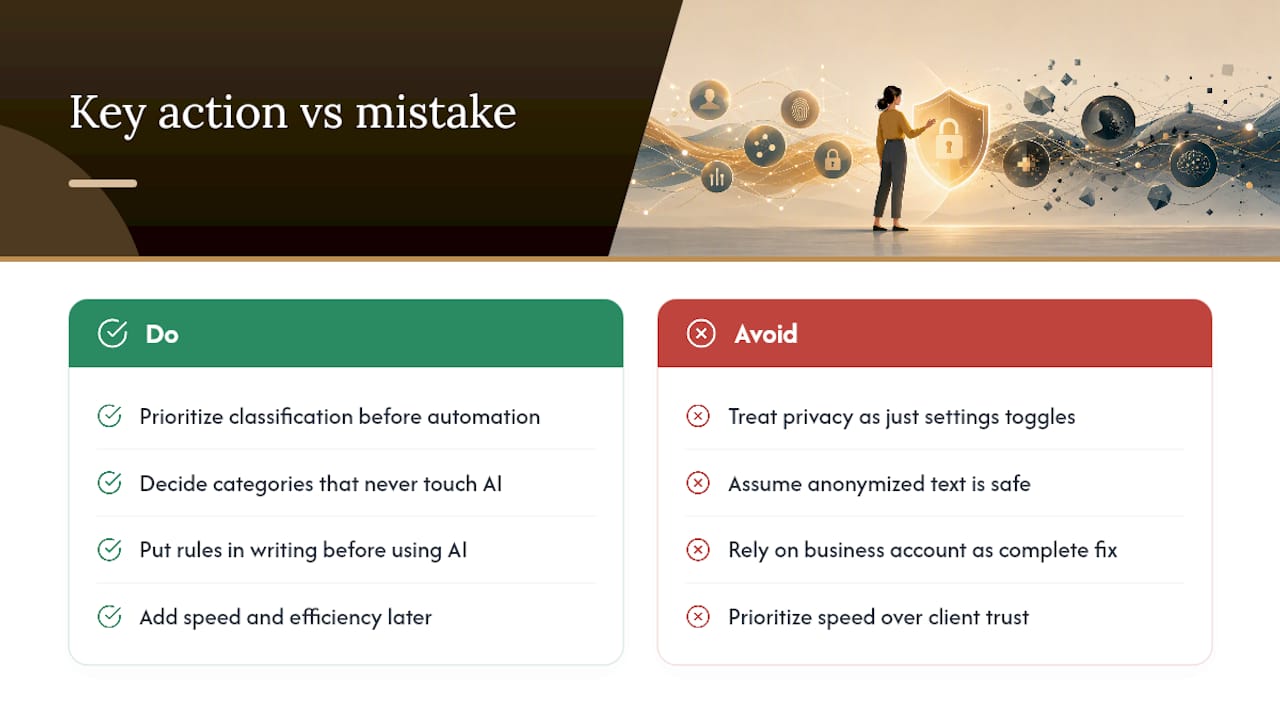
The bigger gap is contextual exposure, the proprietary strategy, the unreleased pricing model, the acquisition plan described in perfectly anonymized prose. Strip out every name and you can still leak the thing that actually mattered to the client. Conventional advice skips this almost entirely because it’s harder to solve with a checkbox.
If you take one thing from this guide, prioritize classification before automation. Decide what categories of client work never touch AI, in writing, before you get efficient with the rest. Speed is easy to add later. Trust, once broken, generally isn’t.
– Jay
Sources
- OpenAI launches Privacy Filter (VentureBeat)
- How ChatGPT protects privacy (OpenAI)
- How freelancers can use AI chatbots without exposing client data (CyberSafetyZone)
- How GDPR affects freelancers (GDPR Advisor)