
TL;DR:
- AI business automation enables solopreneurs to handle repetitive tasks efficiently, freeing time for strategic work.
- Success depends on documenting workflows, starting with high-priority tasks, and building simple automations before scaling.
AI business automation is the practice of using intelligent software to handle repetitive, rule-based, and judgment-driven tasks so you can focus on work that actually grows your business. For solopreneurs and small business owners, this is not a luxury. It is the difference between spinning your wheels on admin and having real time for strategy. The good news? You do not need a tech team or a massive budget to get started. This guide walks you through how to automate your business with AI, step by step, using a process-first approach that actually sticks.
How to automate your business with AI: start by finding the right workflows
Not every task deserves to be automated. The first move is identifying which workflows will give you the biggest return for the least effort.

A proven scoring method ranks workflows by two factors: how often the task happens and how complex it is. Tasks scoring above 200 on a frequency-and-complexity matrix are your highest-priority automation candidates. That score tells you where your time is bleeding out the most.
Your best early targets are high-frequency, low-complexity tasks. Think lead follow-up emails, appointment reminders, invoice processing, and social media scheduling. These are the “quick wins” that free up hours without requiring you to build anything complicated. AI eliminates repetitive work like data entry, email sorting, and invoice processing, shifting your energy toward strategy and creativity.
Here is a practical way to build your shortlist:
- Lead response: 78% of customers buy from the first business to respond, yet many small businesses take over 42 hours to follow up. An automated lead response fixes this instantly.
- Appointment scheduling: Removing the back-and-forth email chain saves 20–30 minutes per booking.
- Invoice and payment reminders: Rule-based triggers handle these perfectly with zero judgment required.
- Client onboarding sequences: A new client signs, and a welcome email, intake form, and calendar invite go out automatically.
One critical rule before you automate anything: document the process first. Automating a broken process only helps you do the wrong thing faster. Map out every step, decision point, and exception before you touch a single tool.
Pro Tip: Pick one workflow to automate first. Run it as a 30-day pilot before touching anything else. This keeps your focus sharp and your risk low.
What tools should you use for AI business automation?
Choosing the right tool starts with understanding what kind of automation you actually need.
Rule-based automation follows rigid if-then logic, while AI-powered automation processes unstructured data, classifies intent, and adapts its decisions. A simple appointment reminder is rule-based. Sorting incoming client emails by urgency and drafting replies is AI-powered. Knowing the difference saves you from buying a Ferrari when a bicycle does the job.
For most solopreneurs, the right stack combines a no-code workflow platform with one or two AI layers on top. Here is how the main feature categories compare:
| Feature category | What it does | Best for |
|---|---|---|
| Rule-based automation | Triggers actions on fixed conditions | Reminders, notifications, data routing |
| AI classification and extraction | Reads and sorts unstructured inputs | Email triage, invoice reading, lead scoring |
| Workflow integration | Connects apps and passes data between them | Multi-step processes across tools |
| AI drafting and generation | Creates text, summaries, or responses | Client emails, reports, social content |
The process-first principle applies to tool selection too. Define your workflow specification before you open a pricing page. Know your triggers, your data inputs, your decision points, and your outputs. Then find the tool that fits the spec, not the other way around.
For higher-stakes decisions, keep a human in the loop. The most effective automation strategy automates the repetitive 80% and reserves human judgment for decisions involving money, legal risk, or irreversible actions. Build that boundary into your workflow from day one.
Pro Tip: Build the minimum viable version of your automation first. A simple Zap or Make scenario that works beats a complex multi-branch workflow that breaks.
Step-by-step: how to build and deploy an AI automation
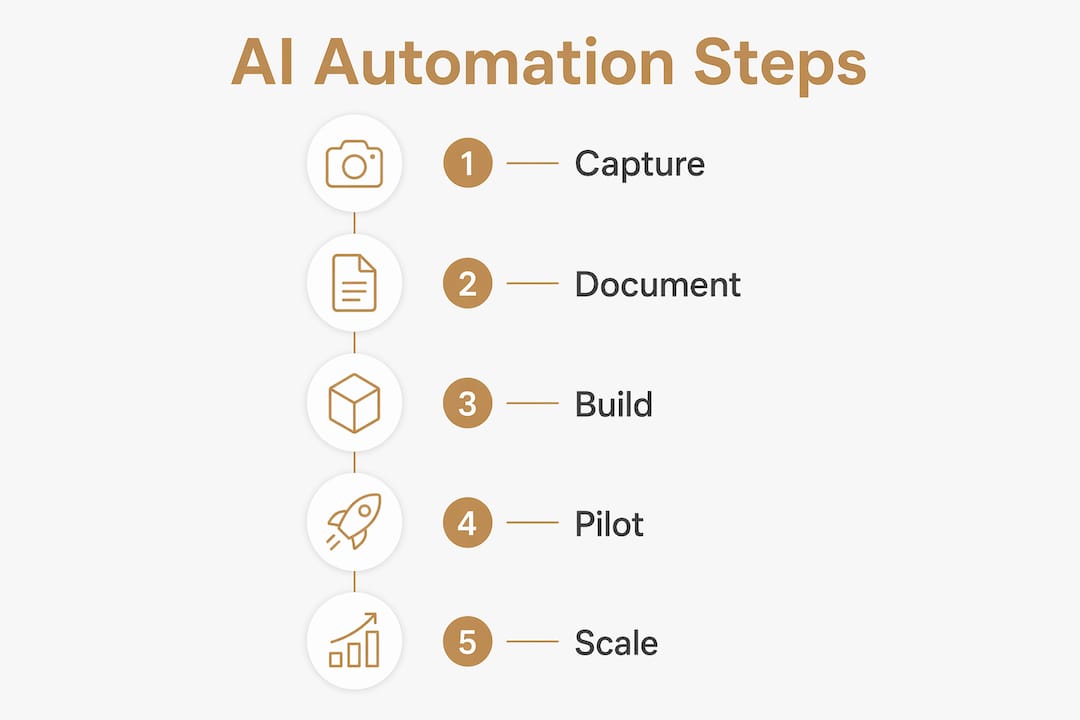
Getting an automation live is a five-stage process. Rushing any stage creates what practitioners call “automation debt,” where you spend more time fixing broken automations than the time you saved building them.
1. Capture the process
Record yourself doing the task. Use a screen recorder or voice memo. Recording actual process runs captures the nuanced judgment calls that manual documentation always misses. Watch the recording back and write down every step, every decision, and every exception.
2. Write a workflow specification
Your spec needs four elements:
- Trigger: What starts the workflow? (A form submission, a new email, a calendar event)
- Sequence: What happens in what order?
- Decision points: Where does the workflow branch based on conditions?
- Exceptions: What happens when something goes wrong?
3. Build the minimum viable automation (MVA)
Start with the simplest version that delivers value. If you are automating lead follow-up, start with a single email sent within five minutes of a form submission. Do not add lead scoring, CRM tagging, and a three-email sequence on day one.
4. Pilot for 30 days
Building the simplest automation first and testing for 30 days reduces automation debt and unnecessary costs. During the pilot, check the automation daily. Log every failure, every edge case, and every time a human had to step in.
5. Add safety layers before scaling
Every production automation needs three protections:
- Error alerts that notify you immediately when something breaks
- A daily summary report showing what ran, what failed, and what was skipped
- A manual fallback so a human can take over without losing data
Pro Tip: Set a calendar reminder for day 31 of every pilot. That is your review date. If the automation saved time and ran cleanly, expand it. If not, fix the process before adding complexity.
Common mistakes to avoid:
- Automating before documenting the process
- Building complex multi-branch workflows before validating the simple version
- Skipping error handling because “it probably won’t break”
- Automating a task that a client or partner expects a personal human response to
How do you measure and scale AI automation results?
Measurement is what separates a one-time experiment from a real business system. Track these metrics from day one of your pilot:
- Time saved per week: Compare hours spent on the task before and after automation
- Error rate: How often does the automation produce a wrong output or fail silently?
- Lead response time: If you automated follow-up, track how fast leads now hear from you
- Conversion rate change: Did faster response or better follow-up move the needle on sales?
Automating routine workflows can save solopreneurs over 10 hours per week. That is a full workday reclaimed every single week. Put a dollar value on that time and you have your automation ROI in plain numbers.
Scaling works best as a sequential rollout. Automate one workflow, stabilize it, then move to the next on your priority list. This approach keeps your systems manageable and your error rate low.
The biggest risk in scaling automation is not moving too slowly. It is moving too fast and creating a web of interdependent automations that nobody fully understands. Document every automation you build, including why you built it and what it connects to.
Balance is the other half of scaling. Keep humans in the loop for decisions with real consequences. Refunds, contract changes, client complaints, and anything involving sensitive data all deserve a human review step. AI handles the volume. You handle the judgment calls.
As your business grows, agentic AI workflows that understand context and make multi-step decisions are becoming more accessible. These go beyond simple if-then triggers and can manage entire processes end to end. Start simple now, and you will be ready to adopt these more advanced capabilities when they fit your scale.
For a deeper look at building solopreneur productivity systems that support this kind of growth, Yoursolobusiness covers the full picture.
Key Takeaways
AI business automation delivers the highest ROI when you document your process first, start with one high-frequency workflow, build the simplest version, and measure results before scaling.
| Point | Details |
|---|---|
| Document before automating | Map every step, decision, and exception before touching any tool. |
| Score workflows by priority | Target tasks scoring above 200 on frequency and complexity for the fastest wins. |
| Build minimum viable automations | Start with the simplest version and pilot for 30 days before adding complexity. |
| Add safety layers to every automation | Use error alerts, daily summaries, and manual fallback protocols on every live workflow. |
| Keep humans in the loop | Automate the repetitive 80% and reserve human judgment for high-stakes decisions. |
What I have learned from automating with AI (and what I wish I knew sooner)
The single biggest mistake I see solopreneurs make is reaching for a tool before they understand their own process. I did this myself early on. I spent three days building a lead nurture automation that broke constantly, and when I finally sat down to record myself doing the task manually, I realized the process had four decision points I had never accounted for. The automation was not the problem. My documentation was.
The process-first rule sounds obvious until you are excited about a new AI tool and you want to plug it in immediately. Resist that urge. Spend 30 minutes recording your workflow before you open a single app. That recording will save you days of debugging.
The other thing I have learned is that automation is not binary. You do not flip a switch and hand everything to a machine. The best setups I have built keep me involved in the moments that matter and let AI handle the volume in between. A client sends an inquiry. AI drafts a response and flags it for my review. I approve it in 10 seconds. That is not full automation. It is the right amount of automation for that situation.
Start with one workflow. Get it running cleanly. Then build the next one. The solopreneur productivity workflow approach is not about doing everything at once. It is about building systems that compound over time. The ROI is real, the time savings are real, and you do not need a team to get there.
— Jay
Yoursolobusiness has the tools to help you automate faster
Running a one-person business at team-level output is exactly what Yoursolobusiness was built for. Jay has tested and documented the AI tools and workflow systems that actually work for solopreneurs, so you are not starting from scratch.

The solopreneur productivity toolkit on Yoursolobusiness gives you seven proven strategies and ten specific tools to automate your workflows and reclaim your time. It is built for solo operators who want practical, field-tested guidance, not generic advice. If you are ready to stop doing everything manually and start building systems that work while you sleep, that toolkit is your next step.
FAQ
What is AI automation for business?
AI business automation uses intelligent software to handle repetitive and judgment-based tasks, such as lead follow-up, email sorting, and invoice processing, without constant human input.
Which tasks should I automate first?
Start with high-frequency, low-complexity tasks. Lead response, appointment reminders, and invoice processing are the best first candidates because they deliver fast, measurable time savings.
How long does it take to set up a business automation?
A simple automation, such as an auto-reply to a new lead, can be live in under an hour. More complex multi-step workflows typically take one to three days to build, test, and stabilize.
Do I need coding skills to automate tasks with AI?
No. No-code and low-code platforms let you build powerful automations using visual editors and pre-built connectors, with no programming required.
How do I know if my automation is working?
Track time saved, error rate, and any conversion metrics tied to the workflow. Review your daily summary report and check for failures every week during the first 30 days.