
The highest-leverage productivity methods for solopreneurs are time-blocking, task batching, a single source of truth, lightweight automation, energy management, the Pomodoro Technique, and the 1-3-5 daily prioritization rule. Used together, they cut context-switching, protect deep work, and let you run a one-person business at a pace that doesn’t burn you out.
Here’s why each one earns its place:
- Time-blocking: Decisions get made once, not all day. Your calendar becomes your operating system.
- Task batching: Groups similar work so your brain stays in one mode longer, slashing the mental reset cost between tasks.
- One source of truth: A single task system stops work from hiding in three apps, two notebooks, and a sticky note.
- Lightweight automation/AI: Repetitive admin runs itself. Treat software as your team for the tasks that don’t need you.
- Energy management: Protecting your peak hours matters more than logging more hours. Flexible working hours can improve both productivity and work-life balance, according to the International Labour Organization.
- Pomodoro Technique: Timed focus sprints make large, vague tasks feel manageable and keep you honest about how long things actually take.
- 1-3-5 daily rule: Forces you to pick one big task, three medium tasks, and five small tasks per day, so you stop starting ten things and finishing none.
Key Takeaways
The single most effective move a solopreneur can make is to protect 3 peak hours daily with time-blocking, then layer batching, a single task system, and two targeted automations to keep those hours from filling back up.
| Point | Details |
|---|---|
| Start with a time audit | Track every hour for five days with Toggl Track to find your biggest leaks before changing anything. |
| Protect peak hours first | Block your top 3 hours for deep work before scheduling anything else; this single step drives most of the gain. |
| One source of truth | Pick one task tool (Todoist, Trello, Notion, or Asana) and consolidate all active work into it within week two. |
| Batch and automate admin | Group invoicing, email, and calls into dedicated windows; automate reminders and lead capture to reclaim 6–8 hours per week. |
| Yoursolobusiness AI Toolkit | The AI Toolkit provides ready-made checklists, prompts, and automation templates that plug directly into the methods above. |
1. How the Pomodoro Technique works for solopreneurs
The Pomodoro Technique is best for short, interruption-prone tasks or for breaking a large project into timed sprints. It works especially well when you’re inside a longer time block and need a structure to stay on track rather than drift.
The standard session runs 25 minutes of focused work followed by a 5-minute break. After four cycles, you take a longer 15–30 minute break. For deep creative work, many solopreneurs stretch sessions to 50 minutes with a 10-minute break.
How to run a Pomodoro session:
- Write down the single task you’re working on before you start the timer.
- Set your timer for 25 minutes (or 50 for deep work).
- Work on that task only. If a stray thought hits, write it down and return to it later.
- When the timer rings, stop. Take your break fully.
- After four cycles, step away for at least 15 minutes.
Good timer options (all free or nearly free):
- A basic phone timer works fine.
- Forest (iOS/Android) gamifies focus by growing a virtual tree during your session. Free tier available; Pro is a one-time purchase around $1.99.
- A physical kitchen timer removes the temptation to check your phone entirely.
Combining Pomodoro with time blocks: Drop two Pomodoro cycles (roughly 60 minutes with breaks) inside a 90-minute deep-work block. The first cycle warms you up; the second is where the real output happens. System stacking small rules like this is one of the most reliable ways solopreneurs protect focused work time.
Pro Tip: Set a physical “do not disturb” signal during Pomodoro sessions. A closed door, headphones on, or a simple status message in your communication apps tells clients and collaborators you’re heads-down without requiring a conversation.
2. Time-blocking builds a schedule that works without willpower
Time-blocking is the highest-leverage architecture for a solo business because it moves decisions from the moment to the calendar. You decide once, on Sunday or Monday morning, what gets done and when. The rest of the week, you follow the plan instead of negotiating with yourself.
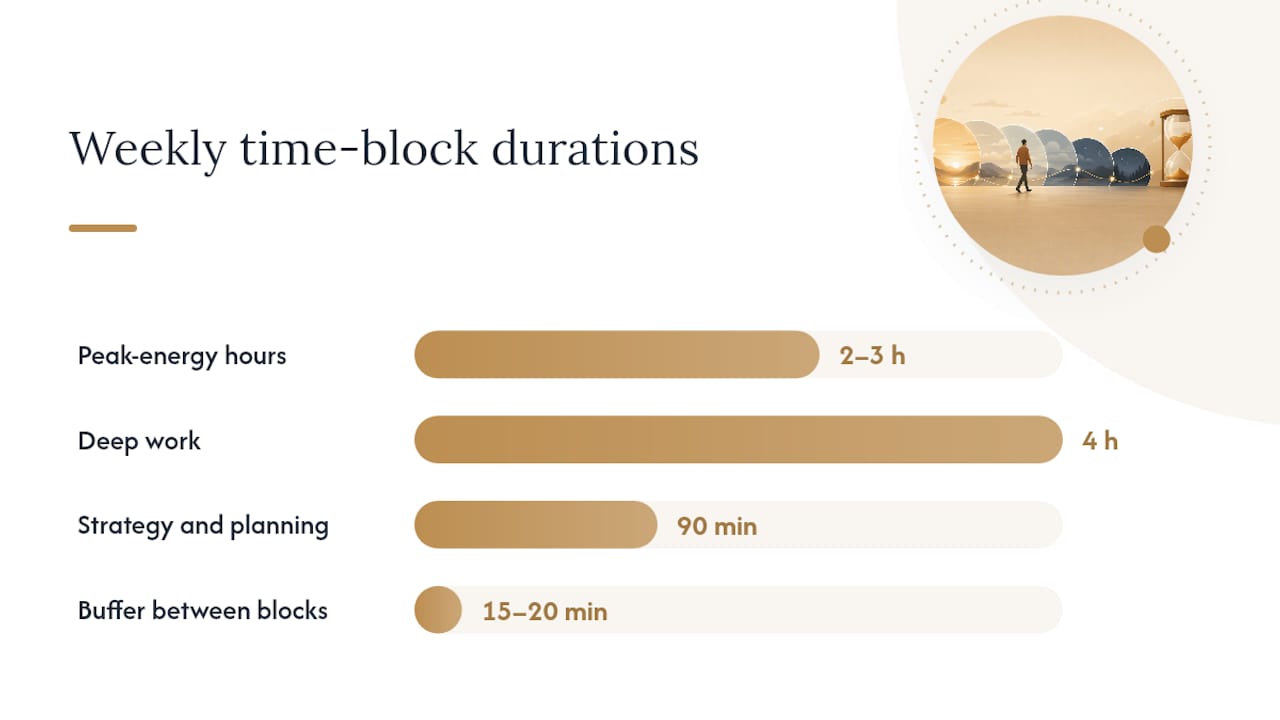
A three-layer weekly architecture works well: deep work days, operations days, and a strategy or planning day. Four focused hours of deep work consistently outperforms a fragmented eight-hour day.
How to set up your weekly time blocks:
- Identify your peak-energy hours (usually the first 2–3 hours after you start work).
- Reserve those hours for your highest-value tasks: client deliverables, content creation, or revenue-generating work.
- Group admin tasks (email, invoicing, scheduling) into a single daily or weekly block, not scattered throughout the day.
- Add 15–20 minutes of buffer between blocks to handle overruns without cascading delays.
- Set calendar notifications and an auto-reply or status message to enforce the boundary.
A sample weekly template:
- Monday: Strategy and planning (90 minutes), then shallow admin
- Tuesday/Wednesday mornings: Deep work blocks (2–3 hours each)
- Thursday: Client calls and communication batch
- Friday morning: Content batch and weekly review
Calendar tool costs: Google Calendar and Apple Calendar are free. Notion Calendar (free tier) and Fantastical (paid, around $4.99/month) add more structure if you want it.
Pro Tip: Treat your calendar blocks like client meetings. If you wouldn’t cancel a client call for a minor distraction, don’t cancel your deep-work block for one either.
3. The Two-Minute Rule and GTD triage keep small tasks from piling up
If a task takes two minutes or less, do it immediately. If it takes longer, it goes into a triage queue. That single rule, borrowed from David Allen’s Getting Things Done (GTD) framework, stops small tasks from becoming a mental backlog that drains focus all day.
Quick triage workflow for email, DMs, and small admin:
- Open your inbox once or twice a day, not continuously.
- Apply the two-minute test: if you can respond, file, or complete it in under two minutes, do it now.
- If it takes longer, assign it to one of three buckets: batch it (similar tasks together), schedule it (put it in a calendar block), or delegate/automate it.
- At the end of each triage session, your inbox should be empty or contain only items with a scheduled next action.
Capture tools that work well:
- A simple voice memo app for ideas that hit mid-walk
- Todoist’s quick-add feature for task capture on mobile
- A single “inbox” section in Notion or a physical notepad
Pair this with the 1-3-5 daily rule at the start of each morning. Your one big task, three medium tasks, and five small tasks for the day get pulled from your triage queue, so nothing sits unscheduled.
4. Pick one source of truth for all your projects and tasks
The most common productivity leak for solopreneurs isn’t laziness. It’s fragmentation. Work lives in three apps, a browser tab, and a text thread, and you spend real time just finding what to do next. One source of truth fixes that.
How tool categories compare for solo use:
| Category | Ease of setup | Time to results | Cost tier | Best for | Maintenance overhead |
|---|---|---|---|---|---|
| Lightweight list apps | Very easy | Immediate | Free/freemium | Simple task lists, daily plans | Very low |
| Flexible workspace apps | Moderate | 1–2 weeks | Free to ~$8/month | Creative pipelines, docs + tasks | Medium |
| Kanban apps | Easy | 2–3 days | Free/freemium | Visual project tracking | Low |
| Full project management | Moderate | 1–2 weeks | Freemium to ~$10/month | Client work, multi-project tracking | Medium |
| Time trackers | Easy | Immediate | Free/freemium | Billing, time audits | Very low |
Where specific tools fit:
- Todoist: Best for simple daily task lists and the 1-3-5 rule. Free tier is generous; Pro is $4/month.
- Trello: Kanban boards for visual project tracking. Free tier works well for most solos.
- Notion: Flexible workspace for docs, tasks, and databases combined. Free for personal use.
- Asana: Stronger for client-facing project tracking with multiple deliverables. Free tier available; paid starts around $10.99/month.
- Toggl Track: Time tracking, not task management. Free tier covers most solo needs. Pairs with any of the above.
Fast onboarding steps:
- Pick one tool from the list above based on your primary work type.
- Start a template (most tools offer free starter templates).
- Migrate only the next seven days of work into it. Don’t import everything at once.
- Set a recurring 15-minute weekly maintenance slot to archive completed items and review what’s next.
Pricing note: most tools above have free or freemium tiers that cover solo use. Team tiers (usually $8–$15/month per seat) are unnecessary until you add collaborators.
5. Task batching and single-tasking cut the context-switch tax
Every time you switch between unrelated tasks, your brain pays a reset cost. Batching groups similar work into single blocks so that cost gets paid once instead of a dozen times a day. Combined with single-tasking, it’s one of the fastest ways to increase productivity as a solopreneur without adding hours.
Batching templates for common solo tasks:
- Invoicing batch: Monday morning, 45–60 minutes. Send all invoices, follow up on outstanding ones, and reconcile.
- Email/DM batch: Twice daily, 20–30 minutes each. Outside those windows, notifications stay off.
- Content production batch: Friday morning, 2–3 hours. Write or record three pieces at once while you’re in creative mode.
- Client calls batch: Thursday afternoon. All calls in one block preserves the rest of the week for deep work.
- Admin batch: End of week, 30 minutes. File receipts, update your task system, prep next week’s 1-3-5.
Single-tasking enforcement is simple but requires deliberate setup: one app open at a time, phone face-down, notifications silenced. The Forest app helps here too, since starting a session creates a small commitment device.
Pro Tip: Map your energy before you assign batches. Put creative batching (writing, design, strategy) in your peak-energy window and admin batching in your afternoon recovery window. Protecting energy beats protecting hours, and scheduling high-value work during peak energy is the lever most solopreneurs underuse.
6. Automation and lightweight AI act as your solo team
Automation is the closest thing a solopreneur gets to delegation. The goal isn’t to automate everything; it’s to automate the repetitive admin and client triggers that eat time without requiring your actual judgment.
Quick automations worth setting up first:
- Email autoresponders: Set expectations on response time without manually replying to every inquiry.
- Invoicing reminders: Most invoicing tools (FreshBooks, Wave, HoneyBook) send automatic payment reminders. Set it once.
- Lead capture to CRM: A form submission triggers a welcome email and adds the contact to your pipeline automatically.
- Content repurposing pipelines: A published blog post triggers a social media draft via a tool like Zapier or Make. WordPress integrates with both for publishing workflow automations.
- Toggl Track: Start a timer when you open a client project. The data shows you exactly where your hours go, which is the first step in fixing leaks.
- Forest: Use it during Pomodoro sessions to reinforce single-tasking without relying on willpower.
Cost guidance: Zapier’s free tier covers five single-step automations. Make’s free tier allows 1,000 operations/month. Most invoicing and CRM tools include basic automation in their free or entry-level tiers. A full automation stack for a solo typically runs $0–$30/month depending on volume.
When to hire a VA instead of automating: if a task requires judgment, relationship context, or creative input, a VA is the better call. Automate the predictable; hire for the unpredictable.
Pro Tip: Review your automations once a month. Tools update, APIs change, and a broken automation that silently fails is worse than no automation at all. A 15-minute monthly check catches drift before it costs you a client.
7. A practical 30-day starter plan to go from reading to doing
Start with measurement, then add protections, then layer automations. That sequence matters because you can’t fix what you haven’t seen.
Week-by-week breakdown:
- Week 1: Time audit and 1-3-5. Track every hour for five days using Toggl Track (free). At the end of the week, identify your three biggest time leaks. Start using the 1-3-5 daily rule every morning.
- Week 2: Time blocks and one source of truth. Build your weekly calendar template. Pick one task tool and migrate your current work into it. Set your peak-energy blocks as non-negotiable.
- Week 3: Batching and Pomodoro. Assign every recurring task type to a batch window. Run Pomodoro sessions inside your deep-work blocks.
- Week 4: Automations and weekly review. Set up two to three automations (invoicing reminders, email autoresponder, lead capture). Run your first weekly review: what worked, what didn’t, what to adjust.
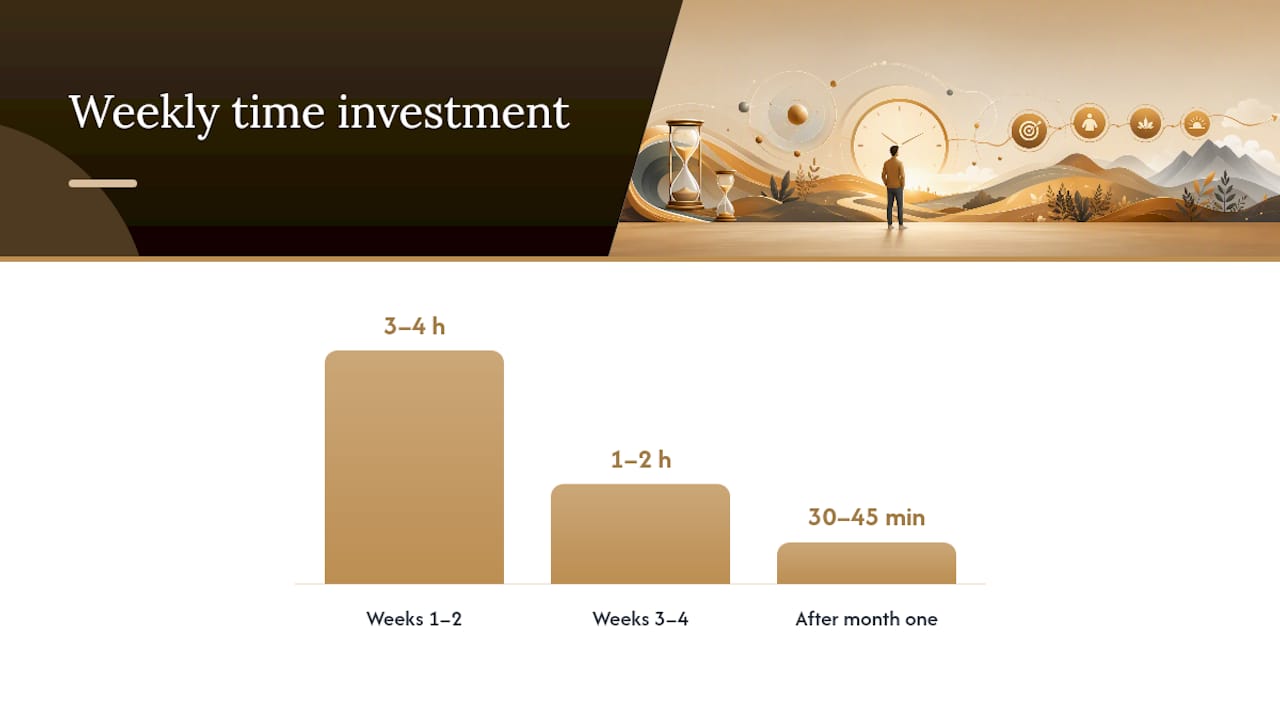
Weekly time investment: Weeks 1–2 require about 3–4 hours of setup. Weeks 3–4 drop to 1–2 hours. After month one, maintenance is roughly 30–45 minutes per week.
Typical subscription costs: $0 if you use free tiers across Toggl Track, Trello or Todoist, and Zapier. $15–$40/month if you upgrade one or two tools.
Most solopreneurs notice an immediate improvement in focus after implementing time blocks in Week 2. Measurable efficiency gains, like fewer missed deadlines and faster task completion, typically show up within 2–4 weeks of consistent use. The three-layer weekly architecture of deep work, operations, and strategy is what makes those gains stick past the first month.
Week-by-week checklist:
- Week 1: Time audit complete, 1-3-5 in daily use
- Week 2: Weekly calendar template built, one task tool active
- Week 3: Batch windows assigned, Pomodoro running in deep-work blocks
- Week 4: Two to three automations live, first weekly review done
8. A solo workflow that produced ~30% faster throughput
Combining time-blocking, a single source of truth, and two targeted automations produced roughly a 30% improvement in solo workflow throughput, as documented in the Yoursolobusiness case study. The main levers were protecting a daily 3-hour deep-work block, batching all client communication into two daily windows, and automating invoicing and lead capture. The result was approximately 6–8 hours reclaimed per week, with fewer missed follow-ups and faster client delivery cycles.
Implementation checklist you can copy:
- Audit your current week with Toggl Track for five days.
- Identify your peak 3-hour window and block it on your calendar.
- Pick one task tool and consolidate all active projects into it.
- Set up invoicing reminders and an email autoresponder.
- Batch client communication into two daily windows (morning and late afternoon).
- Run a 15-minute weekly review every Friday.
Jay is the founder of Yoursolobusiness. [Professional background and credentials available on the author bio page.]
9. Common pitfalls that kill productivity gains before they stick
The most common reason solopreneurs lose their productivity gains isn’t a bad system. It’s one of four traps: over-tooling, over-planning, skipping the weekly review, or ignoring energy limits. Most productivity problems for solos stem from structural issues like income anxiety and decision fatigue, not a lack of discipline.
Specific warnings and fixes:
- Over-tooling: Using five apps to manage tasks creates more overhead than it solves. Pick one and stay with it for 30 days before evaluating.
- Over-planning: A perfect system you spend three hours building is worse than a simple one you actually use. Start with the 1-3-5 rule and add complexity only when you hit a real constraint.
- Skipping the weekly review: Without a review, your system drifts. Fifteen minutes on Friday is the minimum maintenance dose.
- Ignoring client interruptions: Set a written policy for response times and communicate it. Unscheduled interruptions are the fastest way to collapse a time-block system.
- No buffer time: Back-to-back blocks with no breathing room guarantee that one overrun cascades into the whole day.
Sustainability practices:
- Schedule at least one full offline day per week. Work-life balance fully mediates the relationship between flexibility and engagement, according to a Springer study, which means protecting rest isn’t soft advice; it’s a performance variable.
- Run a monthly “stop doing” audit. List every recurring task and ask whether it still earns its time slot.
- Protect recovery windows the same way you protect deep-work blocks. Both are non-negotiable.
Pro Tip: Build your daily habits for solopreneurs around a shutdown ritual: close all tabs, write tomorrow’s 1-3-5, and physically close your laptop. That single act signals the end of the workday and protects the recovery time your system depends on.
My honest take on productivity as a solo founder
The productivity advice most solopreneurs encounter is built for teams. It assumes you have a manager to report to, a standup to attend, and a colleague to pick up the slack. You don’t. That changes everything.
What actually works for a solo is a much smaller, tighter system. I keep one task list, one calendar, and one automation stack. My weekly ritual is a 15-minute Friday review: what shipped, what didn’t, what moves to next week. My shutdown ritual is non-negotiable: write tomorrow’s 1-3-5, close the laptop, done. No exceptions.
The trap I see most often is solopreneurs building elaborate systems they then have to maintain. The system becomes the job. Start with the two-minute rule and the 1-3-5. Add time blocks in week two. Add automations in week four. That sequence works because each layer builds on a habit you’ve already formed, not on willpower you’re hoping to sustain. For more on why systems beat willpower every time, the systems-first approach at Yoursolobusiness is worth a read.
What Yoursolobusiness gives you beyond the free methods
The methods in this article are free to implement. But building the automations, prompts, and checklists from scratch takes time most solopreneurs don’t have. That’s exactly what the AI Toolkit from Yoursolobusiness is built for.

The toolkit gives you a ready-made AI workflow stack: implementation checklists, a prompt library for common solo tasks, and step-by-step automation templates you can deploy in a day rather than a week. It’s designed to plug directly into the methods above, so you’re not starting from zero.
Pricing varies by tier; check the toolkit page for current options. If you’re not sure it fits your workflow yet, treat the first two weeks as a trial. Run the free methods from this article in parallel and see where the gaps are. The toolkit fills the gaps that take the most time to build manually.
For a broader look at how AI fits into a solo workflow, the AI for solopreneurs guide covers the strategic layer before you commit to any specific tool.
Sources
The sources below are worth bookmarking if you want to go deeper on any of the frameworks covered here.
- Solopreneurship
- Time Management System for Solopreneurs | Martin Ebongue
- Time Management for Solopreneurs: 5 Frameworks | Nomixy
- Does Work-Life Balance Really Exist for Solopreneurs? With Leah Remillet – Streamlined Solopreneur
- Does online solopreneur flexibility improve work-life balance and engagement? — Springer
- Flexible working hours can benefit work-life balance, businesses and productivity — ILO
- WordPress





[…] Productivity Methods for Solopreneurs: Practical 30-Day Plan […]