
If you need fast onboarding and marketing muscle, HubSpot is the stronger pick. If you want deep customization and lower per-seat costs as you grow, Zoho wins. Both offer free tiers, but neither is built for scale on free. The real decision comes down to how complex your workflows are today and what the licensing delta looks like once you add seats or hubs later.
TL;DR:
- HubSpot offers faster onboarding and a more user-friendly interface, making it ideal for small teams needing quick setup and marketing focus.
- Zoho provides greater customization, automation, and lower costs per seat for complex workflows, making it better for larger or more intricate sales processes.
- Advanced features and automation tools in both platforms often require higher-tier subscriptions, which can significantly increase long-term costs.
- Integrations for Zoho are more seamless within its own ecosystem, while HubSpot supports a wider range of third-party tools, affecting connectivity choices.
- Support quality on both platforms varies with price tiers, with higher plans offering faster response times and more personalized assistance.
HubSpot vs Zoho CRM: The Core Trade-Off
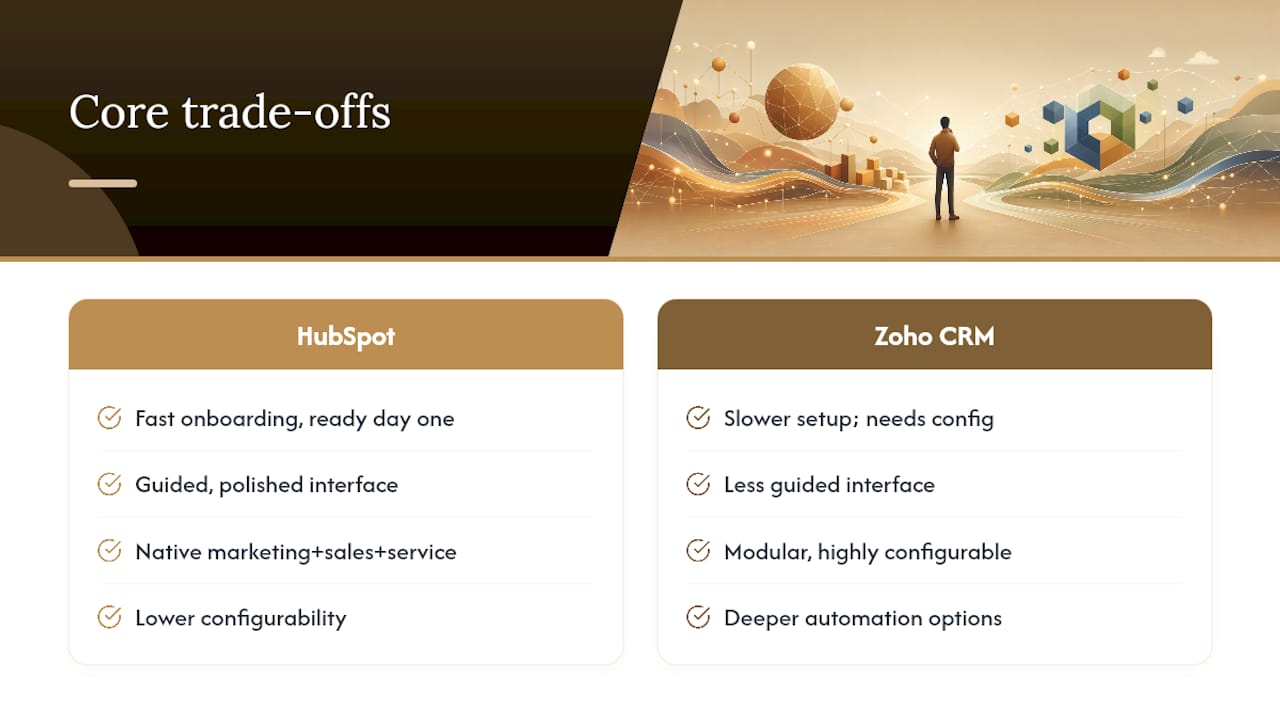
Here’s the honest version of the “hubspot vs zoho crm” debate that most comparison charts skip: you’re not choosing between a good CRM and a bad one. You’re choosing between two different philosophies of software.
HubSpot builds a beautiful front door. It’s designed so a non-technical team can log in on day one and start working without a manual. Its marketing, sales, and service hubs connect natively, and the interface rewards you for staying inside its own walls. That polish costs money once you outgrow the basics, but you’re paying for speed, not features you’ll never use.
Zoho takes the opposite bet. It hands you more raw configurability, more automation, and more first-party apps at a lower price point, but it expects you (or someone on your team) to actually configure it. Territory management, custom modules, and workflow rules that HubSpot locks behind Enterprise pricing often ship standard in Zoho’s mid-tier plans, according to SelectHub’s platform comparison.
Neither approach is objectively better. A five-person consultancy that just needs contacts, pipelines, and email sequencing will feel HubSpot’s onboarding speed almost immediately. A ten-person operation running multiple product lines with different sales processes per region will hit Zoho’s flexibility ceiling much later, because Zoho was built to bend around messy real-world workflows rather than force you into one.
HubSpot vs Zoho Pricing: How Costs Actually Scale
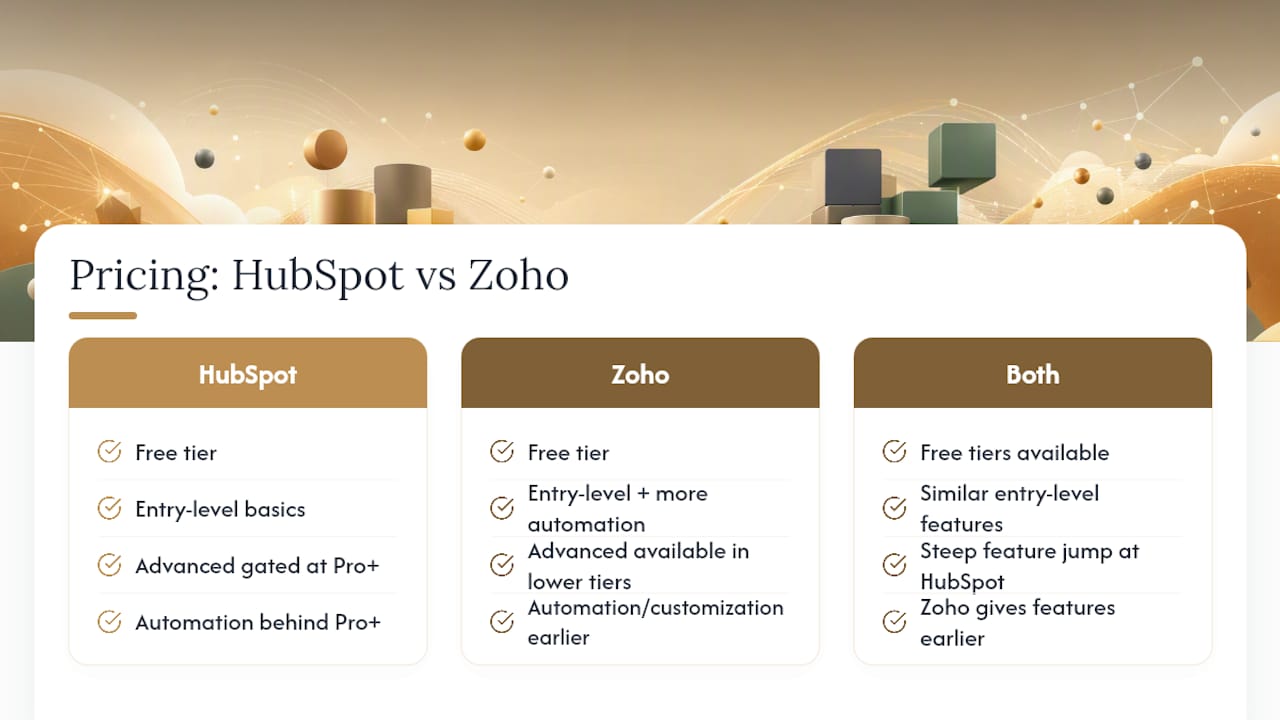
Sticker price tells you almost nothing here. Both platforms offer usable free tiers, and both look reasonable at the entry level. The story changes once you add users, contacts, or automation volume.
HubSpot’s free and Starter tiers cover the basics: contact management, email tracking, simple pipelines. But advanced reporting, custom objects, and multi-step workflow automation sit behind the Professional and Enterprise tiers, and that jump in price is steep compared to the entry point. This is the licensing delta that catches a lot of growing teams off guard: you don’t just pay more per seat, you pay more to unlock features you assumed were standard.
Zoho takes a different approach to gating. According to SelectHub’s analysis, Zoho tends to place more automation and customization tools in its lower-priced tiers, so a team can access workflow rules, territory assignment, and custom fields without jumping straight to an enterprise-grade contract.
That doesn’t mean Zoho is always cheaper at scale. Zoho One’s suite pricing is attractive if you actually use multiple Zoho apps, but if you only need CRM, you’re comparing apples to oranges against a HubSpot hub. The real math: model your team size 12 months out, then price both platforms at that headcount, not today’s. Bundled suite economics also change vendor lock-in and upgrade paths in ways that matter over a two-to-three-year horizon, well beyond the sticker price you see in year one.
Which CRM Is Easier to Learn and Onboard?
HubSpot generally wins the first-week test. According to TechnologyAdvice’s comparison, HubSpot emphasizes a polished, guided user experience specifically to shorten onboarding time, and that shows in how quickly a new sales rep can start logging activity without hand-holding.
Zoho’s learning curve is steeper because its configurability comes at the cost of a plainer, less guided interface. You’ll likely spend more time in setup, more time reading documentation, and more time deciding how you want your pipeline to work instead of accepting a default.
Here’s the trade-off worth sitting with: HubSpot optimizes for the first 30 days. Zoho optimizes for month 12, once your team has configured it around your actual sales process instead of a generic one. If you’re a solo founder or a two-person team without a dedicated CRM admin, that setup time is a real cost, not a footnote.
Pro Tip: Before committing to either platform, map your actual sales stages on paper first. If you can describe your pipeline in five steps or fewer, HubSpot’s defaults will probably fit out of the box. If it takes fifteen steps and three exceptions, budget real time for Zoho’s configuration.
How Do Their Integration Ecosystems Compare?
This is where the “bundle versus marketplace” divide gets concrete. CRM Curator’s comparison notes that Zoho offers a broader ecosystem of first-party apps through Zoho One, while HubSpot leans on a larger third-party marketplace and deep native connectivity across its own hubs.
Practically, that means: if you already run Zoho Books, Zoho Desk, or Zoho Projects, adding Zoho CRM slots in with minimal glue work because it was built by the same team, on the same data model, from day one.
HubSpot instead invites a wider array of outside tools into its ecosystem, from Slack to Shopify to sales engagement platforms. If you’re comparing outreach tools alongside your CRM decision, resources like LeadPilot’s breakdown of sales engagement platforms are worth a look, since your CRM choice often dictates which sequencing tools plug in cleanest.
The trade-off: Zoho’s integrations feel more like one coherent system; HubSpot’s feel more like a hub with spokes reaching into best-of-breed tools you may already use.
What AI and Automation Features Does Each CRM Offer?
Both platforms have shipped real AI, not just a chatbot bolted onto a support tab. According to SelectHub, Zoho’s AI assistant, Zia, focuses on sales performance predictions and send-time optimization, essentially telling reps who to call and when to email for the best odds of a reply.
HubSpot’s AI tools lean toward content generation: drafting emails, summarizing long contact histories, and surfacing insights buried in activity logs so reps don’t have to scroll through months of notes.
Neither AI feature replaces a human closing a deal. But for a lean team, the summarization and drafting tools in HubSpot save real admin time on a daily basis, while Zia’s predictive scoring helps a small sales team prioritize call lists without guesswork. If your bottleneck is writing (follow-ups, proposals, recap emails), HubSpot’s AI tilt matters more. If your bottleneck is deciding who to contact next, Zia’s predictive layer earns its keep.
Who Should Choose HubSpot, and Who Should Choose Zoho?
Multiple analyst roundups converge on the same split: Zapier’s research concludes HubSpot is stronger for marketing-led teams that need fast ramp-up, while Zoho delivers more value per dollar and deeper customization for operationally complex teams. Business lands in a similar place, favoring HubSpot for mid-market marketing depth and Zoho for smaller teams stacking multiple bundled apps.
HubSpot fits you if: your growth engine runs through content and inbound marketing, your team is small enough that onboarding speed matters more than deep configuration, and you want your CRM, marketing, and service tools to feel like one product.
Zoho fits you if: you already run two or more Zoho apps (Books, Desk, Projects), your sales process has real complexity like territories or multi-stage approvals, and you’d rather configure once than pay recurring premiums for features you could set up yourself.
If you’re already inside the Zoho ecosystem, the math tends to favor staying rather than migrating, since bundled suite pricing usually beats piecing together separate tools from different vendors.
What Should You Know Before Migrating or Implementing?
Migration is where a good CRM decision can still go sideways. Data mapping is the first hurdle: contact fields, deal stages, and custom properties rarely translate one-to-one between platforms, so budget time to reconcile them before you import a single record.
Team adoption is the second hurdle, and it’s the one spreadsheets don’t capture. A CRM only works if reps actually log activity in it, and switching costs include retraining muscle memory, not just moving data.
Third: audit your existing automations before you migrate anything. If you’re moving from spreadsheets or a legacy tool, this is also the moment to rebuild your client intake process properly. A client onboarding checklist that aligns your CRM stages with your billing workflow saves you from rebuilding the same fire twice.
Vendor lock-in deserves a mention too. Bundled suite economics create upgrade paths that look convenient in year one and expensive in year three, since switching an entire suite is a much bigger project than switching a single app.
Free Tier and Trial Differences Worth Knowing
Both HubSpot and Zoho offer free tiers, and both are genuinely usable for testing the waters, not just lead-gen traps. But the limits differ meaningfully, and Zapier’s comparison notes those limits show up in user seats, email send caps, and how much automation you can actually run before hitting a wall.
Treat the free tier as a test drive, not a long-term plan. It’s the right place to confirm the interface feels right and your team will actually use it daily. It’s the wrong place to judge automation depth, because both vendors intentionally cap the features that would let you run real operations for free.
Trial periods on paid tiers matter more if you’re testing Enterprise-level features like custom objects on HubSpot or advanced territory rules on Zoho, since those are exactly the features the free tier hides from you.
Comparing Customer Support and Service Quality
Support quality tends to track pricing tier on both platforms. Higher-tier HubSpot customers generally get faster response times and more hands-on onboarding help, while lower tiers rely more on self-service documentation and community forums.
Zoho’s support follows a similar pattern, though its documentation leans more technical, reflecting the platform’s broader configurability. If your team lacks a dedicated CRM admin, factor in the time cost of parsing detailed setup docs versus getting a guided walkthrough.
Neither platform’s free tier includes meaningful live support. Budget for at least a mid-tier plan if you expect to need real help during setup, not just a knowledge base link.
How Do HubSpot and Zoho Handle Security and Compliance?
Both platforms offer standard enterprise-grade protections you’d expect from established CRM vendors: data encryption, role-based access controls, and compliance certifications relevant to handling customer data. Higher-tier plans on both platforms typically unlock more granular permission settings and audit logs, which matter more once you have multiple team members with different access needs.
For a solo founder or small team, the baseline security on either platform is almost certainly sufficient. The gap only starts to matter once you’re handling sensitive customer data across a larger team, at which point it’s worth checking each vendor’s current compliance documentation directly, since certifications and coverage change over time.
Comparing Uptime, Speed, and Reliability
Day-to-day performance rarely makes headlines because both platforms are mature, well-funded products with enterprise customers who wouldn’t tolerate frequent downtime. Reported uptime for both HubSpot and Zoho sits in the range you’d expect from established SaaS vendors serving businesses at this scale.
Where you’ll actually notice a difference is load speed on data-heavy views, like large contact lists or complex reports. Configuration also plays a role: an overloaded custom dashboard or a Zoho instance with dozens of workflow rules stacked on each other can feel sluggish regardless of the underlying platform’s baseline performance. Keep your setup lean, and both platforms perform reliably for typical SMB usage.
A Solo Founder’s Take on Making This Choice
Most of this comparison focuses on features. What actually matters for a solo operation is which automations save real hours. Lead capture into automatic follow-up sequencing is the highest-leverage automation you can build, full stop. Task reminders and templated responses come second.
A CRM is only half the equation. Pairing it with an AI workflow that handles drafting and scheduling turns either platform into something closer to a team member. Time-to-value beats raw capability when you’re the only admin.
— Jay
Turn Your CRM Choice Into a Working System
Picking between HubSpot and Zoho only solves half the problem. The harder part is actually connecting your CRM to the AI tools that automate the follow-ups, drafts, and admin work eating your week, and most solo founders never get past the setup stage before losing momentum.

The AI Toolkit gives you the templates and implementation checklists to wire either CRM into an automated follow-up and lead-response system in days, not months, without hiring anyone to build it for you. It’s the same stack Jay uses to run a one-person operation at team-level output. Grab the toolkit and start connecting your CRM to real automation this week.
Sources
- HubSpot vs Zoho CRM | CRM Curator
- Zoho CRM vs HubSpot CRM | Which CRM Software Wins In 2026? | SelectHub
- HubSpot vs Zoho CRM: Who wins? | TechnologyAdvice
- HubSpot vs Zoho | Zapier research and review





Leave a Reply