

If you sell products, courses, or memberships straight from your bio, Beacons wins on almost every axis that touches your bottom line. If your bio is mostly a navigation hub feeding a mature ad and email stack, Linktree’s integrations still make it the more practical pick. The catch: Beacons wins on fees, but Linktree wins on data. Read the pricing section for the fee math and the integrations section if you’re already running paid ads.
TL;DR:
- Beacons offers lower seller fees, reaching 0% at roughly $30 a month, making it more cost-effective for high-volume product sellers.
- Linktree provides more extensive integrations with ad platforms, tracking, and analytics tools, which benefit marketers running paid campaigns.
- Beacons handles checkout, email automation, and media kits natively, reducing funnel friction for digital sales and brand deals.
- Pricing differences are most impactful above a $300 to $400 monthly revenue threshold, where Beacons’ lower fee structure starts saving money.
- Proper testing of payment, analytics, and automation setup is crucial before switching platforms to avoid costly sales and data losses.
Linktree vs Beacons at a Glance: What Each Tool Actually Does
Beacons was built for creators who want to run a business, not just a bio link. It bundles a native storefront, an AI-generated media kit, email sending, and light CRM features into one dashboard, so a creator selling a $27 template pack or a $15/month membership never has to send buyers to a third-party checkout page. That matters more than it sounds. Every redirect between your bio and a purchase is a chance for someone to bail, and Beacons’ native commerce and media-kit tooling is designed specifically to close that gap.
Linktree, by contrast, still does the one thing it was built to do better than almost anyone: present a clean, recognizable hub of links. It doesn’t try to be your storefront. It tries to be the fastest, most trusted handoff between your Instagram bio and wherever you actually want people to land, whether that’s your Shopify store, your YouTube channel, or your email opt-in form. Audiences already recognize the linktr.ee/yourname format, and that familiarity reduces friction for followers who’ve clicked one before.
Three quick reads on fit:
- Best for sellers: Beacons, because checkout happens without leaving the page.
- Best for a pure navigation hub: Linktree, because the design is dead simple and instantly recognizable.
- Best for an established ad/CRM stack: Linktree, because its integration bench is deeper.
Here’s the honest tally on each, stripped down to what actually affects conversions and cash flow.
Beacons, the upside:
- Sells digital products, courses, and memberships without sending buyers off-platform.
- Generates an AI media kit that can turn inbound brand DMs into signed deals faster.
- Sends email and automations natively, no separate tool required for a basic welcome sequence.
Beacons, the downside:
- The dashboard has more surface area to learn than a simple link list.
- Its free tier still takes a real cut of your sales, which shows up fast if you sell in volume.
Linktree, the upside:
- Setup takes minutes, and the design polish is genuinely best-in-class.
- Integrations with Google Analytics, Zapier, and Klaviyo plug straight into stacks you probably already run.
- Broad audience recognition lowers hesitation on click.
Linktree, the downside:
- No native checkout, so every sale still routes through an outside processor and page.
- Selling digital products means stitching together at least one more tool.
Neither platform is wrong for the wrong reasons. They’re built around different assumptions about what your bio link is supposed to do. Beacons assumes you’re closing a sale. Linktree assumes you’re routing traffic somewhere else to close it.
What Do Linktree and Beacons Actually Cost You?
The subscription price is the smaller number. The bigger one is the seller fee eating into every transaction, and that’s where the two platforms genuinely diverge.
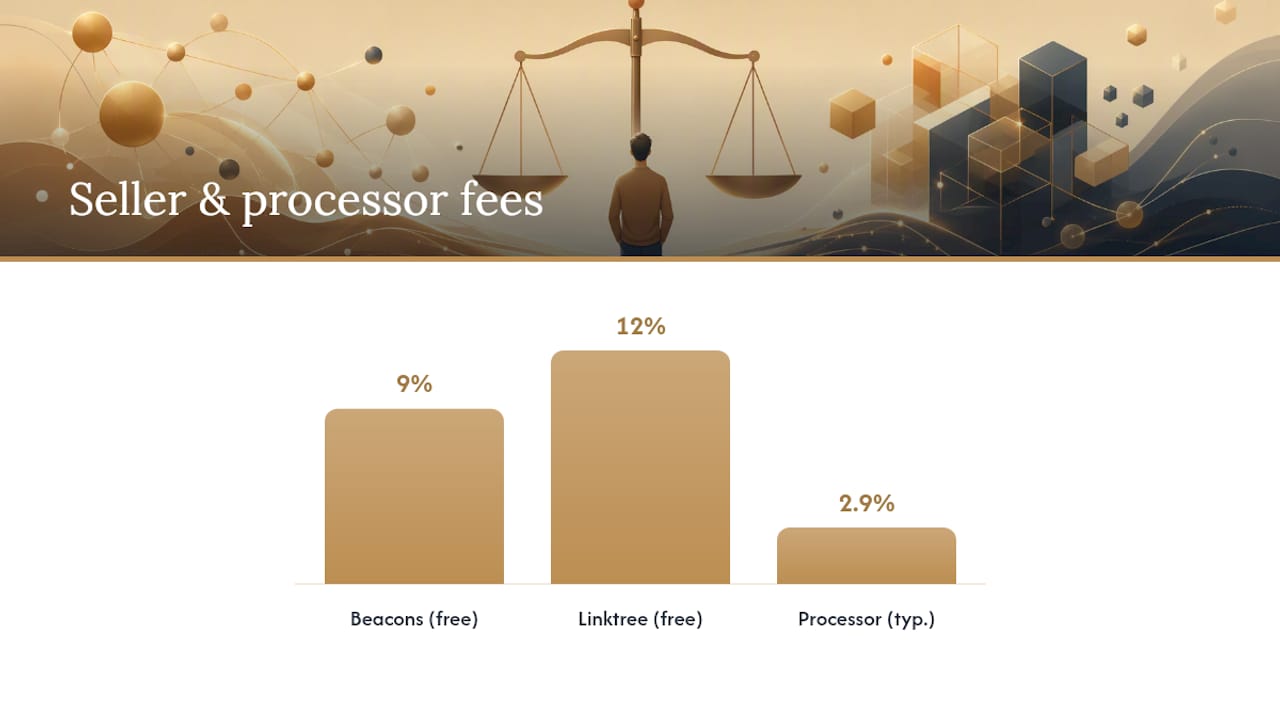
On free plans, Beacons charges a 9% seller fee on sales, while Linktree’s free tier charges 12%. That’s before Stripe or PayPal takes its own cut, which runs separately on both platforms and typically lands around 2.9% plus a small flat fee per transaction. Neither platform’s advertised fee includes that processor charge, so budget for both when you’re pricing a product.
Here’s where it gets interesting for anyone selling more than the occasional digital download.
| Plan tier | Monthly price | Free-tier seller fee | Path to 0% seller fee | Native commerce |
|---|---|---|---|---|
| Beacons Free | $0 | 9% | Not available on free tier | Yes |
| Beacons paid tier | Around $30/month | 0% at this tier | Reached at this tier | Yes |
| Linktree Free | $0 | 12% | Not available on free tier | No (redirect only) |
| Linktree paid tier | Around $35/month | 0% at this tier | Reached at this tier | No (redirect only) |
A quick break-even example: say you sell a $50 digital course and move 20 units in a month, or $1,000 in revenue. On Beacons’ free plan, that 9% fee costs you $90. Upgrade to the roughly $30/month tier that eliminates the seller fee, and you’d need to clear about $334 in monthly sales just to break even on the subscription cost, before even counting the fee savings. Cross that threshold and every additional dollar of revenue is yours to keep, minus the processor fee. On Linktree, the math is similar but starts from a higher baseline fee (12%) and a slightly pricier tier (around $35/month) to zero it out.
Pro Tip: Run your own numbers before you upgrade. If you’re moving under $300 to $400 a month in product sales, the free tier’s percentage fee often costs less than the paid subscription. The break-even point isn’t a fixed rule, it’s math you should redo every time your sales volume shifts.
The takeaway from Talkspresso’s 2026 pricing breakdown is straightforward: Beacons reaches its 0% seller-fee tier at a lower price point than Linktree does, which matters if selling is your primary goal. If selling isn’t the point of your bio at all, this entire calculation is moot, and you should be looking at the integrations section instead.
Which Platform’s Features Actually Move the Needle?
Feature lists are where most comparisons get lazy, listing checkmarks without explaining what a checkmark actually changes about your workflow. Here’s what genuinely affects revenue and time.
Checkout location is the single biggest functional split between these two tools. Beacons keeps the entire purchase, from click to payment confirmation, inside its own interface. Linktree still operates as a redirect layer: a follower clicks your link, lands on your Linktree page, then clicks again to leave for wherever the actual transaction happens. Each additional click or page load is a place someone can lose interest or get distracted by a notification. For anyone selling something, that second click is the one that costs you customers.

Email tells a similar story with a different verdict depending on what you already own. Beacons lets you send emails and build basic automations, like a welcome sequence for new subscribers, without leaving the platform. Linktree collects emails but expects you to route them into Mailchimp, Klaviyo, or a similar tool you already run. If you don’t have an email tool yet, that’s one more account to manage. If you already have Klaviyo dialed in with segments and flows built over years, Linktree’s approach saves you from re-platforming for no reason.
AI and creator-CRM tooling favors Beacons for anyone chasing brand deals. Its AI-generated media kit pulls your audience stats and engagement numbers into a shareable document that can convert inbound brand interest into paid deals with less friction for creators who don’t already have a manager or agency handling that outreach. Linktree doesn’t offer an equivalent, leaning instead on design polish and link organization as its core value.
Quick rundown of what each platform actually supports:
- Native checkout: Beacons yes, Linktree no.
- Native email sends and automations: Beacons yes, Linktree collection only.
- AI media kit / creator CRM: Beacons yes, Linktree no.
- Custom domain support: both platforms support it, letting you point a domain you own at your page.
- Design and template polish: Linktree’s templates are generally considered the more refined of the two.
Custom domain support matters more than it looks on a feature grid. Whichever platform you use, pointing your own domain (like links.yourbrand.com) at your bio page means you’re not building years of audience trust into someone else’s URL. If you ever switch platforms, you keep the address. Skip that step and you’re rebuilding brand recognition from zero if you ever migrate.
Do Your Integrations Actually Work the Way You Need Them To?
If you’re running Facebook or TikTok ad campaigns, this section matters more than the pricing table does.
Linktree supports a noticeably wider integration bench: Google Analytics, universal UTM parameters, Facebook and TikTok pixels, Zapier, Klaviyo, and Mailchimp all connect natively. That combination lets you see exactly which link drove a click, which campaign drove that click, and whether that click converted downstream, the kind of attribution chain that paid advertising depends on.
Beacons’ integration coverage is narrower. Zapier’s own listing for Beacons shows a smaller set of native connections compared to Linktree’s roster, which means creators running a mature marketing stack may hit gaps that Linktree simply doesn’t have.
Here’s why that gap matters beyond convenience: missing pixel or UTM support materially raises the switching cost for anyone already running paid campaigns, because every dollar of ad spend without accurate attribution is a dollar you can’t optimize. In fact, when GA, pixels, and UTM tracking are already load-bearing parts of your funnel, that data accuracy often outweighs the appeal of a cheaper path to 0% seller fees, because a poorly attributed campaign can waste far more than a seller fee ever would.
Before you commit to either platform, validate the integrations you actually rely on:
- Fire a test click through your Facebook or TikTok pixel and confirm it registers in Ads Manager.
- Build one UTM-tagged link and check that it shows up correctly in Google Analytics.
- Connect Zapier or Klaviyo and run one automation end-to-end, not just a connection test.
If any of those steps fail or feel clunky, you’ve found your deal-breaker before you’ve paid for a year of subscription.
How Do You Actually Choose Between Them?
Run through this checklist before you sign up for either platform:
- Do you sell products, courses, or memberships directly from your bio? If yes, weight heavily toward Beacons.
- Are you running paid ad campaigns that need pixel and UTM attribution? If yes, weight toward Linktree.
- Do you need a custom domain for long-term brand ownership? Both support it, so this doesn’t break the tie either way.
- What’s your monthly sales volume? Under $300 to $400, a free tier’s percentage fee is often cheaper than a paid subscription. Above that, run the break-even math from the pricing section above.
Three scenarios and the pick that fits each one:
- You’re just starting out and your bio is mostly a link hub for now. Linktree’s free tier gets you live in minutes with a clean design and zero learning curve.
- You’re launching your first paid digital product. Beacons removes the extra checkout step and its lower break-even tier makes sense once you’re clearing a few hundred dollars a month.
- You’re an established creator running ad campaigns into a Klaviyo or Mailchimp funnel. Linktree’s integration depth protects the attribution data your campaigns depend on.
Watch for a few red flags during signup on either platform: payment onboarding eligibility can vary by country, so confirm your region supports payouts before you build a launch around it. Read the terms around digital products carefully, since some categories (physical goods, certain financial products) face extra restrictions. And don’t assume payout speed is instant. Verify it during setup, not after your first sale.
How Do You Actually Migrate Without Losing Sales or Data?
Whether you’re switching platforms or launching fresh, follow this sequence to avoid the traps that quietly cost creators money in the first week.
- Set up your account and verify payment onboarding first, before building out a single link. Payout verification can take days depending on your bank and region, and it’s the single most common bottleneck creators hit.
- List your first product or link set, keeping descriptions and pricing consistent with what you’ve already promoted elsewhere.
- Connect analytics and pixels, whether that’s Google Analytics, a Facebook pixel, or a Zapier automation, before you drive any real traffic.
- Run a test purchase with a low-cost item to confirm the entire checkout or redirect flow works, payment clears, and confirmation emails send.
- Send a test email through your welcome automation to check formatting and deliverability before real subscribers see it.
Common traps to avoid: skipping payout verification until after launch, which delays your first payday by days. Redirect friction on non-native platforms, where a broken or slow link between your bio and checkout quietly bleeds sales. Broken UTM parameters that make your analytics dashboard look empty even when traffic is flowing. And duplicate email consent records if you’re migrating a list, which can trigger compliance headaches down the line.
Pro Tip: If you’re moving from a redirect-based hub to a native-checkout page, add UTM templates to your old links before you switch, and export your email list first to avoid duplicate consent records landing in your new platform’s database.
How This Comparison Was Built
This comparison leans on current pricing pages and integration documentation for both platforms, cross-checked against third-party feature grids like LinkInBio’s comparison breakdown, industry reporting on creator monetization trends, and Zapier’s own integration listings. Pricing reflects a 2026 snapshot, and both platforms adjust tiers periodically, so confirm current numbers before you commit.
A quick real-world gut check: a solo creator selling a $40 mini course who moves 15 units a month is sitting at $600 in revenue. That’s below most break-even thresholds for a paid tier, meaning the free plan’s percentage fee is probably still the cheaper option until sales climb. The math shifts fast once volume grows, which is exactly why revisiting it monthly matters more than picking the “right” plan once and forgetting about it.
Before committing to a paid tier on either platform, test the actual purchase and email flow live with a real (even $1) transaction. Marketing pages describe intent. Only a live test confirms execution.
- Pricing and fee documentation from Beacons and Linktree’s own sites.
- Third-party integration listings via Zapier.
- Feature comparison grids from independent review sites.
Consolidate or Stay Modular? A Solo Founder’s Take
Every solo operator eventually asks the same question: fewer tools that do more, or more tools that each do one thing well? There’s no universal answer, but there is a pattern I’ve noticed across creators who get this decision wrong. They consolidate too early, before they know what they actually need, and end up locked into a platform’s ecosystem before they’ve validated their own offer.
Consolidating with a tool like Beacons makes sense once you’ve proven people will pay you and you’re spending real hours stitching together checkout, email, and media kits by hand. That admin overhead is the actual cost, not the subscription price. Staying modular with Linktree plus a separate email tool makes sense when you already have that stack humming and switching would mean rebuilding automations you spent months tuning.
The trade-off that matters most isn’t features. It’s data ownership. Own your email list and your analytics regardless of which bio tool you pick, because that’s the asset that survives any platform migration.
– Jay
Want to Automate What Happens After the Click?
Neither Linktree nor Beacons will write your welcome email sequence or build the dashboard that tells you which bio link actually drove revenue this month. That’s the gap Yoursolobusiness fills: a resource built specifically for solo creators who need their post-click workflow, email automations, analytics tracking, and content production, running without hiring anyone to manage it.

The AI Toolkit walks through the exact stack for automating a welcome flow the moment someone joins your list from a bio link, plus setting up a lightweight analytics dashboard that tracks conversions without you manually checking three different platforms. If you’re weighing whether a $30 or $35 monthly subscription pays for itself, pair that decision with a look at the tools already automating the marketing work around it. Start with the AI Toolkit to see the exact stack.
Sources
- Zapier – Beacons integrations
- Beacons vs Linktree 2026: Pricing, Fees, and Best Fit – Talkspresso
- Beacons vs Linktree: Choosing the right link-in-bio tool – Jotform