
AI works best as a research co-pilot: it speeds up planning, transcription, and synthesis so teams get themes and quotes in hours instead of weeks. It doesn’t replace researcher judgment, and every AI output needs a human check before it reaches a stakeholder deck. Research teams, product managers, solopreneurs, and CX leads all benefit, because the biggest wins are faster time-to-insight, the ability to run open-ended conversations at real scale, and richer evidence you can back with actual quotes and clips.
TL;DR:
- AI excels in planning, transcription, tagging, and synthesis, but human review is essential for accurate themes and quotes before stakeholder sharing.
- Using AI for continuous voice of customer programs, large-scale open-text analysis, and rapid concept testing offers significant time savings and broader insights.
- Verify AI outputs by directly matching themes to transcript clips and ensure strict privacy measures, especially with sensitive or behavioral research.
- Choose AI tools that offer evidence traceability, data privacy, export options, and integration capabilities, tailored to your team size and needs.
- Conduct small, two-week mini-projects utilizing AI to streamline transcription, synthesis, and reporting while measuring time savings and accuracy improvements.
What AI Customer Research Actually Covers
AI customer research isn’t one tool doing one job. It’s a set of capabilities you slot into different stages of a study: drafting plans, recruiting participants, running interviews, transcribing and tagging, then synthesizing and reporting. Nielsen Norman Group’s research on AI found the technology helps most in planning and analysis, not in replacing the parts of research that require watching real human behavior.
Here’s where it earns its keep in practice:
- Always-on voice of customer (VoC) programs that replace the quarterly survey blast with continuous, conversational feedback
- Concept testing at a volume no human moderator could realistically cover
- Large-scale open-text analysis, turning thousands of survey comments into themes in minutes
- Persona generation drawn from patterns across interview transcripts
- Stakeholder-specific briefs, where the same findings get reshaped for engineering, marketing, or the executive team
The rule of thumb: if the data is language-based and open-ended, AI usually adds value fast. If you’re observing behavior or building trust in a sensitive interview, you still need a human in the room.
How to Build an AI-Augmented Research Workflow
The workflow that works isn’t “hand everything to AI.” It’s AI doing the heavy lifting at defined checkpoints, with a person reviewing before anything moves forward. Here’s how that breaks down stage by stage.
- Planning. Use AI prompts to draft research objectives, screener questions, and discussion guides. Never ship a first draft. Template it, then edit it yourself, because AI-written screeners often bury a leading question in otherwise clean phrasing.
- Recruiting. Automate outreach and scheduling. Still validate your sampling frame by hand, and check that consent language covers AI processing of the recordings.
- Interviews. AI-moderated interviews let you run adaptive conversations with far more participants than a human team could handle, at lower cost per conversation. Use them when you need exploratory breadth. Switch to a human moderator when the topic demands trust or emotional nuance, and always capture audio so you can pull clips later.
- Transcription and tagging. Nail down speaker identification, strip personally identifiable information, and let AI run the first pass of coding. Then review it yourself; auto-tagging drifts on nuance more than people expect.
- Synthesis. Cluster the themes AI extracts, pull the quotes that actually support them, and tag which insights are “ownable” by which team. Keep a direct line from every claim back to its transcript clip.
- Reporting. Build role-specific summaries instead of one giant deck. Link every claim in the report back to the exact clip or transcript segment it came from.
Pro Tip: Before you trust any AI-generated theme, open the transcript and find the three clips that supposedly support it. If you can’t find them fast, the theme isn’t ready for a stakeholder deck.
Maze’s research on UX teams found that most product teams already lean on AI for question drafting, transcription, tagging, and report generation, and see measurable time savings when it’s used this way rather than as a full replacement for the researcher.
How Do You Choose the Right AI Research Tools?
Pick tools by what they let you verify, not just what they promise to automate. A tool that produces slick summaries but hides its source transcripts is a liability the first time a stakeholder asks, “Where did this come from?”
Evaluate on these axes using best tools for AI design articles for practical guidance:
- Evidence traceability: can you click from a theme straight to the transcript clip that supports it?
- Data sovereignty and privacy: where does the data live, and who can access it?
- Exportability: can you get your transcripts and tags out if you switch tools?
- Model explainability: does the tool show its reasoning, or just hand you a conclusion?
- Context-window limits: can it handle a full 60-minute transcript, or does it truncate?
- Integrations: does it connect to the insights repo or project tools you already use?
Run through this checklist before committing to anything: confirm storage location and retention policy, test the export process on a real transcript, set permission controls before your first interview, and build redaction into your process rather than bolting it on later.
| Team size | Recommended tool strategy |
|---|---|
| Solo or small team | Focused stack: one transcription tool, one insights repo, one lightweight AI assistant |
| Mid-size research team | Integrated platform covering more of the pipeline, with export options kept open |
| Enterprise research org | Best-of-breed tools per stage, connected through a shared repo for traceability |
If you’re assembling a stack from scratch, a curated list of AI research tools can save you from testing a dozen options nobody on your team actually needs.
What Are the Risks of Using AI in Customer Research?
The failure modes are predictable, and every one of them has a fix that takes minutes, not weeks.
- Hallucinated or fabricated quotes. Never include a quote in a report until you’ve matched it against the actual transcript clip.
- Priming and leading questions. AI-drafted discussion guides can smuggle in bias through word choice. Vet every question for leading language, and A/B test prompts before you scale an interview series.
- Privacy and consent gaps. Redact personally identifiable information, document how long you retain recordings, and get explicit consent for AI processing before the interview starts, not after.
- Situations where AI shouldn’t run the show. Video-based behavioral observation, high-trust clinical or legal interviews, and conversations with vulnerable populations still call for a human moderator and human judgment, full stop.
NN/g’s guidance on AI in research is blunt about this: AI outputs need human review because models can hallucinate or mislabel, and that risk doesn’t shrink just because your sample size grew.
A Two-Week Mini-Project You Can Run Solo
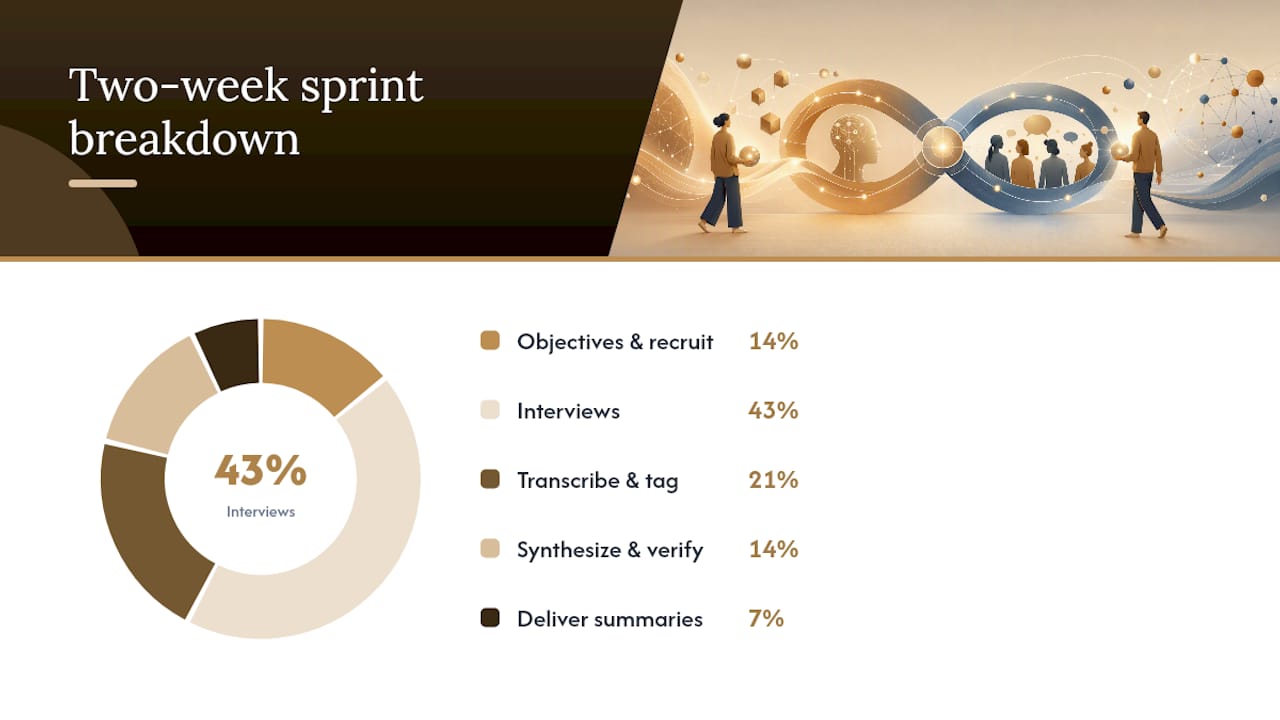
You don’t need a research department to test this. A minimal stack, one transcription tool, one insights repo, and one summary assistant, covers most of what a solo researcher or small team needs without juggling five subscriptions.
Here’s a sprint you can run in two weeks with 20 interviews:
- Days 1 to 2: Draft objectives and screener with AI, then edit by hand. Recruit and schedule.
- Days 3 to 8: Run interviews, mixing AI-moderated sessions for breadth with a few human-moderated calls for depth.
- Days 9 to 11: Transcribe, sanitize PII, and run first-pass auto-tagging.
- Days 12 to 13: Synthesize themes, verify every quote against its clip, and flag anything that can’t be traced.
- Day 14: Deliver role-specific summaries to stakeholders, each claim linked to source evidence.
Set your acceptance criteria before you start: track time-to-insight against your last manual project, require every quote in the final report to match its transcript exactly, and check whether stakeholders actually reference the findings a week later. DesignRush’s practitioner guidance backs this approach: start with whichever phase currently eats the most of your time, usually transcription and synthesis, and measure before you expand further. For structuring the recruiting and scheduling side, a workflow automation guide for solopreneurs covers patterns that map directly onto this sprint.
What I’d Tell You to Actually Do Next
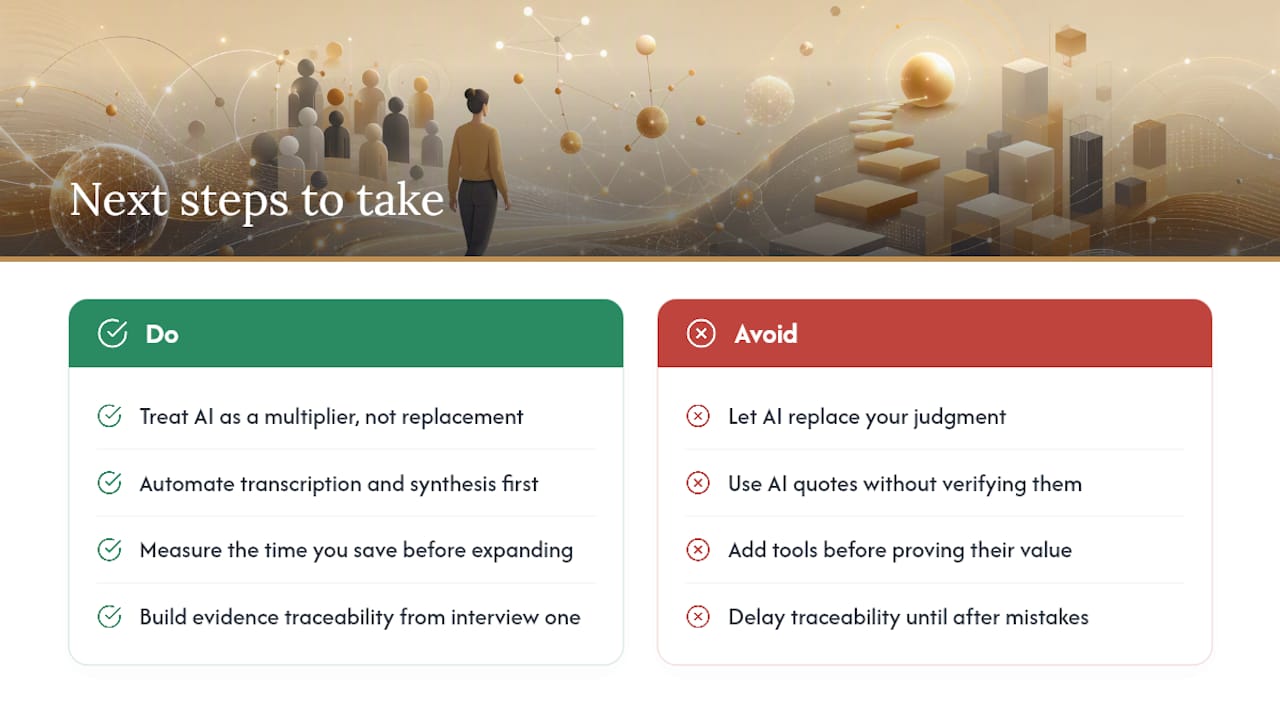
AI is a productivity multiplier here, not a substitute for a researcher’s judgment. It won’t tell you which finding matters to the business, and it will confidently hand you a wrong quote if you let it.
Start small. Automate transcription and synthesis first, measure the time you save, then decide what else earns a spot in your stack. Build evidence traceability into your process from the very first interview, not after a stakeholder catches a mistake.
— Jay
Get the Tested AI Toolkit for Solo Researchers
Running this workflow alone means every hour spent testing tools is an hour not spent talking to customers. There is an AI Toolkit available designed to help solo practitioners skip the trial-and-error phase: it includes checklists, prompts, and a tested tool stack covering stages like planning, transcription, synthesis, and reporting.

It’s built for solopreneurs and small teams who want a workflow that’s already been stress-tested rather than assembled from scratch. If you’re also weighing individual tools beyond the toolkit, the best AI tools roundup covers options worth comparing. Grab the AI Toolkit and run your first mini-project this month instead of next quarter.
Sources
- Research with AI — Nielsen Norman Group
- How AI Helps Scale Qualitative Customer Research — HBR
- AI in UX research: Tools, trends, and best practices — Maze





Leave a Reply