
Yes, AI podcast editing genuinely works, and for most solo shows it can cut postproduction time by more than half. If you want fast automatic cleanup, try Resound, which automates filler-word and silence detection, mix-and-master, and exports edited audio/video with per-edit review capability. If you record remote interviews on separate tracks, Riverside handles that best. If repurposing matters more than polish, Podsuite turns one upload into show notes and clips. If you want a single tool that does most of it well, Zencastr’s chat-based editing is the closest thing to an all-in-one.
TL;DR:
- Automated podcast editing tools can reduce postproduction time by more than half, mainly handling filler words, silence, noise, and transcripts.
- Key tools like Resound and Zencastr support manual approval, multitrack processing, and transcription editing, accommodating different recording setups.
- Choosing the right tool depends on your recording format, desired automation level, export needs, and integration with your hosting platform.
- Effective workflows involve uploading, auto-cleaning, transcription, editing by text, manual review, and final mixing, which can streamline a 60 to 90-minute episode.
- Pairing editing tools with comprehensive content platforms accelerates the entire production process from research to publish, especially for solo creators.
What Is AI Podcast Editing, and How Does It Work?
AI podcast editing uses machine learning models to handle the repetitive parts of postproduction automatically: cutting filler words, trimming dead air, cleaning up background noise, and generating transcripts you can edit like a text document instead of a waveform. Instead of scrubbing through an hour of audio by ear, you upload the file and the software flags what to fix.
This matters because traditional editing is where solo podcasters lose the most time relative to the value it adds. Recording an episode might take 45 minutes. Editing it the old way can eat two or three hours. Automated podcast editing tools compress that gap by handling the mechanical cleanup first, so your manual pass focuses on the moments that actually need a human ear, like tone, pacing, and whether a joke landed.
Here’s a rundown of the eight tools shaping this category right now, including practical examples in an AI Workflow Examples for Freelancers and Agencies guide.
- Resound automates filler-word and silence detection, mixing, and mastering, and it accepts single or multitrack uploads with per-edit review before anything ships. It exports WAV, MP3, and AAF, which matters if you hand final polish to a separate audio engineer. It’s the strongest pick for creators who want speed without giving up a manual approval step.
- Zencastr built its editing experience around chat commands. Its “AI Podcast Editor by Chat” lets you type plain-language instructions and it applies noise reduction, leveling, and filler removal, then auto-generates chapters and show notes from the transcript. If you dislike waveform editors, this interface is a genuine relief.
- Adobe Podcast runs entirely in the browser and leans on its Enhance Speech feature to strip room noise and echo from rough recordings, plus captioning and music removal, all tied into Adobe’s broader Firefly ecosystem. It suits creators who already live in Adobe’s world and want one login for audio and creative work.
- Riverside records up to 10 guests on separate audio and video tracks, then lets you edit by transcript and generate clips and captions automatically. It’s built for remote interview shows where track separation prevents one bad mic from ruining the whole recording.
- Podsuite turns a single upload into transcripts, show notes, chapters, social clips, and blog posts, with timestamped clip suggestions built in. If repurposing is your bottleneck, not raw audio quality, this is the fastest route from episode to published content.
- Wondercraft skips recording gear entirely. It generates full episodes from text prompts with lifelike voiceovers, useful for creators testing a show concept or producing narrated content without sitting behind a mic.
- Gling focuses on ultra-fast cuts and social-ready exports, aimed at creators who want speed over depth of control.
- OpusClip is video-first, built to slice long-form recordings into short, platform-ready clips for social distribution.
Feature Comparison: What Each Tool Does Best
No single tool wins every category, and that’s the point of treating this as a stack rather than a single purchase decision.
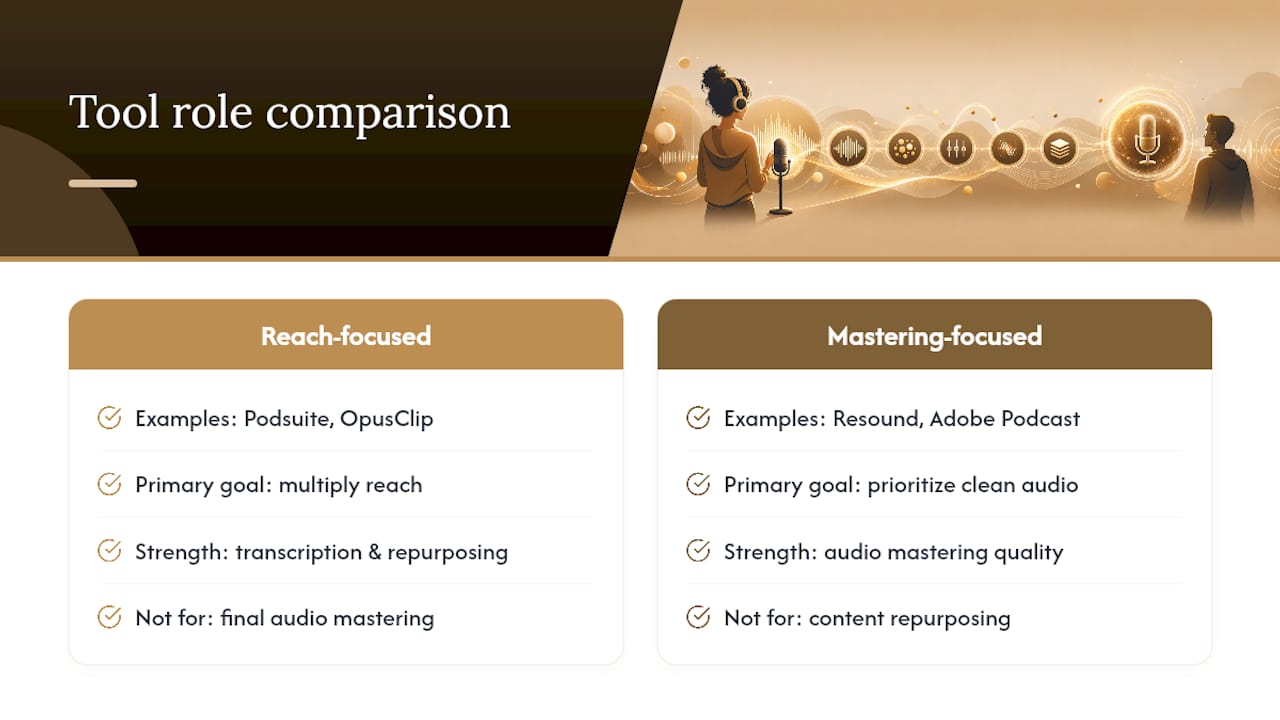
The trade-off shows up clearly once you line these up. Podsuite and OpusClip are built to multiply your reach from one recording, but neither one is trying to be your primary audio mastering tool. Resound and Adobe Podcast go the other direction, prioritizing clean sound over content repurposing.
Pro Tip: Run transcription and audio mastering through separate tools when you can. Pro workflows often separate the two functions because transcription-optimized processing can quietly degrade the master if you let one tool handle both jobs.
How Do You Choose the Right AI Editor for Your Show?
Start with how you record, not with which tool has the flashiest demo. A solo narration show has almost nothing in common with a three-guest interview format, and the right tool changes based on that alone.
Work through these questions before you commit to a subscription:
- Do you record single-track or multitrack, and does the tool actually support separate-track processing?
- How much automation do you want? Full auto-cuts, or edits you approve one at a time?
- How accurate does your transcription need to be, and does the tool support your show’s languages?
- What export formats do you need for your host and any downstream editor?
- Does the tool integrate with your podcast host, or will you export and upload manually every time?
- What’s the real pricing once you’re past the free tier, and does it scale with your episode volume?
Watch for a few warning signs during any trial. Walk away if a tool won’t let you edit the transcript before it finalizes chapters, if pricing is vague about file limits or overage charges, if export options are locked to one proprietary format, or if it has no real answer for multitrack files. Also check how the platform handles your audio data once uploaded. Retention policies vary a lot between these tools, and that matters more with sensitive interviews.
A Practical 60 to 90 Minute Episode Workflow
Here’s the sequence that gets a typical solo episode from raw file to published without an all-nighter:
- Upload and ingest (5 minutes): Get the raw file or multitrack recording into your editor.
- Auto-clean and denoise (5 to 10 minutes): Run noise reduction and speech enhancement first, before transcription touches the file.
- Auto-transcribe (5 minutes, processing in background): Generate the transcript while you handle other tasks.
- Edit by text (15 to 20 minutes): Remove fillers, mark chapters, and cut tangents directly in the transcript.
- Manual pass (10 to 15 minutes): Listen to flagged sections and anything the automation might have misjudged, like sarcasm or a deliberate pause.
- Mix and master (10 minutes): Apply loudness normalization and final levels.
- Generate clips and show notes (10 minutes): Pull social clips and finalize written content from the transcript.
- Export and publish (5 minutes): Confirm formats match your host’s requirements, then push live.
Pro Tip: Before you hit publish, run a final check on loudness levels, timestamp accuracy in your chapters, and whether guest names are spelled correctly in the transcript. AI gets names wrong constantly, and it’s the fastest way to look unpolished.
What I’ve Learned Running AI Editing as a One-Person Show
Automation earns its keep on the boring 80 percent of editing, cutting dead air, catching fillers, leveling volume. Where it still falls short is judgment: knowing when a long pause is dramatic instead of dead air, or when a guest said something sensitive that needs a human decision, not an algorithm’s guess. I keep manual review in place for anything involving a real person’s reputation or a legally sensitive topic. Everything else goes through the automated pass first. That split alone is what turns a three-hour edit into something closer to forty-five minutes of actual attention, with the rest handled by the AI workflow stack doing the repetitive work in the background.
– Jay
Build Your Full AI Editing Stack With a Content Platform
Picking one editing tool solves half the problem. The other half is knowing which transcription tool, which prompt library, and which research tool to pair it with so your whole production pipeline runs without a team behind it. That’s exactly what a dedicated content platform maps out in Best AI Research Tools for Solopreneurs in 2026, a practical breakdown of the AI stack solo creators use to research, write, and produce content at a pace that used to require hiring help.

The guide is built for solopreneurs and freelancers seeking templates and tool recommendations for immediate application, rather than another list of trends to file away. If you’re already testing editors like Resound or Zencastr, this is the next logical step: fill in the rest of your stack, from show notes to research, so editing is the fast part instead of the whole bottleneck. Read the guide, pick two or three tools that fit your workflow, and start testing them on your next episode.