
Optimizing your workflows cuts cycle time, reduces operating costs, and frees your team to focus on work that actually moves the needle. That’s the short answer. The longer answer is that two-thirds of executives already know their organizations are too complex and too slow — they just haven’t made the structural changes to fix it yet. If you’re reading this, you’re ready to.
Here’s what well-executed workflow improvement delivers:
- Shorter cycle times across production, service delivery, and approval chains
- Lower operating costs by removing redundant steps and manual hand-offs
- Higher output quality through standardized, documented execution
- Faster time to market when bottlenecks are cleared before they compound
- Better employee retention as repetitive, low-value tasks get removed from people’s plates
Key Takeaways
Optimizing your workflows is the highest-leverage operational move available to most leaders because it compounds: faster cycles, lower costs, and better retention all improve together when the underlying process is clean.
| Point | Details |
|---|---|
| Define before you fix | Optimization means mapping, simplifying, and standardizing — not jumping straight to automation. |
| The McKinsey reality check | Two-thirds of executives report their organizations are overly complex; that’s a process problem, not a people problem. |
| Simplify before automating | Automating a flawed process accelerates waste — remove redundant steps first, then apply automation. |
| Measure with a baseline | Track cycle time, error rate, and hand-off wait time before and after every change to confirm real improvement. |
| Yoursolobusiness resources | The AI Workflow Automation guide and AI toolkit give solo operators and small teams a field-tested system to implement these steps immediately. |
Why optimize workflow? Start with a clear definition
Workflow optimization is the practice of examining how work actually moves through your organization, identifying where it slows or breaks, and redesigning those steps to deliver measurably better results. It is not a full organizational redesign, and it’s not the same as automation. Business process improvement is a continuous practice built on measurement and incremental refinement, not a one-time project you close out and forget.
The scope matters. Optimization covers:
- Mapping existing steps and hand-offs as they actually happen
- Simplifying by removing redundant or low-value activities
- Standardizing so every team member follows the same proven path
- Automating only after the process is already clean and documented
Optimization is the right tool when a process is fundamentally sound but slow, error-prone, or inconsistently executed. If the process itself is broken at a structural level — wrong ownership, wrong sequence, wrong purpose — you’re looking at reengineering, not optimization. Knowing the difference saves you months of wasted effort.
What are the real business benefits of optimizing workflows?
The case for process improvement isn’t abstract. Each benefit below connects directly to a KPI your finance team or board already tracks.
Productivity goes up when friction comes down
Every unnecessary approval, duplicate data entry, or status-update meeting is time your team spends not doing the work. Documented workflow management reduces bottlenecks, improves transparency, and lets managers check status without scheduling yet another check-in. When people spend less time navigating the process, they spend more time on the output.
Costs drop as waste gets removed
Redundant steps cost real money. Rework caused by unclear hand-offs costs more. When you map a process end-to-end and cut the steps that add no value, the labor savings compound quickly. Frameworks like Lean and Six Sigma give you a structured method to find those non-value-adding activities before they become permanent fixtures in your budget.
Quality and consistency improve through standardization
A process that lives in someone’s head produces inconsistent results the moment that person is out sick or moves on. Standardized, documented workflows mean every team member follows the same proven path, which reduces error rates and makes quality repeatable rather than person-dependent.
Speed to market accelerates when bottlenecks clear
Approval queues, sequential hand-offs, and siloed data are the hidden tax on your time to market. Removing even one unnecessary approval gate from a product launch process can shave days off a release cycle. Those days add up to competitive advantage.
Retention improves when repetitive work disappears
People don’t quit because the work is hard. They quit because the work is pointless. Optimizing workflows frees time for high-value work and reduces the repetitive manual tasks that cause burnout. When your best people spend their energy on problems worth solving, they stay.
Statistic callout: McKinsey research found that two-thirds of executives report their organizations are overly complex and inefficient. That’s not a people problem. It’s a process problem, and it’s fixable.
How to improve workflow in seven practical steps
This is the part most guides skip: the ordered sequence that actually works. Process mapping, stakeholder engagement, small pilots, and testing before scale are the standard, proven steps. Here’s how to run them.
-
Map the current state. Document every step, decision point, and hand-off as it actually happens today — not as the procedure manual says it should happen. Walk the process yourself or interview the people doing the work. Deliverable: a visual process map with owners and time estimates at each step.
-
Identify bottlenecks and waste. Look for steps where work piles up, where rework is common, or where the same information gets entered more than once. Lean practitioners call these “non-value-adding activities.” You’re looking for the same thing: steps that consume time without moving the output forward.
-
Simplify before you do anything else. Remove redundant steps, consolidate approvals, and eliminate hand-offs that exist only because of organizational habit. This is the step most teams skip in their rush to automate — and it’s the most important one.
-
Run a small pilot. Pick one team or one process instance and test your redesigned flow for two to four weeks. Collect data on cycle time, error rate, and team feedback. A pilot creates momentum and surfaces problems before they affect the whole organization.
-
Automate what’s clean and repetitive. Once the process is simplified and tested, apply automation to the steps that are high-volume, rule-based, and low-exception. Routing approvals, sending status notifications, and populating reports are good candidates. Novel judgment calls are not.
-
Measure against your baseline. Compare your pilot results to the pre-optimization data you captured in step one. Cycle time, error rate, and hours saved are your primary signals. Without a baseline, you’re guessing.
-
Iterate on a regular cadence. Workflows that were efficient last year become bottlenecks as your business grows and conditions change. Build a quarterly review into your calendar and treat optimization as an ongoing practice, not a project with a close date.
Pro Tip: Never automate a broken process. Automation amplifies whatever is already happening — if the process has redundant steps or unclear ownership, automation just makes those problems faster and harder to fix. Simplify first, automate second.
Which tools help you put workflow efficiency into practice?
Technology doesn’t fix a bad process, but it does make a good one faster and more visible. The right tool category depends on the problem you’re solving.
Collaboration and communication
Slack sits at the center of most modern team workflows as the connective tissue between people, apps, and automated notifications. Its channel structure lets you organize conversations by project or process, and its integrations with hundreds of other tools mean it can serve as the trigger point for automated hand-offs. The practical use case: replace status-update meetings with a dedicated Slack channel where your project management tool posts automatic updates.
Business process management and workflow orchestration
Kissflow is a no-code BPM platform that lets non-technical teams build, run, and monitor structured workflows without writing a line of code. It’s particularly strong for approval chains, HR processes, and procurement workflows where you need visibility into who has the ball at any given moment. If your team is still routing approvals by email, a tool in this category is your highest-ROI starting point.
Automation and RPA
Robotic Process Automation tools handle high-volume, rule-based tasks that cross multiple systems — think extracting data from one platform and entering it into another. They’re powerful for finance, operations, and compliance workflows where the steps are predictable and the volume is high. The selection criteria here are integration depth and exception-handling capability, not just price.
Analytics and process monitoring
Once your workflows are running, you need visibility into where they slow down. Process mining tools analyze event logs from your existing systems to surface bottlenecks you didn’t know existed. Think of them as an X-ray for your operations.
Selection criteria to evaluate any tool:
- Ease of onboarding: Can your team use it without a six-week implementation project?
- Integration: Does it connect to the systems you already use?
- Data portability: Can you export your process data if you switch tools?
- Cost shape: Subscription vs. per-user pricing changes your math as you scale.
- Security and compliance: Does it meet your industry’s data-handling requirements?
Poor onboarding is one of the most common reasons workflow optimization tools fail to deliver their promised gains. A tool your team won’t use is not a tool — it’s a line item.
| Tool category | Primary problem solved | Best for | Typical time to value | Cost shape |
|---|---|---|---|---|
| Collaboration platforms | Communication silos, status visibility | Teams of any size | Days to weeks | Per-user subscription |
| BPM / workflow orchestration | Approval chains, structured process routing | Mid-size to enterprise | Weeks to months | Per-user or usage-based |
| Automation / RPA | High-volume, cross-system repetitive tasks | Operations, finance, compliance | Months | Per-bot or enterprise license |
| Analytics / process mining | Hidden bottlenecks, performance monitoring | Mature process environments | Weeks to months | Usage or enterprise |
What obstacles will you face, and how do you get past them?
Even the best-designed optimization project can stall. Here are the four most common blockers and what to do about each.
Cultural resistance
People protect the way they work, especially when they built it. Frontline workers who weren’t consulted often find ways — consciously or not — to work around new processes. The fix is involvement, not announcement. Bring the people doing the work into the mapping session. Let them identify the bottlenecks. When the solution is partly theirs, adoption follows.
Siloed data and disconnected systems
A workflow that crosses three departments and four software platforms is only as fast as its slowest integration. Before you redesign the process, audit the data hand-offs. Where does information get re-entered manually? Where does it get lost between systems? Those are your integration priorities.
Automating a flawed process
This one deserves its own warning because it’s so common. Teams see automation as the goal and skip the simplification step. The result: a faster version of a broken process. Automate only after you’ve removed the redundant steps and confirmed the logic is sound.
Lack of sustained leadership attention
Optimization projects start with executive energy and die when that attention moves to the next priority. Assign a named process owner for every workflow you change. That person is accountable for the KPIs and for raising issues before they become crises.
Red flags that a process isn’t ready for automation:
- No documented current-state map exists
- Ownership of the process is unclear or contested
- Exception rates are above 20% (too many edge cases for rule-based automation)
- The team hasn’t agreed on what “good” looks like
Pro Tip: When you hit cultural resistance, try a “process walk” — sit with a frontline team member for two hours and watch them do the work. You’ll learn more in those two hours than in any workshop, and you’ll earn more trust than any slide deck can buy.
How do you measure whether your workflow improvements are working?
Measure before you change anything. That baseline is the only honest way to know whether your optimization delivered real value or just felt like progress.
KPIs that matter
- Cycle time: Total elapsed time from process start to completion
- Lead time: Time from request to delivery (includes waiting time)
- Error rate: Percentage of outputs requiring rework or correction
- Hand-off wait time: Time work sits idle between steps
- Employee hours saved: Direct labor reduction per process cycle
Monitoring cadence
Run daily check-ins during a pilot phase. Move to weekly reviews during the first 90 days of a full rollout. Quarterly reviews work for mature, stable processes. System-level process changes produce more durable gains than individual time-management tactics, but only when someone is watching the numbers.
A simple ROI framework
The formula is straightforward: (Hours saved per week × average hourly cost) + (Error reduction × average rework cost) = Weekly savings. Multiply by 52 for an annual figure, then subtract your implementation and tooling costs. Most well-scoped optimization projects break even within one to two quarters.
Business process improvement produces compounding returns when you track these numbers consistently. The first cycle shows you what’s possible. The second cycle shows you what’s sustainable.
How do you make workflow gains stick over the long term?
One-off fixes don’t hold. The organizations that sustain productivity gains treat improvement as a continuous cycle, not a project. McKinsey’s research on process redesign shows that structure changes alone — new org charts, new reporting lines — rarely produce lasting results. What works is focusing on how work actually flows: the hand-offs, the task sequences, and the decision points where time gets lost.
The practical checklist for making improvements last:
- Assign executive sponsorship to every process change above a certain scope threshold. Without a named sponsor, improvements drift.
- Give frontline teams ownership of the documented process. They’re the ones who will notice when it starts to slip.
- Document everything in a single, accessible location. Without a single source of truth, teams develop workarounds and the process drifts back to its old shape within months.
- Schedule quarterly audits. A workflow that’s efficient today may become a bottleneck next year as volume grows or team composition changes.
- Invest in reskilling. When automation removes repetitive tasks, redirect that capacity deliberately. People need to know what they’re being freed up to do.
This applies at every scale. At Yoursolobusiness, we see solo operators apply the same principles with remarkable results. A freelancer who maps their client onboarding process, removes three redundant email exchanges, and automates the contract-and-invoice step with a simple tool can reclaim several hours per new client. Multiply that across a full client roster and the productivity gains for solo operators are just as real as they are for a 500-person team.
Pro Tip: Build your improvement cadence into an existing meeting rhythm rather than creating a new one. A 15-minute “process health” segment in your monthly operations review is far more likely to survive than a standalone quarterly workshop that competes with everything else on the calendar.
Your one-week plan to get started right now
You don’t need a six-month transformation program to get a visible win. Here’s a timeboxed plan any leader can execute or delegate this week.
-
Day 1: Pick one process. Choose a process that is high-frequency, cross-functional, and currently causing visible friction. Approval workflows, client onboarding, and reporting cycles are reliable starting points.
-
Day 2: Map it. Spend 90 minutes with the people who actually do the work. Document every step, every hand-off, and every decision point. Use a whiteboard, a shared doc, or a simple flowchart tool — the medium doesn’t matter, the honesty does.
-
Day 3: Identify your top three bottlenecks. Where does work pile up? Where does rework happen most often? Mark those steps and assign a hypothesis for why each one slows down.
-
Day 4: Define your baseline metrics. Pull the current cycle time, error rate, and hand-off wait time for the process you mapped. These numbers are your before-picture.
-
Day 5: Design a simplified version and pick a pilot team. Remove at least one redundant step. Assign a process owner. Set a two-to-four-week pilot window with a defined end date and a check-in midpoint.
What good looks like after week one: A documented current-state map, three named bottlenecks, a baseline metric set, a simplified redesign, and a pilot team with a start date. That’s a real deliverable — not a slide deck, not a strategy document.
Checklist for your next status meeting:
- Current-state process map (visual, with owners at each step)
- Baseline metrics (cycle time, error rate, hand-off wait time)
- Simplified redesign with removed steps highlighted
- Named process owner and pilot team
- Pilot start date and check-in schedule
The thing most leaders get backwards about workflow optimization
Here’s my honest take: most optimization projects fail not because the methodology is wrong, but because teams skip straight to automation. They see a slow process, they buy a tool, and they automate the slow process. Now they have a fast, expensive version of the same problem.
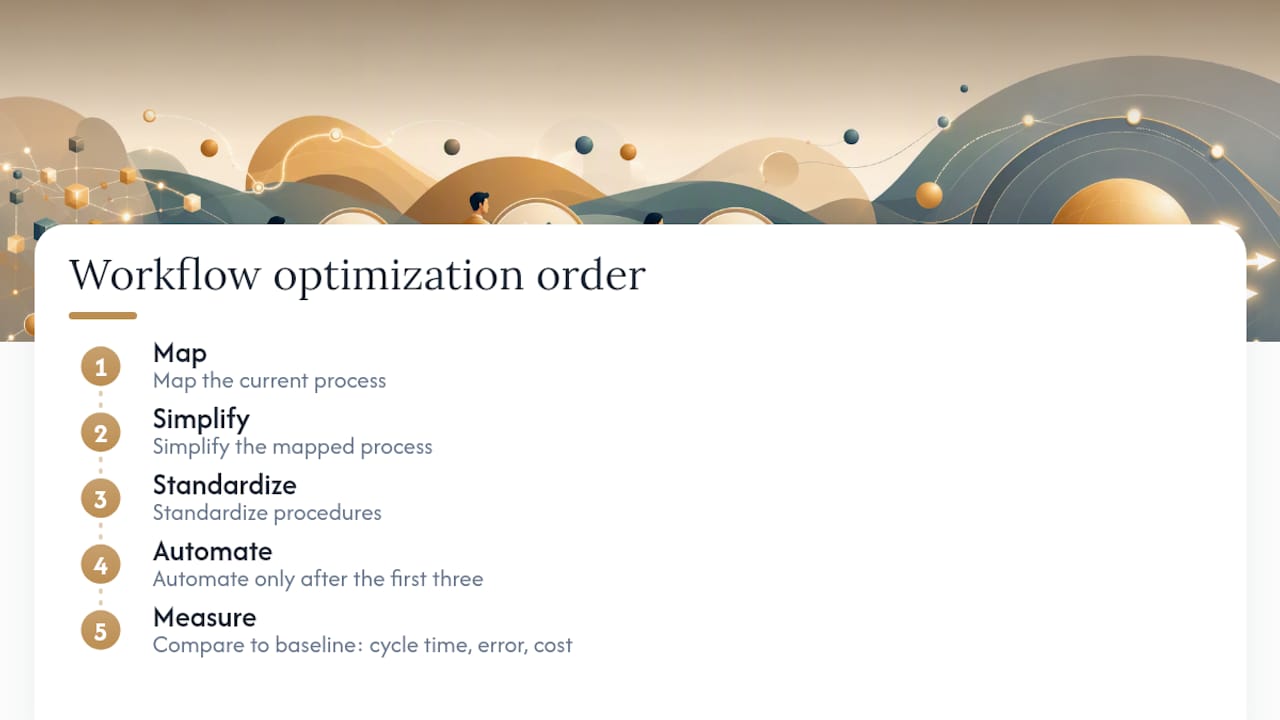
The right order is: map, simplify, standardize, then automate. Automation is the reward for doing the first three steps well, not a shortcut around them.
I’ve seen this play out at the solo operator level too. A freelancer automates their invoicing before they’ve standardized their pricing structure. The automation runs perfectly and sends out invoices with inconsistent line items. They’ve now automated their own inconsistency. The fix took longer than the original problem would have.
The other thing leaders underestimate is the measurement step. Most teams define success as “the new process is running.” That’s not success. Success is a measurable improvement in cycle time, error rate, or cost — compared to a documented baseline. Without that baseline, you’re flying blind, and you’ll never know whether the change was worth the effort.
Start small, measure honestly, and build from there. The AI workflow automation guide at Yoursolobusiness covers how to layer AI tools into this sequence once your process foundation is solid — worth reading before you reach for any automation tool.
A practical next step if you want guided help
If you’ve read this far and you’re thinking “I know what to do, I just need the right tools to do it,” the AI Workflow Automation for Solopreneurs guide at Yoursolobusiness is the most direct next step. It walks through how to build AI-assisted workflows end-to-end, with tool recommendations, prompt templates, and implementation checklists you can use immediately.

It’s built for solo operators and small teams who want to move fast without hiring a team to manage the process. If your situation involves enterprise-scale change management, legacy system integrations, or a workforce of hundreds, you’ll likely need an outside consultant alongside any self-serve guide. But if you’re a founder, freelancer, or small-team leader who wants a practical, field-tested system for getting more done with less friction, the Yoursolobusiness AI toolkit is where to start. Check out the guide and pick one workflow to fix this week.
Sources
- Want to break the productivity ceiling? Rethink the way work gets done — McKinsey
- How to improve and optimize a business process, step by step | TechTarget
- Monday
- Workflow Management: Definition, Components, and Benefits | NetSuite
- Workflow optimization: Common mistakes and how to fix them — Wrike
- Time management is about more than life hacks — Harvard Business Review
- Optimization project management & Six Sigma — PMI