
For most solo founders and freelancers, Cal.com wins on pure value: an unlimited free tier and open-source flexibility beat Calendly’s polish for anyone watching every dollar. The one big exception is if you need a broad, native CRM integrations marketplace or a huge existing review footprint for client trust. Then Calendly earns its higher price tag.
TL;DR:
- Cal.com offers an unlimited free tier with multiple event types and calendar connections, making it more suitable for solopreneurs managing several booking types.
- Its open-source, self-hosted option provides more control but requires technical expertise and maintenance, unlike Calendly’s fully hosted, polished experience.
- Calendly’s native CRM integrations and larger review footprint benefit teams heavily reliant on Salesforce or HubSpot, or those seeking established trust signals.
- Transitioning from Calendly to Cal.com is straightforward with a one-click import, but complex CRM or HIPAA integrations may need rebuilding and validation post-migration.
- For daily reliability and security, hosted versions are comparable, but self-hosting Cal.com shifts uptime responsibility to the user, suitable only for those with technical resources.
Cal.com vs Calendly: A Side-By-Side Comparison
You’ve probably already skimmed both pricing pages and felt your eyes glaze over. Let’s fix that with one table that actually answers the question you came here with.
| Dimension | Cal.com | Calendly | Notes |
|---|---|---|---|
| Free plan generosity | Unlimited event types and calendar connections | One event type, one calendar connection | Cal.com’s free tier is dramatically more usable for anyone running multiple offers |
| Starting price / team pricing | Free (hosted); paid tiers add team features | Free; paid tiers start once you need more than one event type | Calendly’s free-tier cap often forces an early upgrade |
| Integrations / CRM depth | Growing, developer-extendable | Larger native marketplace, deeper Salesforce/HubSpot sync | Calendly holds the edge for teams already living inside a CRM |
| Self-hosting / open-source | Yes, full open-source option | No | Self-hosting shifts uptime and maintenance to you |
| API & developer tools | Full REST API plus Cal Atoms embedding | Limited public API surface for embedding | Cal.com is built for product teams that want scheduling inside their own app |
| Enterprise compliance | SOC 2, ISO, and HIPAA available on some plans at lower entry cost | Enterprise compliance available but gated behind higher contract tiers | Cal.com is more accessible for regulated solo practices |
| Ease of setup & booking UX | Clean but slightly more configuration-heavy | Fastest onboarding, most familiar to invitees | Calendly’s booking flow is the one more strangers have already seen |
| Best for | Developers, technically capable teams, cost-conscious solopreneurs | Non-technical teams that want polish and low-friction rollout | Match the tool to your technical comfort, not just your budget |
Cal.com’s edge starts at the free tier itself. As of mid-2026, Cal, while Calendly caps free users at one event type and one calendar connection. That single restriction is often the deciding factor for solopreneurs juggling a discovery call, a demo, and a follow-up meeting type.
How Should You Choose Between Cal.com and Calendly?
Start with your own technical comfort level, not the feature list.
- If you’re solo with no engineering resources: use Cal.com’s hosted free plan first, since it gives you multiple event types without a credit card.
- If you have development skills or regulatory needs (HIPAA, data residency): self-host Cal.com or upgrade to its Organizations tier for compliance features at a lower entry point.
- If your clients already expect Calendly’s booking page and you sync heavily with Salesforce or HubSpot: Calendly’s integration depth reduces friction on the invitee side.
- Before committing, test three things: does your CRM connect cleanly, does the free tier survive a real week of bookings, and can you customize the booking page enough to feel like “you”?
- Red flag: if you’re stalling out shopping for scheduling tools instead of booking clients, that’s a sign to pick one and move on. Revisit pricing your offer instead.
How Do You Migrate From Calendly to Cal.com?
Switching tools sounds like a weekend project you’ll never actually do, and that fear keeps a lot of solopreneurs stuck paying for a tool they’ve outgrown.
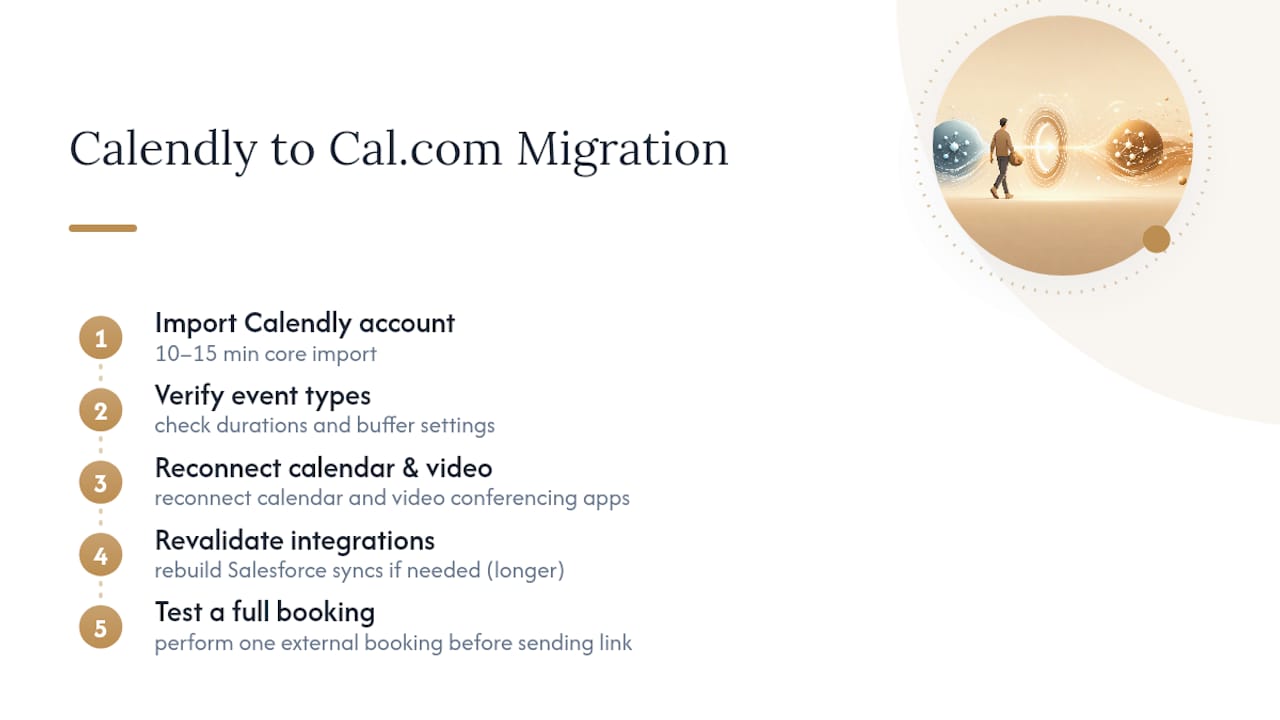
Cal.com removes most of that friction with a 1-click import that moves your event types and settings directly from Calendly. The import handles your booking pages, availability windows, and basic configuration in one pass, which is the part that usually eats an afternoon when done manually.
What it does not handle cleanly: complex integrations. If you’ve wired Calendly into a native Salesforce workflow or a HIPAA-compliant intake process, plan to revalidate those connections after the switch rather than assuming they carried over intact. That’s not a Cal.com weakness so much as the nature of anything touching regulated data or deep CRM logic.
The practical migration order looks like this: export or connect your Calendly account inside Cal.com’s import tool, confirm each event type landed with the right duration and buffer settings, reconnect your calendar and video conferencing apps, then test one full booking as an external user before you send the new link to real clients. Budget ten to fifteen minutes for the core import and a bit longer if you’re rebuilding a Salesforce sync from scratch.
Which Tool Has Better Customer Support?
Calendly’s support experience benefits from scale. With a mainstream, established product, its help center and support channels have had years to mature around common non-technical questions, and its broader integrations marketplace and larger verified review footprint reduce friction for external invitees who’ve likely used the tool before.
Cal.com’s support leans more heavily on documentation and its developer community, which makes sense for a product built around an open API. If you’re comfortable reading docs or asking in a community channel, that’s not a downside. If you want a human on the other end of a chat widget fast, Calendly’s support infrastructure currently feels more built out for that expectation. Neither tool publishes a formal support SLA on its free tier, so don’t expect guaranteed response times unless you’re on a paid plan with account management attached.
Are Cal.com and Calendly Reliable for Daily Use?
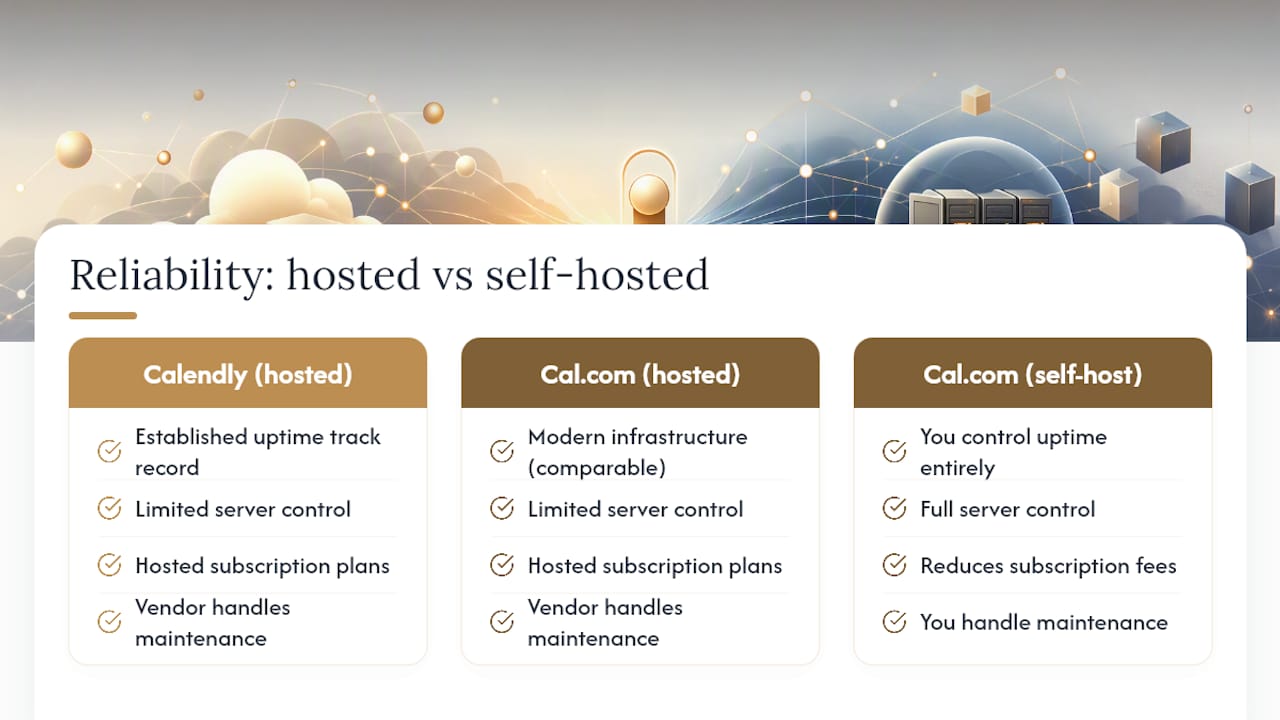
Both platforms run as hosted SaaS by default, which means your booking pages depend on their infrastructure staying up. Calendly, as the more established, mainstream product, has more years of production traffic behind its uptime track record. Cal.com’s hosted version runs on comparable modern infrastructure, but if uptime guarantees matter enough to demand a contractual SLA, that typically means an enterprise-tier conversation with either vendor.
Self-hosting Cal.com changes this equation entirely. You control the server, which means you also own the responsibility. Self-hosting reduces subscription fees but shifts maintenance and uptime work onto you, with a typical low-traffic VPS running somewhere in the $5 to $60 monthly range depending on load. That’s real savings, but only if you’re willing to babysit a server or automate the babysitting.
For most solopreneurs, the hosted free or low-tier plan on either product is the pragmatic call. Save self-hosting for when you have a specific reason: data residency requirements, a philosophical commitment to open-source infrastructure, or a volume of bookings that makes the subscription cost worth eliminating.
How Do the Mobile Apps Compare?
Calendly’s mobile app reflects its broader polish advantage. Booking notifications, calendar sync, and rescheduling all work with the kind of smoothness you’d expect from a product that’s spent years refining its non-technical user experience.
Cal.com’s mobile experience is functional but leans more on responsive web behavior than a fully native-feeling app in every interaction. If you’re mostly checking bookings on the go and rarely configuring event types from your phone, this gap won’t affect you much. If you manage your entire scheduling setup from a phone screen, Calendly currently has the smoother touch experience.
What Security Measures Does Each Platform Use?
Security posture splits along the same open-source versus hosted-SaaS line as everything else in this comparison.
Calendly, as a mature SaaS product, handles vulnerability management centrally. Every patch and security update rolls out automatically to every hosted customer, with no action required on your end. That’s the built-in advantage of a closed hosted platform.
Cal.com offers that same automatic patching on its hosted plan. But the self-hosted option puts vulnerability management in your hands: you’re responsible for applying updates, monitoring for exposed instances, and keeping your server patched. On the compliance side, Cal.com’s Organizations plan advertises SOC 2, ISO, and HIPAA availability at a lower entry price than Calendly’s enterprise contract tiers, which matters if you’re a solo consultant handling health or financial data without an enterprise budget.
What Do User Reviews Say About Cal.com and Calendly?
Review volume tells its own story here. Calendly shows a larger number of reviews on platforms like G2, while Cal.com has positive reviews but a smaller total sample size. That gap affects more than bragging rights: a bigger review base gives external stakeholders, like a client evaluating your booking page for the first time, more social proof that the tool is legitimate and widely trusted.
Cal.com’s reviews skew heavily positive among developers and technically inclined users who value the open API and self-hosting option, but the smaller sample size means less data to generalize from. Calendly’s larger footprint reflects its longer market presence and broader non-technical user base. Neither pattern should override the functional fit questions above. A tool with fewer reviews isn’t automatically less reliable. It’s simply newer to a wider audience.
Jay’s Perspective: How I Use Scheduling as a Solo Founder
I lean on the free plan, the 1-click import, and the open API when I need a booking form to feed straight into another tool without duct tape in between. [author_bio] [internal_data] The moment scheduling starts working invisibly in the background is the moment you know you picked the right one.
— Jay
Turn Your Booking Link Into a Full Intake Workflow
Cal.com or Calendly gets someone on your calendar. Neither one qualifies your lead, preps your notes, or sends the follow-up while you’re still in the meeting. That’s the gap Yoursolobusiness fills: a layer of AI-driven automation that sits on top of whichever scheduling tool you pick, turning a bare booking link into a full intake system.

Our AI workflow automation guide walks through connecting your booking page to automated lead qualification and follow-up sequences, so a new calendar event triggers real prep work instead of just a reminder ping. If you’re also rethinking how you screen leads before the call, How to Use ChatGPT for Client Discovery Calls is worth a read for the intake side of the equation. Start with our AI Research Tools guide to build the automation stack that makes every booked call count.





Leave a Reply