
AI daily planning takes your calendar and to-do list and turns them into a realistic, time-blocked schedule, ranking tasks by deadline and energy instead of leaving you to guess. It works best for professionals juggling client calls, deliverables, and admin in the same day. Start by connecting your primary calendar and one task list, then generate today’s plan and see what it gets right.
TL;DR:
- AI daily planners are most effective when they can sync with all your calendars and task apps to avoid manual updates and double entry.
- Adaptive replanning features are crucial for handling schedule disruptions, automatically reshuffling tasks instead of requiring manual adjustments.
- Proper calibration of task duration estimates and consistent end-of-day reviews improve the planner’s accuracy over time, especially when feeding corrections back into the system.
- The best tools depend on your work style: mobile voice-first apps for quick capture, calendar-focused systems for scheduled days, or agentic planners for complex, multi-step projects.
- Security considerations should include verifying data handling policies, choosing tools with on-device processing if privacy is a priority, and routinely reviewing OAuth permissions.
What Does AI Daily Planning Actually Do?
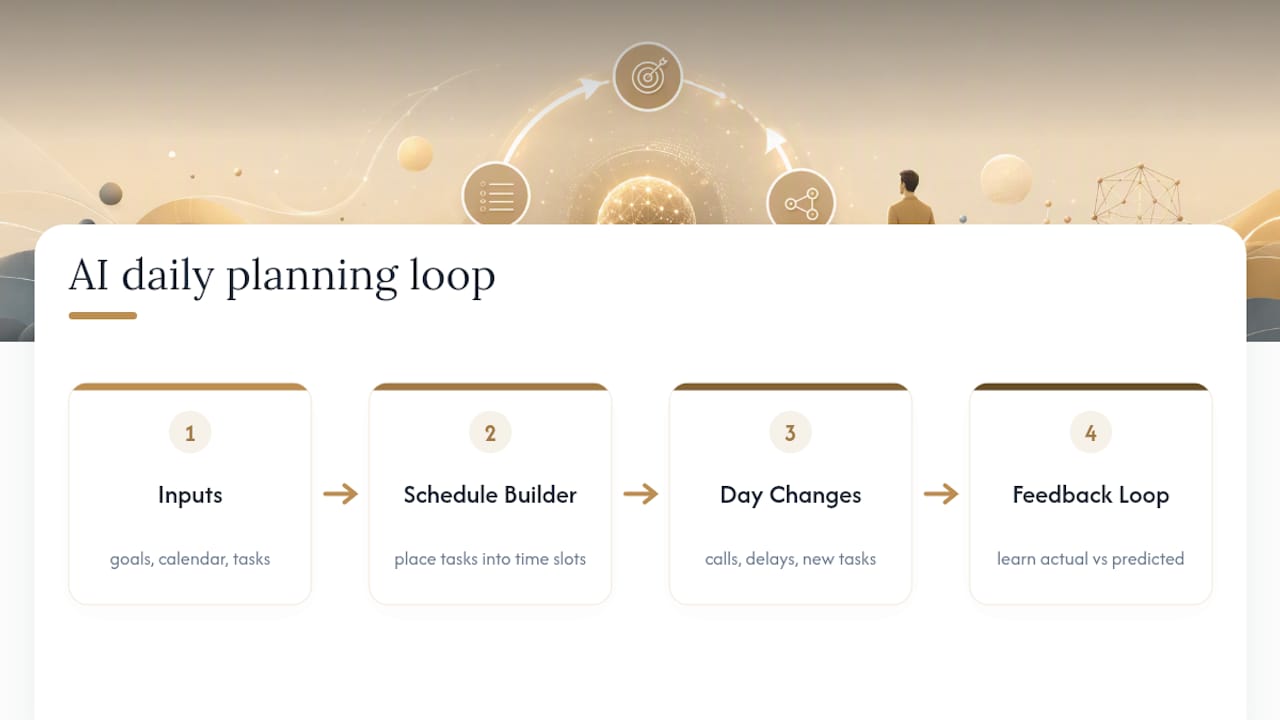
An AI daily planner reads your goals, your calendar events, and your task list, then builds a schedule that puts each task in an actual time slot instead of leaving it floating on an unordered list. That’s the core shift from a traditional to-do app: you stop deciding when something happens and let the tool propose it, then you approve or adjust.
Most tools estimate how long a task will take, often based on defaults or a bit of your own calibration, and place it where your calendar has room. Better ones factor in energy patterns, putting demanding work in your sharper hours and routine tasks in your slower ones. Products like Dayloom generate a full daily plan from goals, habits, and calendar events in under two minutes, with tasks tied directly to the goals they serve rather than sitting in a generic queue.
The harder problem is what happens when your day doesn’t cooperate. A client call runs long, a task takes twice the estimated time, a new fire drops in your inbox at 11 AM. Adaptive replanning is what separates a decent AI planner from a static schedule generator: it notices the conflict and reshuffles what’s left, instead of leaving you to manually drag six blocks around. This depends on the tool learning from what actually happened versus what it predicted, a feedback loop that agentic AI systems increasingly rely on to make each day’s plan a little more realistic than the last.
Integrations matter more than they sound like they should. If your planner can’t see your Google, Apple, or Outlook calendar, plus whichever task app holds your actual work (Todoist, Notion, Things), it’s just another list you have to update by hand. That defeats the purpose entirely.
Where AI daily planning still needs you: judgment calls about which client gets priority when two deadlines collide, deciding when “good enough” beats “optimized,” and knowing when a task genuinely needs deep focus versus when the AI’s tidy block is fiction. The tool proposes. You still decide.
What Features Actually Matter in an AI Daily Planner?
Feature lists across most planner apps look nearly identical on the surface. What separates a tool worth paying for from one that adds friction comes down to execution on a handful of specifics.
- Calendar sync and multi-calendar visibility. If you run separate calendars for client work, personal life, and a side project, the planner needs to see all of them at once. A planner blind to your personal calendar will happily schedule a client call over your kid’s recital.
- Duration estimation and auto time-blocking. Look for tools that let you correct estimates over time rather than ones that guess once and never adjust. Static estimates get stale fast.
- Adaptive replanning and conflict resolution. When a meeting gets added mid-morning, does the app quietly reshuffle the rest of your day, or does it just flag the conflict and leave you to fix it?
- Two-way sync with task managers. Completing a task in Todoist should mark it done in your planner too, not create a duplicate you have to reconcile by hand.
- Focus protection. Features like Pomodoro timers, app blocking, and dedicated focus modes show up across most serious planning apps, often bundled with an Eisenhower Matrix for prioritization and habit tracking for recurring routines.
- Transparency. Can you see why the AI scheduled something at 2 PM instead of 9 AM? Editable templates and explainable suggestions matter more than raw automation.
- Pricing signals. Free tiers usually cap the number of calendars, tasks, or AI generations per day. Read the fine print before you build your whole workflow around a plan you’ll outgrow in a week.
Pro Tip: Test any planner’s free tier with your messiest day, not your easiest one. A tool that handles three back-to-back client calls plus a deadline crunch tells you far more than one tested on a quiet Tuesday.
How Do Solopreneurs Actually Use AI Daily Planning?
The apps matter less than the workflow you build around them. Here’s how AI daily planning fits into five common working patterns for independent professionals.
- Single-client days. When you’re deep on one account, protect delivery blocks first and let the AI schedule check-ins and admin around them. Tell the planner which blocks are immovable before it touches anything else.
- Batching admin and meetings. Cluster invoicing, email triage, and low-value calls into one or two windows instead of letting them fragment your day. An AI planner that understands task dependencies, the same logic behind DAG-based task decomposition, can group independent admin tasks together while keeping sequenced client deliverables in order.
- Deep work windows. Schedule your hardest thinking work during your documented peak hours, not whenever a gap happens to open up. Most planners let you flag “focus time” as a recurring template so it survives the daily reshuffle.
- Launch or delivery days. Build in explicit milestones, buffer blocks between dependent steps, and at least one contingency slot for the thing that always goes wrong. A launch day with zero slack is a launch day that blows up your evening.
- End-of-day review. Spend five minutes marking what actually took longer than estimated. This is the single highest-leverage habit for solopreneurs using AI planning, because it’s the input that makes tomorrow’s plan more accurate than today’s.
None of this requires exotic tooling. It requires treating the AI’s first draft as a draft, correcting the parts that don’t fit your reality, and feeding those corrections back so the next plan improves. Readers building broader automation around their business might also find the overlap with AI workflow automation for solopreneurs worth exploring once daily planning feels dialed in.
How Do You Set Up an AI Daily Planner From Scratch?
You can get a working AI daily planning system running in under an hour. Here’s the order that avoids the most common setup mistakes.
- Pick one task source and 2-3 daily goals. If your tasks currently live in three different apps, pick the one you’ll actually maintain and migrate the rest. Trying to sync everything on day one guarantees you’ll abandon the setup by Thursday.
- Connect your primary calendar. Grant calendar access first, since almost every planner needs this to place anything at all. Add secondary calendars only once the primary sync is working cleanly.
- Set permissions to least privilege. Most planners request broader OAuth scopes than they need. Grant read/write to calendar and tasks; skip contacts, email, and drive access unless a specific feature demands it.
- Calibrate duration estimates on a small sample. Rather than trying to teach the tool your habits across a thousand tasks, correct the estimates on ten to fifteen real ones. Practitioner guidance consistently favors this quick-calibration approach over waiting for the AI to “learn” passively.
- Build templates for your ideal week. Block recurring focus time, client call windows, and admin batches as a repeating frame the AI respects when it generates new plans.
- Run your first generated plan and adjust it. Expect to move two or three things. That’s normal. Lock the day once it reflects reality, not the AI’s first guess.
- Use quick-input shortcuts for midday changes. Voice input or a fast capture shortcut matters more once you’re actually using the tool daily. A planner you have to open a full app to update loses to whichever one you can adjust from your phone’s lock screen.
- Close with a two-minute reflection. Note what ran long, what got skipped, and why. Feed that into your weekly review so patterns show up before they become chronic scheduling problems.
Pro Tip: Resist rebuilding your entire calendar structure in week one. Run the AI planner alongside your existing habits for five to seven days before you trust it to make the first call on your schedule.
Is It Safe to Trust an AI Planner With Client Data?
Your calendar reveals a lot: client names, meeting cadences, project deadlines, sometimes deal sizes typed straight into event titles. Before connecting any planning tool, check how it actually handles that information.
On-device versus cloud processing is the first real fork in the road. Some tools process your daily brain-dump locally and only sync to the cloud when you opt into backup, an approach Priority One uses as a stated privacy differentiator. Cloud-first tools aren’t automatically unsafe, but they mean your client details are sitting on someone else’s server by default, not by choice.
Check three things before you commit: data retention policy (how long does deleted data actually persist?), export options (can you get your data out cleanly if you switch tools?), and whether deletion is immediate or “eventual.” Vague answers to any of these are a signal to keep looking.
Explainability matters here too. A planner that can show you why it scheduled a task at a given time is also one that’s easier to audit for what it’s doing with your data behind the scenes. Opacity in scheduling logic often pairs with opacity in data handling.
Three practical habits reduce exposure regardless of which tool you pick: keep a separate work-only calendar rather than mixing client details into your personal one, use initials or project codes instead of full client names in event titles, and review OAuth permissions every few months to revoke access you no longer need. For a deeper walkthrough, see AI privacy for freelancers.
What I’ve Learned Building an AI-Assisted Planning Routine
The workflow that actually holds up: three uninterrupted hours blocked as a recurring template, treated as immovable unless a client emergency genuinely qualifies. The AI proposes what goes around that block. It doesn’t get a vote on the block itself.
Calibration prompts matter more than people expect. A simple daily note, “this task took 40 minutes, I estimated 20,” does more for accuracy over two weeks than any amount of fiddling with settings. The same goes for a nightly frame: three sentences describing tomorrow’s real priorities beats letting the AI infer them from a stale task list.

Two rules never bend: client calls don’t move once confirmed, and end-of-day admin (invoicing, inbox zero, tomorrow’s prep) stays untouched by auto-scheduling. Everything else is fair game for the AI to rearrange.
Which Type of AI Planner Fits Your Work?
AI daily planners fall into four loose categories, and picking the wrong one for your work style is the most common reason people abandon these tools within a month.
- Mobile voice-first planners suit people who think out loud and want to brain-dump into their phone between meetings. Fast capture, weaker on deep calendar logic.
- Calendar-first planners suit people whose day is genuinely driven by scheduled events rather than open task lists. Strong sync, less flexible with unscheduled work.
- Agentic planners use reflection and memory to improve scheduling accuracy over time, drawing on the same DAG-based task decomposition research that shows parallel execution of independent tasks reduces total project time. Best for people with complex, multi-step client work.
- Integrated habit systems bundle planning with habit tracking and focus tools, suited to solopreneurs who want one app instead of three.
The real tradeoffs sit on three axes: how much control you’re willing to hand over versus how much automation you want, how much convenience you need versus how much privacy you’re willing to trade for it, and whether you’d rather pay more for depth or less for simplicity. Before committing, check integrations with your actual task manager, whether the app works offline, how transparent its scheduling decisions are, the real pricing model past the free tier, and how much setup friction stands between download and a usable first plan.
Realistic Expectations for AI Daily Planning
AI daily planning saves real time on the mechanical part of scheduling, but the gains flatten out fast once your calendar syncs are dialed in and your templates are solid. Past that point, more automation just means more fiddling with settings instead of doing the work.
Know when to stop optimizing: if you’re spending fifteen minutes tweaking a plan that would’ve taken five minutes to just do manually, the tool has become the task. Keep a few blocks sacred and untouched by any algorithm, always.
— Jay
Get the Full AI Toolkit Behind This Workflow
Setting up calendar sync and duration calibration is the easy part. Building a full stack of AI tools that actually replaces hours of manual work every week is where most solopreneurs get stuck. A free guide called the AI Toolkit covers tools, prompt libraries, and setup checklists used to run a one-person business at team-level output.

Inside, you’ll find recommended tool categories for planning, client communication, and admin automation, plus prompts for calibrating duration estimates and building weekly templates faster than trial and error. For those narrowing down categories of tools, the Best AI Tools 2026 roundup breaks down solid picks by use case. Grab the toolkit, pick one workflow from it, and put it to work this week.
Sources
For readers who want to go deeper on the mechanics behind AI planning tools, the Atomic Task Graph research explains how decomposing tasks into dependency graphs improves execution efficiency. The ACL survey on LLM planners covers the evaluation criteria (completeness, optimality, efficiency) that separate genuinely capable planners from ones that just look sophisticated. Product examples like Dayloom and the Daily Planner app on the App Store illustrate common feature patterns worth comparing against your own needs. For a broader look at agentic AI architecture, the Exabeam explainer and AmmarAI’s piece on AI productivity workflows both add useful context.
FAQ
Can AI create a daily routine planner?
Yes. AI daily planners build a routine from your goals, calendar events, and recurring tasks, then adjust that routine as your actual days diverge from the plan.
What is the best AI daily planner?
There’s no single best option since the right pick depends on whether you need calendar-first scheduling, voice-first capture, or an agentic planner that learns from past performance. Match the category to how you actually work rather than chasing the highest-rated app.
What is the best free app for daily planning?
Most AI daily planners offer a free tier with limits on the number of calendars, tasks, or daily AI generations, so test a few against your real workload before committing to a paid plan. Yoursolobusiness’s AI Toolkit outlines free and low-cost picks worth starting with.
What is the best AI program for everyday use?
For solopreneurs specifically, the strongest everyday picks combine calendar sync, adaptive replanning, and task manager integration rather than any single standout feature. Prioritize transparency in scheduling decisions over raw automation, since a planner you can’t audit is one you’ll eventually stop trusting.





Leave a Reply