
The most effective time management tips come down to nine actions you can start today: set your top 3 daily priorities, time-block your deep work, use one calendar for everything, add reminders for deadlines, batch similar tasks, protect your breaks, say no when it matters, do a 15-minute weekly review, and pick one system to test for two to three weeks before changing anything.
- Set your top 3 priorities each morning before opening email
- Time-block at least one focused deep-work session daily
- Put every deadline, class, and meeting on one calendar
- Set reminders well before anything that matters
- Batch emails, admin, and messages into one or two daily slots
- Schedule breaks as actual calendar events, not afterthoughts
- Say no to one low-value request this week
- Spend some time each week reviewing what worked
- Pick one tip from this list and test it consistently for a few weeks
Pro Tip: If a system keeps failing you, the problem is almost never willpower. It’s a mismatch between the system and how your brain actually works. Swap the system, not your self-image.
Key Takeaways
Consistent, small systems beat elaborate frameworks: pick one or two techniques, test them for two to three weeks, run a weekly review, and only add complexity when you’ve genuinely outgrown what you have.
| Point | Details |
|---|---|
| Start with your top 3 | Each morning, name the three tasks that would make the day feel successful before touching anything else. |
| One calendar, one task app | Calendar owns the when; your task app owns the what. Keeping roles separate prevents system collapse. |
| Weekly review in 15–30 minutes | Check completions, spot bottlenecks, and name Monday’s top three every Sunday to close the feedback loop. |
| System mismatch, not failure | If a method keeps failing you, swap the system. Planning and prioritization are learnable skills, not fixed traits. |
| Yoursolobusiness toolkit | The Yoursolobusiness productivity toolkit gives solopreneurs a ready-made framework to skip the trial-and-error setup phase. |
What are the best time management tips for building a real schedule?
The single most useful shift you can make is consolidating everything into one calendar. Not a planner AND a whiteboard AND a sticky-note wall. One place. Your calendar handles the when; a task app handles the what. That split keeps things from collapsing into a never-ending to-do list with no time attached to anything.
Harvard Summer School recommends that students use a calendar to schedule deadlines, classes, and study blocks, then set reminders so nothing slips through. The same logic works for professionals and solopreneurs.
Here’s the setup that works:
The night-before habit. Spend 10 minutes before bed doing three things: check tomorrow’s calendar, move any unfinished tasks to a specific time slot, and write your top 3 priorities on a sticky note or in your task app. This tiny ritual means you wake up with a plan instead of a blank slate.
What goes on the calendar vs. the task app:
- Calendar: meetings, classes, time blocks for deep work, breaks, recurring weekly events
- Task app: project subtasks, ideas, someday/maybe items, checklists
A sample weekday time-block layout:
| Time | Block |
|---|---|
| 7:00–8:00 AM | Morning prep + top 3 review |
| 8:00–9:30 AM | Deep work block 1 (hardest task) |
| 9:30–9:45 AM | Break |
| 9:45–12:00 PM | Deep work block 2 or meetings |
| 12:00–1:00 PM | Lunch (protected) |
| 1:00–3:00 PM | Collaborative work, calls, email batch |
| 3:00–3:15 PM | Break |
| 3:15–5:00 PM | Admin, planning, lighter tasks |
| 5:00 PM | Shutdown ritual |
The UGA Extension’s time management guide emphasizes planning ahead as a core strategy, and their checklist approach maps directly to this kind of structured day.
Pro Tip: Always add a 15-minute buffer between blocks. The planning fallacy is real — we consistently underestimate how long tasks take. Buffers are not wasted time; they’re the glue that keeps your schedule from falling apart by noon.
How do you choose what to work on first?
Start with your Most Important Tasks (MITs). Each morning, pick two or three tasks that would make the day feel genuinely successful if you finished them. Everything else is secondary.
For the rest of your list, the Eisenhower Matrix gives you a fast triage tool. Every task falls into one of four boxes:
- Urgent + Important: Do it now (a client deadline today, a test tomorrow)
- Not Urgent + Important: Schedule it (deep project work, skill building)
- Urgent + Not Important: Delegate it or batch it (most emails, routine requests)
- Not Urgent + Not Important: Drop it or defer it indefinitely
Pareto thinking layers on top of this. Roughly 20% of your tasks tend to drive the majority of your meaningful results. Before you start your day, ask: “Which two or three items on this list actually move the needle?” Those are your MITs.
A simple decision tool you can copy onto a sticky note:
- High impact + high urgency = do it first
- High impact + low urgency = block time for it this week
- Low impact + high urgency = batch or delegate
- Low impact + low urgency = cut it
When your to-do list is overloaded, run through it quickly and mark each item H (high impact) or L (low). Then pick your top three H items and ignore the rest until those are done. It sounds almost too simple, but it cuts through the paralysis that comes from staring at 25 tasks with no clear winner.
Which tools and systems actually help you manage time?
The answer is not the fanciest app. It’s the simplest combo you’ll actually use. One calendar plus one task app, with clear roles for each, beats any elaborate system you abandon after a week.
How common combos work:
- Google Calendar + Todoist: Calendar owns time blocks and meetings; Todoist holds project tasks and next actions. Works well for professionals who live in Google Workspace.
- Apple Calendar + Reminders: Fully native, zero learning curve. Best for people who want minimal friction and already use Apple devices.
- Paper planner + digital calendar: The planner handles daily priorities and notes; the digital calendar manages shared events and reminders. Surprisingly effective for people who think better on paper.
- Notion or Obsidian as a hub: Pulls tasks, notes, and project tracking into one place. Higher learning curve, but powerful for solopreneurs managing multiple projects.
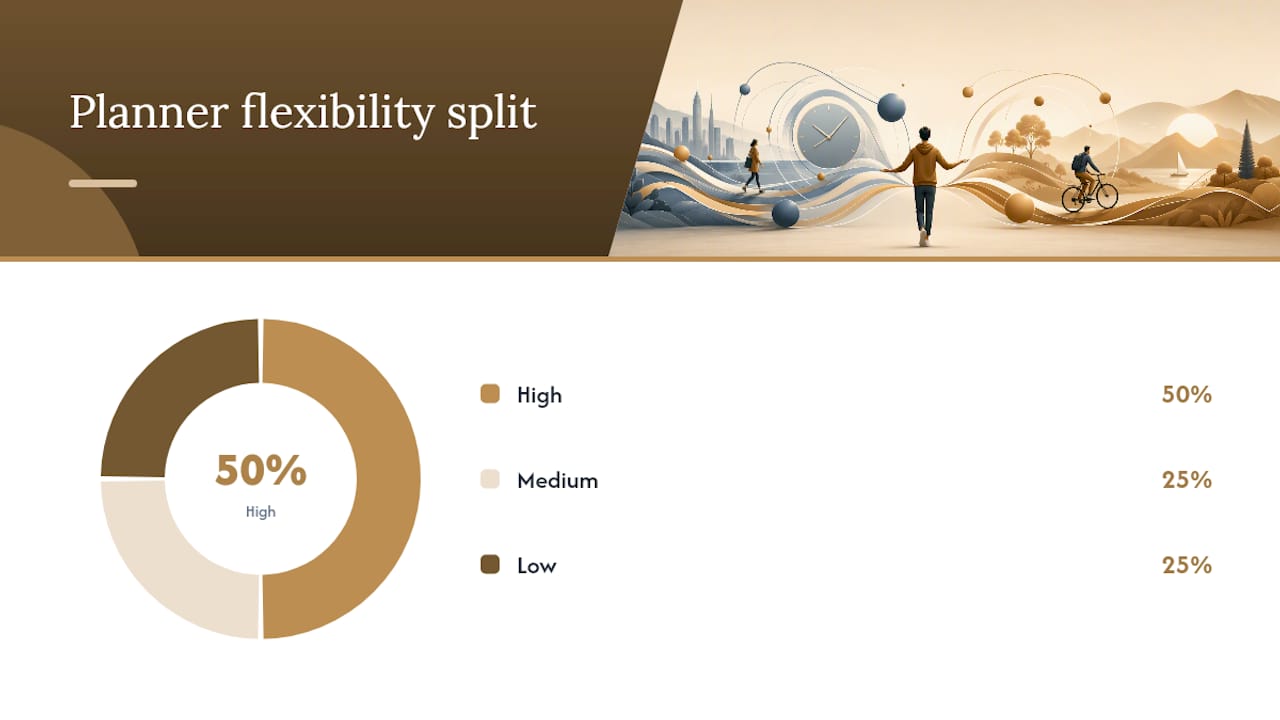
Planner type comparison:
| Planner type | Best for | Flexibility | Learning curve |
|---|---|---|---|
| Paper pocket planner | Focus, low distraction | Low | Minimal |
| Digital calendar-first | Scheduling, reminders | High | Low |
| Task-app-first | Project tracking, lists | High | Medium |
| Hybrid (paper + digital) | Thinking + coordination | Medium | Low |
Atlassian’s guide on time management methods highlights time-blocking and batching as two of the highest-leverage techniques, and both work best when your calendar and task app are connected with clear handoff rules.
Quick setup checklist:
- Create recurring calendar blocks for deep work, admin, and breaks
- Add a weekly review event every Sunday (15–30 minutes)
- Set a daily reminder for your night-before planning habit
- In your task app, create three buckets: Today, This Week, Someday
- Link your task app to your calendar where the tools allow it
Pro tip on integration: Most task apps let you email tasks in or connect via Zapier or native integrations. Set up one automation, like forwarding starred emails to your task inbox, and you’ll stop losing things in your inbox immediately.
How do you get into focused work and actually stay there?
Pick one sprint method and protect it like a meeting with your most important client.
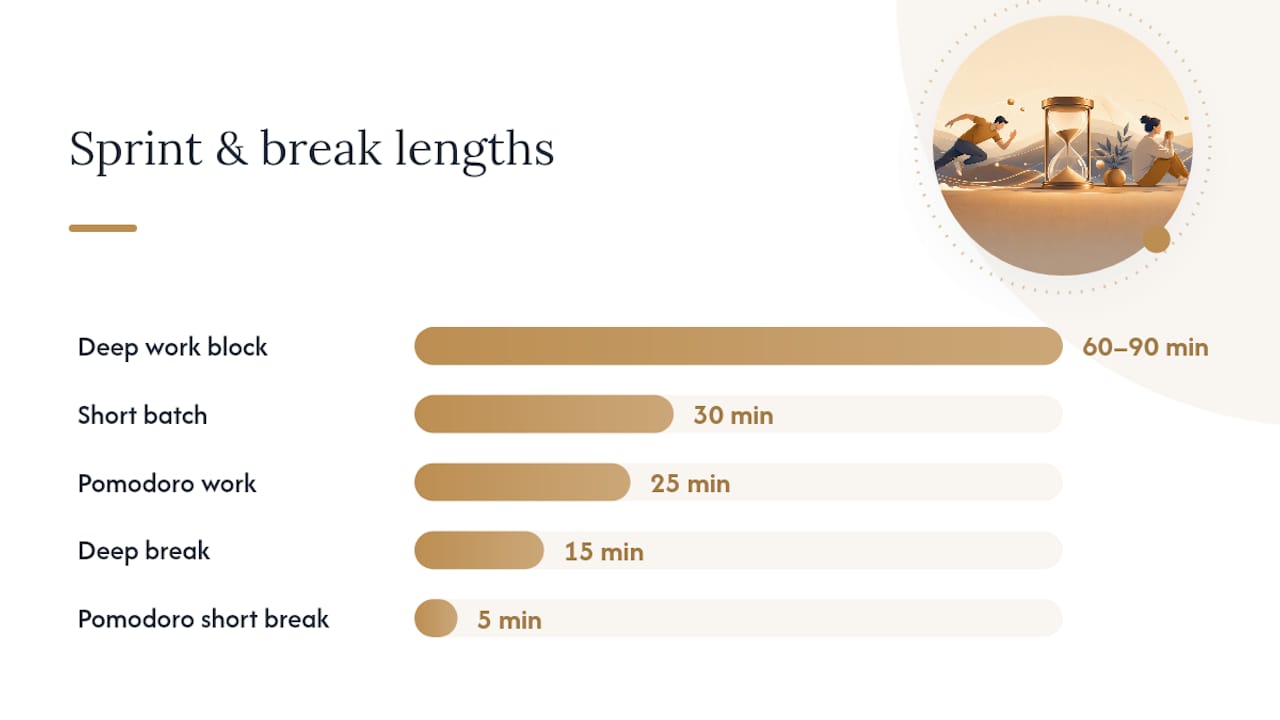
The Pomodoro Technique is the easiest entry point:
- Choose one task before you start the timer
- Set a timer for 25 minutes and work on nothing else
- When the timer rings, take a 5-minute break (stand up, move, don’t scroll)
- After four rounds, take a longer break of 20–30 minutes
- Review what you finished and reset your task for the next round
For deeper creative or analytical work, 60–90 minute blocks tend to outperform 25-minute sprints. Here’s how to run one:
- Clear your desk and close every tab you don’t need
- Write the single output you want from this block at the top of a blank page
- Set a timer for 60–90 minutes and put your phone in another room
- Work until the timer ends, then take a real 15-minute break before reviewing
Batching vs. single-tasking: Batching groups similar tasks together (all emails at 9 AM and 4 PM, all calls on Tuesday afternoons) to reduce the mental cost of switching. Single-tasking means doing one type of work at a time within a block. Use batching for repetitive, low-complexity tasks; use single-tasking for anything that requires real concentration.
A sample sprint routine for common tasks:
- Writing or studying: 90-minute deep block, then 15-minute break, then 60-minute second block
- Admin and email: Two 30-minute batches (morning and late afternoon)
- Creative work: One long 90-minute block in your peak energy window
Pro Tip: Build a short transition ritual between tasks: close your tabs, write one sentence about what you just finished, and write one sentence about what comes next. This two-minute habit cuts the mental residue from the previous task and gets you into the next one faster.
Atlassian’s research on time management confirms that limiting distractions and setting personal deadlines are among the most reliable ways to protect focused time.
Why do breaks and routines matter for sustainable productivity?
Protecting your energy is part of time management, not separate from it. A schedule that runs you into the ground by Wednesday is not a good schedule.
Marquette Today’s guide on time management makes the point that managing energy alongside time is what separates sustainable productivity from burnout cycles.
A sample daily routine built for longevity:
- 6:30–7:00 AM: Wake, no phone, light movement or coffee
- 7:00–7:15 AM: Review calendar and top 3 priorities
- 8:00–9:30 AM: Peak deep work (hardest task first)
- 9:30–9:45 AM: Micro-break, move your body
- 9:45–12:00 PM: Second work block or meetings
- 12:00–1:00 PM: Lunch away from your desk
- 1:00–3:30 PM: Collaborative tasks, calls, lighter work
- 3:30–3:45 PM: Micro-break
- 3:45–5:00 PM: Admin, planning, wrap-up
- 5:00 PM: Shutdown ritual (close tabs, update task app, done)
Warning signs you’re overloaded:
- You’re skipping breaks because you “don’t have time”
- Your top 3 list keeps rolling over to the next day, unchanged
- You feel busy all day but can’t name what you actually finished
When you spot these signs, the fix is not to work harder. It’s to cut one commitment, protect one break, and say no to one new request. Realistic expectations are a productivity strategy, not a weakness.
True productivity means protecting time for meaningful work and being able to stop at a reasonable hour. The goal is not to squeeze every second.
How and when should you say no, delegate, or ask for help?
Saying no and delegating are the fastest ways to reclaim time for high-impact work. Most people treat them as last resorts. They should be first-line tools.
Delegation checklist:
- Identify tasks that don’t require your specific expertise or judgment
- Write a clear one-paragraph brief: what needs to happen, what done looks like, and the deadline
- Hand it off with enough lead time for one round of questions
- Set a single check-in point rather than hovering
Ready-to-use phrases:
- “I can’t take that on right now, but I can revisit it in [timeframe].”
- “That’s outside my current priorities. Can someone else own it?”
- “I’d love to help. Can you tell me the deadline so I can see if it fits?”
- “I’m at capacity this week. Let’s schedule this for [specific date].”
Low-effort delegation options worth knowing: automation templates (Zapier, Make) for repetitive digital tasks; a part-time virtual assistant for inbox management and scheduling; a co-working accountability partner for tasks you keep avoiding. You don’t need a full team to offload meaningful work. For freelancers, scaling income through smart delegation often starts with identifying just two or three recurring tasks to hand off.
How do you run a weekly review that actually improves your system?
A 15–30 minute weekly review is the fastest feedback loop you have. Without it, you’re flying blind and repeating the same inefficiencies every week.
Weekly review checklist:
- List every task you completed this week (takes 5 minutes, feels good)
- Note any missed deadlines or tasks that rolled over more than twice
- Identify your biggest win and your biggest bottleneck
- Check your calendar for next week and time-block your top priorities
- Name your three most important tasks for Monday morning
Simple signals to watch:
- Task completion rate: are you finishing your top 3 most days?
- Missed deadlines: more than one per week signals overcommitment
- Energy peaks: which days and times did you do your best work?
The UGA Extension’s time management resources include time-audit exercises that pair well with this kind of weekly check-in. A time audit, even a rough one, shows you where hours are actually going versus where you think they’re going.
When you want to improve your system, change one variable at a time. Try a new technique for two to three weeks before deciding it doesn’t work. Changing everything at once makes it impossible to know what’s helping. MindTools recommends the nightly review and top-3 habit as two of the highest-return daily practices, and the weekly review is where you zoom out and confirm those habits are pointing in the right direction.
What’s the one action each audience type should start with?
The best time management technique is the one that fits your actual daily reality. Here’s a single high-impact action for each role, with a two-step setup.
Students
- Action: Add every assignment deadline and exam to your calendar the moment it’s assigned, then set a reminder 48 hours before each one.
- Setup: (1) Open your syllabus and block 20 minutes to enter all dates. (2) Set recurring Sunday reminders to review the upcoming week.
- What success looks like after two weeks: No more last-minute panic. You’ll start assignments earlier because you can see them coming.
Harvard Summer School and SNHU both recommend calendar use and understanding assignment scope as the two highest-leverage habits for students balancing academics and life.
9–5 professionals
- Action: Block one 90-minute deep-work window on your calendar every morning before anyone else can schedule over it.
- Setup: (1) Go to your calendar right now and add a recurring “Focus Block” from 8:00–9:30 AM. (2) Set your status to Do Not Disturb during that window.
- What success looks like after two weeks: You’ll finish your most important project work before most meetings even start.
Solopreneurs
- Action: Do a 15-minute weekly review every Sunday and name your three most important tasks for Monday.
- Setup: (1) Add a recurring Sunday 5:00 PM calendar event called “Weekly Review.” (2) Use the checklist from the review section above.
- What success looks like after two weeks: You’ll stop spinning your wheels on low-value tasks and start each week with laser focus on what actually grows your business. Pairing this habit with a solopreneur productivity workflow can compound the results quickly.
Does your brain type affect which system works for you?
If a time management system consistently makes you feel like a failure, it’s almost certainly a system mismatch, not a personal one.
A 2025 review published in Frontiers in Education found that planning, goal setting, prioritization, and task organization are associated with improved wellbeing and performance in both educational and work contexts. The key finding is that these skills can be learned and practiced, and that the right system matters as much as the effort you put in.
Psychology Today explains that time management is an executive function of the brain. Struggles with planning, prioritization, or follow-through can be brain-based, not character-based. For neurodivergent readers, external accountability, visual timers, and gamification tend to work better than purely internal systems.
A stepwise experiment framework:
- Pick one or two tips from this article
- Test them consistently for two to three weeks
- Run a quick weekly review to measure fit (completion rate, stress level, energy)
- If they’re not working, swap one element, not the whole system
Accommodations that help neurodivergent readers:
- Visual timers (Time Timer is a popular physical option) for Pomodoro sprints
- Body doubling or co-working sessions for tasks you keep avoiding
- Gamification apps that turn task completion into points or streaks
- External calendar reminders set at multiple intervals (48 hours, 24 hours, 1 hour before)
The start-small approach is backed by Atlassian’s guidance and echoed across university resources: test one technique before layering on more. A menu of strategies you can rotate is more durable than a single rigid system.
Why I always teach small systems first
Here’s my honest take: most people don’t have a time management problem. They have a system-overload problem. They’ve read about Pomodoro, time blocking, GTD, the Eisenhower Matrix, and a dozen other frameworks, and they’re trying to run all of them at once. That’s not a system. That’s a second job.
At Yoursolobusiness, the approach I keep coming back to is this: pick the smallest possible system that gives you a result, run it for two to three weeks, and only add complexity when you’ve outgrown what you have. A solopreneur who does a 10-minute night-before plan and a 15-minute Sunday review is already ahead of most people with elaborate productivity setups they abandoned in week two.
The research backs this up. The Frontiers in Education review shows that planning and prioritization improve outcomes, but the effect comes from consistent practice, not from using the most sophisticated tool. Small and consistent beats complex and sporadic every time.
If you try one tip from this article and it clicks, tell me about it. That kind of real-world feedback is what shapes the next resource I build.
A ready-made productivity system for solopreneurs
If you’ve read this far and you’re thinking, “I get it, but I want a system that’s already built,” that’s exactly what the Yoursolobusiness productivity toolkit is for.

It’s a practical resource designed for solo founders who want to skip the trial-and-error phase and start with a tested framework. You’ll find tool recommendations, implementation checklists, and workflow templates built around the same small-system philosophy in this article. It won’t do the work for you, but it cuts the setup time significantly.
If you’re ready to go further and automate the repetitive tasks that eat your schedule, the Yoursolobusiness AI toolkit shows you exactly which tools to use and how to connect them. Start with the productivity toolkit, apply one system for two to three weeks, then layer in automation when you’re ready.
Sources
- Boosting productivity and wellbeing through time management: evidence-based strategies for higher education and workforce development
- 8 Time Management Tips for Students – Harvard Summer School
- 10 Strategies for Better Time Management
- 10 time management methods & tips to improve productivity | Atlassian
- Which Time Management Strategies Work Best for You? | Psychology Today
- What Is Time Management? | Mind Tools
- Time Management Strategies: 8 Tips for Balancing College and Life
- On Topic: Eight tips on improving time management | Marquette Today
Recommended
- 7 Solopreneur Productivity Tips for Better Focus and Balance
- 7 Powerful Questions to Make Your Week More Productive: Guide to Weekly Review for Solopreneurs – Your Solo Business
- The Ultimate Productivity Toolkit for Solopreneurs [7 Strategies + 10 Tools] – Your Solo Business
- Daily Habits for Solopreneurs: Boost Productivity 60%