
For solo founders who need fast, coherent multi-email campaigns, Tugan.ai is the quickest way to generate a connected five-email arc from a single landing page URL. If deliverability is your bigger worry, especially for cold outreach, pick a platform built around warmup and per-step analytics, like Instantly or Smartlead. And if you already live inside a CRM, HubSpot sequences or ActiveCampaign will save you the hassle of stitching a new tool into your stack.
Here’s your fastest path to a working sequence today:
- Launching something new? Try Tugan.ai first. Paste your landing page URL, and it drafts a full arc with each email doing one job.
- Running cold outreach? Test Instantly or Smartlead for their built-in warmup and reply detection.
- Already inside HubSpot or ActiveCampaign? Use their native sequence builder before adding another subscription to your stack.
Pick one goal, generate a sequence today, and read every draft against your actual offer before you hit send.
Key Takeaways
The most effective AI email sequence gives each message one clear job, grounds every claim in a real offer brief, and tracks per-step performance instead of overall open rates.
| Point | Details |
|---|---|
| Start with the offer, not the tool | Feed the AI a landing page URL or detailed brief so it grounds claims in your actual product. |
| One job per email | Each message in the arc should do exactly one thing: welcome, build trust, handle an objection, or pitch. |
| Watch per-step analytics | Track open, click, and reply rates for each email individually, not just the campaign average. |
| Fix authentication first | Set up SPF, DKIM, and DMARC and warm up new domains before sending any AI-generated sequence live. |
| Test with a narrow tool first | Try Tugan.ai for full-arc generation or Yoursolobusiness’s AI Toolkit prompts before subscribing to an all-in-one platform. |
What Are AI Email Sequences, and How Do They Work?
An AI email sequence is a series of connected emails, usually three to seven messages, generated or drafted with artificial intelligence to move a reader toward one action: a purchase, a reply, a booked call, or a completed setup step. Where a single email tries to do everything at once, a sequence spreads the work across multiple sends, giving your reader time to warm up instead of feeling pitched at.
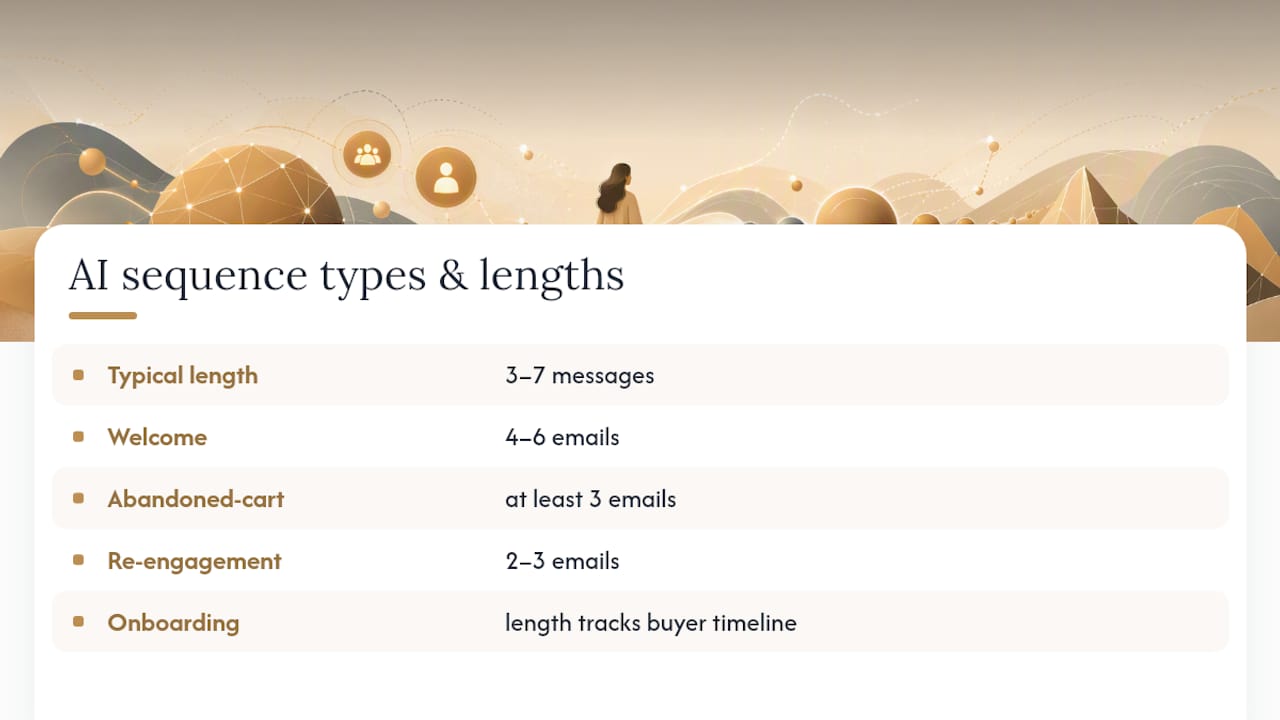
The common sequence types you’ll build as a solopreneur are welcome sequences (introducing new subscribers to your brand), onboarding flows (guiding new customers through setup), abandoned-cart sequences (recovering a stalled purchase), re-engagement sequences (waking up cold subscribers), and nurture campaigns (building trust before an offer). ActiveCampaign’s guidance recommends four to six emails for a welcome sequence, at least three for abandoned cart, and two to three for re-engagement, with length tracking the buyer’s actual decision timeline rather than an arbitrary count.
What makes this “AI” rather than just “email marketing” is the generation layer. Tools like Tugan.ai, Sequenzy, and EmailComposer.ai take a product description, a landing page, or a short brief and output a full connected arc, complete with subject-line variants, personalization tokens, and escalating calls to action, in minutes instead of hours. That speed is real. The tradeoff is that generated copy needs to be checked against your actual offer, or you risk emails that sound polished but say nothing true about your product.

Which AI Email Tools Actually Deserve Your Trial Signup?
Twenty-one tools claim to help with sequences. Most solopreneurs only need to seriously trial two or three, based on the specific job in front of them.
| Tool | Best For | Standout AI Capability | ESP/CRM Integration | Deliverability Safeguards | Pricing Shape |
|---|---|---|---|---|---|
| Tugan.ai | Drafting full multi-email arcs fast | Generates connected campaigns from a brief or URL | Export to common ESPs | Not a sending platform | Freemium/trial |
| Sequenzy | HTML-ready drafts with visual editing | Block-structured editor plus HTML export | Direct HTML import to most ESPs | Not a sending platform | Free tier available |
| EmailComposer.ai | Quick prompt-based first drafts | Copy frameworks like PAS and AIDA baked into prompts | Copy-paste into any ESP | Not a sending platform | Free tier available |
| HubSpot sequences | Sales teams inside HubSpot CRM | Per-step performance reporting, task reminders | Native to HubSpot CRM | Enrollment/unenroll triggers | Paid tiers, CRM-bundled |
| ActiveCampaign | All-in-one marketing automation | Journey-based automation with sequence templates | Native automation builder | Built-in deliverability tools | Tiered subscription |
| Mailchimp | Small businesses wanting one platform | Guided sequence templates by type | Native to Mailchimp | Standard authentication support | Free tier, tiered plans |
| Saleshandy | Cold email teams at scale | Sequence software built for outreach volume | Native sending platform | Warmup and deliverability tools | Tiered subscription, trial |
| Instantly | Cold outreach at volume | Built-in warmup network across many inboxes | Native sending platform | Dedicated warmup, deliverability monitoring | Tiered subscription, trial |
| Lemlist | Personalized multichannel outreach | Image and video personalization at scale | Native sending platform | Warmup add-on | Tiered subscription, trial |
| Woodpecker | Agencies managing client campaigns | Automatic pause on out-of-office replies | Native sending platform | Deliverability checks built in | Tiered subscription, trial |
| Smartlead | High-volume cold email senders | Unlimited warmup pool across inboxes | Native sending platform | Warmup, rotation across sender accounts | Tiered subscription, trial |
| Reply.io | Multichannel sales sequences | AI-assisted sequence and email writing | Native sending platform, CRM sync | Built-in deliverability tools | Tiered subscription, trial |
| Snov.io | Lead-gen plus outreach in one tool | Combines prospecting with drip campaigns | Native sending platform | Warmup add-on | Tiered subscription, free tier |
| Mailshake | Simple sales sequences | Straightforward sequence builder for small teams | Native sending platform | Basic deliverability tools | Tiered subscription, trial |
| Klenty | Sales teams needing CRM sync | Sequence automation tied to CRM data | Deep CRM integrations | Deliverability monitoring | Tiered subscription, trial |
| QuickMail | Solo and small agency cold outreach | Auto-pause on detected replies | Native sending platform | Built-in warmup | Tiered subscription, trial |
| Coffee | Fast automated sequence setup | Streamlined sequence builder for non-technical users | Native sending platform | Basic deliverability guidance | Trial available |
| Apollo.io | Prospecting plus sequences together | Combines a contact database with sequence automation | Native sending platform, CRM sync | Built-in deliverability tools | Free tier, tiered plans |
| Outreach | Enterprise sales teams | Advanced sequence analytics and A/B testing | Deep CRM integrations | Enterprise deliverability tools | Custom/enterprise pricing |
| HubSpot Native Sequences | Teams already on HubSpot | Task and call reminders alongside automated emails | Native to HubSpot | Enrollment/unenroll triggers | Included in CRM tiers |
Three of these tools solve a narrower problem than the rest: drafting the words. Tugan.ai works from a landing page URL or a short brief and outputs a connected campaign where each message keeps its own subject line, angle, and CTA. Test it by feeding it your actual product page and checking whether the middle emails still make sense without the first one. Sequenzy structures its output into editable blocks, heading, body, button, footer, and exports clean HTML, which matters if you’re pasting into an ESP that mangles formatting. EmailComposer.ai leans on proven copy frameworks like PAS and AIDA, useful when you need a fast first draft and already know your offer cold.
The rest split into two camps: all-in-one marketing platforms (HubSpot, ActiveCampaign, Mailchimp) that bundle sequence building with your whole email operation, and cold-outreach specialists (Instantly, Smartlead, Lemlist, Woodpecker, Klenty, QuickMail, Reply.io, Snov.io, Mailshake, Saleshandy, Apollo.io, Outreach, Coffee, Consider) built around warmup and reply detection at volume. Nearly all of the outreach specialists work with US-based sending domains and standard ESP authentication without extra configuration, though warmup features vary in how many days they recommend before your first real send.
What Should You Check Before Committing to a Tool?
A free trial is only useful if you know what you’re testing for. Run through this list in your first session, before you generate a single real sequence:
- Sequence arc support. Can the tool generate a full multi-email arc from one brief, or does it only write one email at a time? The difference decides whether you’re saving hours or just outsourcing the first draft.
- Personalization depth. Does it support real merge tokens (name, company, recent action), or just generic placeholders you’ll have to hand-edit anyway?
- Per-step analytics. Can you see open, click, and reply rates for each individual email in the sequence, not just the campaign as a whole? HubSpot’s sequence tool exposes this reporting by default, and it’s the single best signal for knowing which email in your arc is actually working.
- Deliverability protections. Does the platform include domain warmup, or do you need a separate tool? Reviewer guidance on cold outreach software treats this as one of the top three purchase risks, alongside sending volume and pricing that creeps up after the trial.
- Integration friction. Will your draft export cleanly into your existing ESP or CRM, or will you be reformatting HTML by hand?
- Pricing transparency. Is the free tier real, or a seven-day trial disguised as “free”? Ask directly what happens to your sending volume and contact limits the day the trial ends.
When you get a demo, ask the vendor point-blank: “What happens to my open rates if I exceed your recommended daily sending volume?” and “Can I export this sequence if I cancel?” Vague answers to either question are a red flag. So is a pricing page that hides per-contact costs until checkout.
Pro Tip: Negotiate the annual discount even on a small plan. Most of these vendors will quietly knock 15 to 20 percent off monthly pricing if you ask before you commit, especially during a trial when they know they still need to close you.
How Do You Write a Prompt That Generates a Full Sequence?
The fastest way to get a usable arc isn’t a clever one-line prompt. It’s giving the AI your actual offer to ground its claims in, then editing hard.
Here’s the starter prompt structure that works across Tugan.ai, Sequenzy, and EmailComposer.ai:
- Paste your landing page URL or a 3-sentence offer description. Tools built to pull from real product content produce more accurate copy than a single vague prompt, because they’re not inventing benefits you don’t actually offer.
- Specify the arc length and goal. “Generate a 5-email welcome sequence for new subscribers, ending in a soft pitch for [offer]” gives the AI a finish line instead of open-ended rambling.
- Set the tone in one sentence. “Conversational, no jargon, short paragraphs” keeps the output usable without a full rewrite.
- Ask for subject line variants per email, not just one, so you have A/B options ready.
For different sequence types, adjust the cadence and CTA pressure:
- Cold outreach: 3 to 4 emails, spaced 2 to 3 days apart, CTA escalating from “worth a quick chat?” to a direct calendar link by email three.
- Abandoned cart: 3 emails over 48 to 72 hours, starting with a reminder, then urgency, then a discount or incentive.
- Onboarding: 4 to 6 emails timed to product milestones (day one, day three, day seven), each tied to one specific feature or setup step.
Before you send anything, run this micro-edit checklist against every generated draft:
- Does each email have exactly one job?
- Are all subject lines distinct, not variations of the same phrase?
- Does the call to action escalate, rather than repeat, from email to email?
- Is the length appropriate for the channel (shorter for cold outreach, longer is fine for nurture)?
Pro Tip: If email three of a five-email arc could be deleted without breaking the story, the AI padded the sequence. Cut it, don’t just polish it.
That “one job per email” rule isn’t a stylistic preference. It’s the single practice experts point to most often for keeping a sequence coherent instead of repetitive.
What Deliverability Steps Come Before You Hit Send?
A brilliant AI-generated sequence with broken authentication lands in spam, and no amount of clever copy fixes that. Handle this before you send a single real message.

Set up SPF, DKIM, and DMARC on your sending domain first. If you’re using a new domain or a sending account under six weeks old, warm it up gradually, starting at a low daily volume and increasing over two to three weeks, rather than blasting your full list on day one.
When you’re ready to test the actual sequence:
- Send to a small seed list of accounts you control across different providers (Gmail, Outlook, Yahoo) to check inbox placement before real sends.
- Throttle your sending volume rather than firing every email in the sequence to your full list at once.
- Watch per-step open, click, and reply rates, not just the campaign total, so you can catch a weak email early.
- Set unenroll-on-reply rules so a prospect who responds doesn’t keep getting the next scripted email. HubSpot’s sequence controls handle this automatically, pausing enrollment when someone replies or books a meeting.
On the export side, know what you’re actually importing. HTML exports from tools like Sequenzy drop cleanly into most ESPs but occasionally clash with a platform’s own template engine. Native sequence builders inside HubSpot or ActiveCampaign skip that friction entirely because the draft never leaves the platform. API-based imports offer the most control but need someone comfortable with basic setup, not necessarily a developer, but not a total beginner either.
How Jay Actually Builds AI Sequences at Your Solo Business
Jay treats every AI-generated sequence draft the same way: as a fast first pass, never a finished product. The workflow starts with a real offer brief or landing page, generates the arc, then reads every email out loud before it goes near an ESP, because copy that sounds fine on screen often stumbles when spoken.
The biggest mistake solo founders make isn’t picking the wrong tool. It’s sending the first draft. A generated sequence is a starting point that still needs a human check against what you’re actually selling.
Three things worth checking in your own workflow:
- Does each email reference something specific to your offer, not a generic benefit the AI invented?
- Would you actually send this email to a friend, or does it read like a template?
- Are you tracking per-step performance, or just glancing at overall campaign stats?
For the full prompt library and toolkit Jay uses to run these workflows, the AI Toolkit collects the prompts referenced throughout this guide in one place.
Why Most Sequence Advice Gets the Order Backward
Most guides to AI email sequences lead with tool features: word counts, template libraries, AI model names. That’s backward. The tool matters far less than whether you fed it a real offer to work from.

I’ve watched solo founders spend a week comparing Tugan.ai against Sequenzy against EmailComposer.ai on features alone, then generate a sequence with a two-sentence prompt and wonder why the output sounds generic. The tools aren’t the bottleneck. The brief is. A detailed landing page or product description grounds the AI in real claims; a vague prompt gets you vague copy, no matter which platform wrote it.
The other overrated metric is open rate. Everyone chases it, but a sequence with great opens and no replies is failing at its actual job. Per-step reply and click data tells you which email in the arc is doing the work. Watch that before you touch subject lines.
If you’re a solo founder with limited time, prioritize the brief over the tool, and the per-step data over the vanity metric. Everything else is optimization on a foundation that either holds or doesn’t.
Get the Prompts and Toolkit Behind This Guide
Every prompt structure in this guide came from Yoursolobusiness’s own prompt library, built specifically for solo founders who don’t have a marketing team to hand this off to.

If you’re piecing together a full AI stack instead of just one email tool, the AI Toolkit gives you the prompt bank Jay references for sequence building, subject line variants, and offer briefs, all in one place instead of scattered across bookmarked tabs. Solo founders don’t need forty tools; they need the handful that actually replace hours of work, and that’s the filter every resource on the site runs through. Pair it with the Best AI Research Tools guide if you’re still gathering proof points and benefits to ground your next sequence in something true. Start with the toolkit, generate your first sequence today, and edit it against your real offer before it goes anywhere near a send button.
Tool Docs and Explainers Worth Bookmarking
- HubSpot sequence enrollment and reporting docs for unenroll triggers and per-step performance.
- Tugan for full-arc drafting from a landing page.
- Sequenzy’s AI email writer for block-based HTML drafts.
- Emailcomposer for framework-driven quick prompts.
- Superhuman’s email sequence template for the one-job-per-email rule.
- Follow-up automation for small businesses for pairing sequences with lead nurture.
Sources
- Email sequence template — Superhuman Blog
- Create and edit sequences — HubSpot Knowledge
- Tugan
- Emailcomposer