

Running a one-person business used to mean choosing between doing everything yourself and hiring help you couldn’t afford. AI for solopreneurs changes that equation completely. With the right tools, you can operate with the output of a full team, without a single payroll entry.
The numbers back this up. Research indicates that solo founders leveraging AI automation complete 3.2 times more tasks weekly compared to those using manual processes. And according to Forbes research, 82% of solopreneurs use AI for client communication and meetings, 78% for operational efficiency and automation, and 71% for working with contractors. This is not a trend. It is a shift in how solo businesses are built.
Here is what AI actually does for you as a solopreneur:
- Replaces repetitive tasks so you focus on high-value work
- Generates marketing copy, social posts, and email sequences on demand
- Handles customer inquiries and follow-ups around the clock
- Automates lead qualification, reporting, and competitive research
- Accelerates digital product creation from idea to launch
- Reduces operational costs while increasing your capacity to serve clients
The rest of this guide shows you exactly where and how to apply AI across every part of your solo business.
How AI powers your marketing and content creation
Marketing is the task most solopreneurs dread most, and it is also where AI delivers the fastest wins. Tools like ChatGPT, Jasper, and Copy.ai can generate blog outlines, email sequences, ad copy, and social captions in minutes. You go from staring at a blank page to editing a solid draft.

The real efficiency gain comes from batching. Instead of writing one post at a time, you can prompt an AI tool to generate a month’s worth of social content in a single session, then schedule it with Buffer or a native platform scheduler. That workflow alone reclaims several hours every week.
Here are the marketing tasks you can hand off to AI right now:
- Blog post research, outlines, and first drafts
- Email newsletter copy and subject line testing
- Social media captions across LinkedIn, Instagram, and X
- Ad copy variations for testing
- SEO keyword clustering and content briefs
- Repurposing long-form content into short clips, carousels, or threads
Pro Tip: Build a personal prompt library for your most repeated marketing tasks. A well-crafted prompt for your weekly newsletter saves you from starting from scratch every time, and the output gets sharper as you refine it.
How to create and sell digital products with AI
Digital products are one of the best revenue models for solopreneurs, and AI cuts the production time dramatically. What used to take weeks of research, writing, and design can now happen in days. You handle the expertise and judgment; AI handles the heavy lifting.
Start with idea validation. Use AI to analyze search trends, identify gaps in existing products, and draft a quick outline before you invest serious time. Then use it to write the content, design the structure, and even generate cover graphics with tools like Adobe Firefly or Canva’s AI features.
Product types you can build with AI assistance:
- Online courses with AI-drafted lesson scripts and slide outlines
- Ebooks and guides written from your expertise with AI structuring the flow
- Templates and swipe files (email sequences, social calendars, proposal frameworks)
- Notion or Airtable dashboards packaged as productivity tools
- Membership content libraries built from AI-assisted research
Once your product is ready, AI also handles delivery. Tools like ConvertKit or Gumroad automate the purchase confirmation, file delivery, and welcome sequence without you touching a thing.
How AI handles customer support and communication for you
Client communication is a time sink that never fully empties. AI changes that. Chatbots and intelligent auto-response tools can handle FAQs, appointment scheduling, and initial inquiry responses 24/7, so you are not chained to your inbox.
Tools like Intercom, Tidio, or even a well-configured ChatGPT-powered assistant can manage the first layer of client interaction. They answer common questions, collect intake information, and route complex issues to you. Your clients get a fast response; you get your time back.
Practical AI applications for client communication:
- FAQ chatbots embedded on your website or client portal
- Automated follow-up sequences after discovery calls
- Meeting scheduling via tools like Calendly with AI-drafted confirmation emails
- Onboarding email sequences triggered by purchase or sign-up
- Support ticket triage that flags urgent issues and auto-resolves simple ones
For solopreneurs managing ongoing client relationships, tools that support client portal automation can reduce the back-and-forth that eats up your afternoons. The goal is not to remove the human touch. It is to make sure your human attention goes where it actually matters.
Automating operational workflows and data analysis with AI
Back-office work is where solopreneurs quietly lose hours every week. Pulling reports, monitoring competitors, qualifying leads, and aggregating data from multiple tools are all tasks that feel productive but rarely move the needle. AI can handle most of them automatically.

McKinsey’s 2025 small business AI report found that solopreneurs using AI-powered automation spent 60% less time on research and analysis tasks, the highest time-savings category across all business sizes. That is not a marginal improvement. That is a restructured workweek.
The key distinction is between basic app connectors and AI-native workflows. Tools like Zapier connect apps and trigger simple actions. AI-native tools bundle research, analysis, and action into a single flow. You get intelligence, not just connectivity.
Operational tasks you can automate today:
- Lead qualification and scoring based on inbound inquiry data
- Competitive monitoring with automated alerts when rivals change pricing or content
- Weekly performance reports pulled from your analytics tools
- Invoice generation and payment follow-up reminders
- Contract and proposal drafting from a template with client-specific details
How to scale without hiring: AI strategies for growth
The old model said growth required headcount. AI breaks that assumption. A well-built AI workflow automation stack lets you serve more clients, produce more content, and generate more revenue without adding a single employee.
Research on AI integration in entrepreneurship shows that AI during the growth phase helps solopreneurs lower costs, improve personalization, and strengthen customer loyalty, creating competitive advantages that compound over time. That last part matters. Personalization at scale used to require a marketing team. Now it requires a good prompt and the right tool.
The question of when to hire is worth taking seriously. Solopreneurs should delay hiring until their output requirements genuinely exceed what a well-optimized AI stack can deliver. Hiring too early often adds management overhead before you have the revenue to justify it.
AI-enabled growth strategies for solopreneurs:
- Personalized email campaigns triggered by client behavior
- Automated upsell and cross-sell sequences for existing customers
- AI-generated content that builds your authority and drives organic traffic
- Chatbot-assisted lead nurturing that keeps prospects warm without your involvement
- Automated client reporting that demonstrates value and reduces churn
For a deeper look at scaling without a team, the playbook is simpler than most solopreneurs expect.
Overcoming infinite options paralysis: a structured AI adoption pathway
The biggest reason solopreneurs stall on AI is not lack of interest. It is infinite options paralysis, the overwhelming sense that there are too many tools, too many use cases, and no clear starting point. The solution is structure, not more research.
MIT Sloan’s Ethan Mollick puts it plainly: cheap experimentation is the core power of AI for entrepreneurs. You do not need to find the perfect tool. You need to try something, see what works, and iterate. That mindset shift alone removes most of the friction.
Here is a phased approach that works:
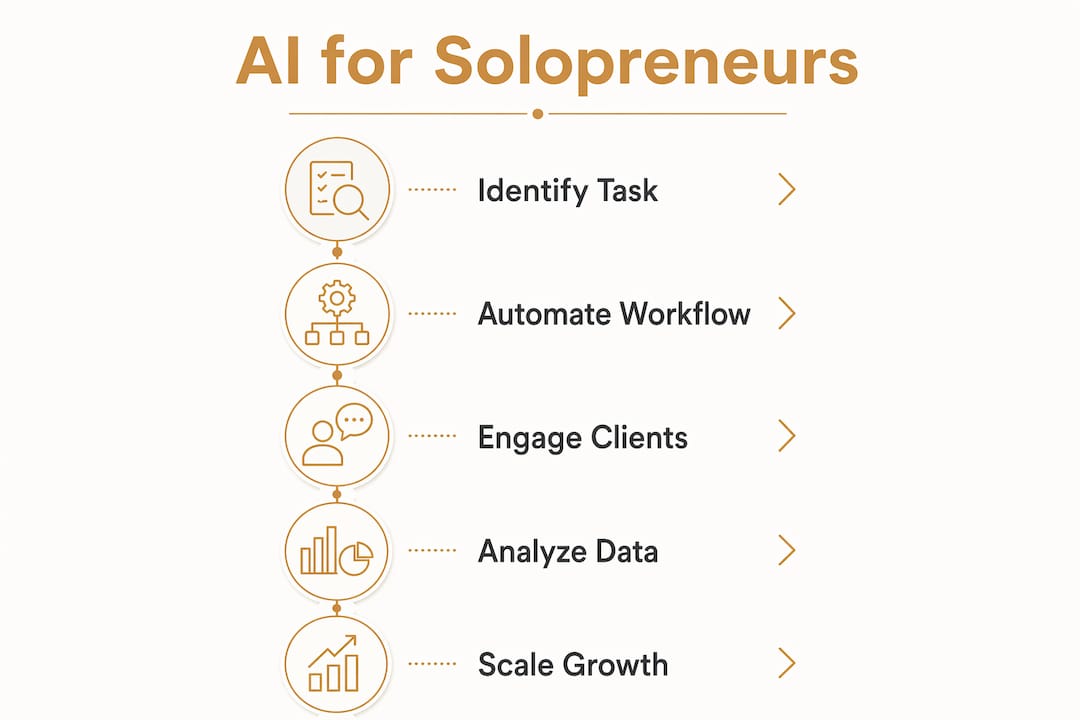
- Audit your time. Spend one week tracking where your hours go. Identify the three tasks you repeat most and hate most.
- Pick one automation. Choose the highest-pain task and find one AI tool that addresses it directly. Do not build a full stack yet.
- Run a two-week test. Use the tool daily for two weeks. Measure time saved and output quality honestly.
- Add one layer at a time. Once the first tool is running smoothly, add the next. Week one: basic app connections. Week two: content scheduling. Week three: intelligence workflows for research and lead qualification.
- Build your context layer. Move toward tools that remember your business context, not just generic prompt boxes. Platforms like MATRY are built specifically to turn scattered priorities into weekly execution plans for solo operators.
Pro Tip: When you feel stuck choosing between tools, ask your AI assistant directly: “Given that I run a solo [type] business and my biggest bottleneck is [X], what is the single next tool I should add?” A context-aware answer beats a comparison article every time.
Best AI tools for solopreneurs in 2026
You do not need every tool. You need the right ones for your specific bottlenecks. Here is a curated set covering the core categories, with honest notes on who each one fits best.
- ChatGPT (OpenAI): The workhorse for writing, brainstorming, drafting, and research. The paid tier adds web browsing and image generation. Start here if you have not already.
- Zapier: Best for connecting your existing tools with simple trigger-action workflows. The free tier covers 100 tasks per month and five active workflows, enough to get started.
- Make (formerly Integromat): More powerful than Zapier for complex branching logic, and the free tier includes 1,000 operations per month. Better for solopreneurs with multi-step workflows.
- Buffer: Social media scheduling without the noise. Clean interface, solid analytics, and a free plan that covers three channels.
- Adobe Firefly: Generative image and design tool for creating ad visuals, product graphics, and branded assets without a designer.
- Intuit Assist (QuickBooks): AI-powered bookkeeping that automates expense categorization, invoice tracking, and financial summaries. Saves hours at tax time.
- Calendly: Automated meeting scheduling with AI-drafted confirmation and reminder emails. Eliminates the back-and-forth entirely.
- Jasper: Purpose-built for marketing copy. Better than general-purpose models for brand-consistent long-form content and ad campaigns.
- Notion AI: Turns your Notion workspace into an active thinking partner. Summarizes notes, drafts project plans, and generates SOPs from bullet points.
- MATRY: An AI execution layer built for solo founders and freelancers. It captures your business context, goals, and blockers, then surfaces weekly priorities and revenue actions. Designed for follow-through, not just planning.
| Tool | Primary use | Free tier | Best for |
|---|---|---|---|
| ChatGPT | Writing, research, drafting | Yes (limited) | All solopreneurs |
| Zapier | App connections | 100 tasks/month | Simple automations |
| Make | Complex workflows | 1,000 ops/month | Multi-step logic |
| Buffer | Social scheduling | 3 channels | Content creators |
| Adobe Firefly | Visual design | Yes (limited) | Product and ad visuals |
| Intuit Assist | Bookkeeping | With QuickBooks plan | Finance management |
| Calendly | Meeting scheduling | Yes (basic) | Service-based solopreneurs |
| Jasper | Marketing copy | Trial only | Brand-consistent content |
| Notion AI | Workspace + planning | With Notion plan | Project and knowledge work |
| MATRY | Execution planning | Waitlist | Solo founders needing structure |
For a full breakdown of how these tools fit together, the AI toolkit at Yoursolobusiness walks through the complete stack with implementation guidance.
Privacy and data security when using AI tools
AI tools are powerful, but they come with real data risks that solopreneurs often overlook until something goes wrong. When you paste client information, financial data, or proprietary business details into a general-purpose AI tool, that data may be used to train future models unless you explicitly opt out.
Read the privacy settings before you use any tool with sensitive information. OpenAI, for example, lets you turn off chat history and model training in your account settings. Google’s Gemini and Anthropic’s Claude have similar controls. Make it a habit to check these settings when you onboard a new tool.
A few practical rules worth following:
- Never paste full client contracts, tax documents, or personal identifying information into a public AI interface
- Use anonymized or generalized versions of client data when asking AI for analysis
- For tools that handle payments or store client data, verify SOC 2 compliance or equivalent security certification
- Keep a short list of which tools have access to which data, and review it quarterly
Business automation for freelancers carries the same data responsibilities as any client-facing service. Your clients trust you with their information, and that trust extends to the tools you use on their behalf.
How to measure the ROI of your AI integrations
AI tools cost money and time to set up. Measuring whether they are actually paying off keeps you from spinning your wheels on tools that look impressive but do not move your business forward.
Start with a simple baseline. Before adding any AI tool, note how long the target task takes you each week and what it costs in your hourly rate. After 30 days with the tool, measure the same task again. The difference is your time ROI.
For revenue-generating automations, track the metrics that matter directly:
- Content tools: organic traffic, email open rates, and lead volume before and after
- Lead qualification tools: time from inquiry to qualified conversation, and close rate
- Customer support tools: average response time and client satisfaction scores
- Operational automations: hours saved per week and error rate reduction
A tool that saves you five hours a week at your effective hourly rate pays for itself quickly, even at a $50/month subscription. The tools that do not show measurable impact within 60 days are worth cutting. You do not need a bloated stack. You need a lean one that actually works.
Real solopreneurs using AI to grow their businesses
The Forbes research on AI-powered solopreneurs draws from Zoom’s Solopreneur 50 program, which reviewed nearly 3,000 applicants across 48 states and 12 industries. The pattern across high-performing solo operators is consistent: they use AI not to replace their expertise, but to extend their capacity.
A freelance content strategist who previously capped out at four clients now manages eight, using AI to handle first drafts, research briefs, and performance reports. A solo e-commerce operator uses automated competitive monitoring to adjust pricing weekly without spending hours on manual research. A consultant uses AI-generated proposal templates and a scheduling bot to cut the time between initial inquiry and signed contract from five days to one.
These are not edge cases. They reflect what happens when you use AI to replace repetitive work and redirect your energy toward the work only you can do. The solopreneurs who are pulling ahead in 2026 are not working harder. They built better systems.
Key Takeaways
AI for solopreneurs works best when applied systematically across marketing, operations, and client communication, starting with one high-pain task and building outward from there.
| Point | Details |
|---|---|
| Start with one task | Identify your highest-pain repeating task and automate it before building a full stack. |
| AI multiplies output | Stripe’s survey found solo founders using AI complete 3.2 times more tasks weekly than manual operators. |
| Delay hiring deliberately | Expand your AI stack before adding headcount; hire only when output demands exceed what AI can handle. |
| Measure ROI at 30 days | Track time saved and revenue impact for each tool; cut anything that shows no measurable result within 60 days. |
| Protect client data | Disable model training in AI tool settings and never paste sensitive client information into public interfaces. |
Ready to build your AI-powered solo business? The Yoursolobusiness AI toolkit gives you the full stack, implementation checklists, and prompt libraries Jay uses to run a one-person business at team-level output. Start there.
