
For most professionals and small teams, the best LinkedIn outreach automation tools in 2026 are HeyReach (best for multi-sender agency scaling), Dripify (best for visual sequence building), Expandi (best for cloud-based smart sequences), and Meet Alfred (best for multi-channel team workflows). If you’re a solopreneur running solo, Dux-Soup or Waalaxy get you started with minimal setup. Safety posture matters as much as features: HeyReach and Expandi both enforce per-account send limits, while LinkedIn’s own guidance confirms automation works best as partner-supported, contextual outreach rather than bulk blasting.
- HeyReach — auto-rotates multiple sender accounts, unified inbox, CRM push; best for agencies and growth teams
- Dripify — visual drip builder, sequence templates, analytics; best for small teams wanting a no-code workflow
- Expandi — cloud sequences, multi-channel follow-ups, campaign analytics; best for teams scaling meetings
- Meet Alfred — multi-channel sequences (LinkedIn + email + Twitter), team workspaces; best for sales teams
- Dux-Soup — lightweight browser extension, profile visits, lead capture; best for solo operators starting out
Key Takeaways
The safest, most effective LinkedIn outreach automation strategy combines per-account send limits, a real CRM integration for reply handling, and a short warm-up pilot before scaling volume.
| Point | Details |
|---|---|
| Start with a 7–14 day pilot | Cap daily actions at 20–50 per account and review reply rate before scaling. |
| Safety architecture beats feature count | Prioritize tools with per-account limits, residential or local-IP sending, and warm-up defaults. |
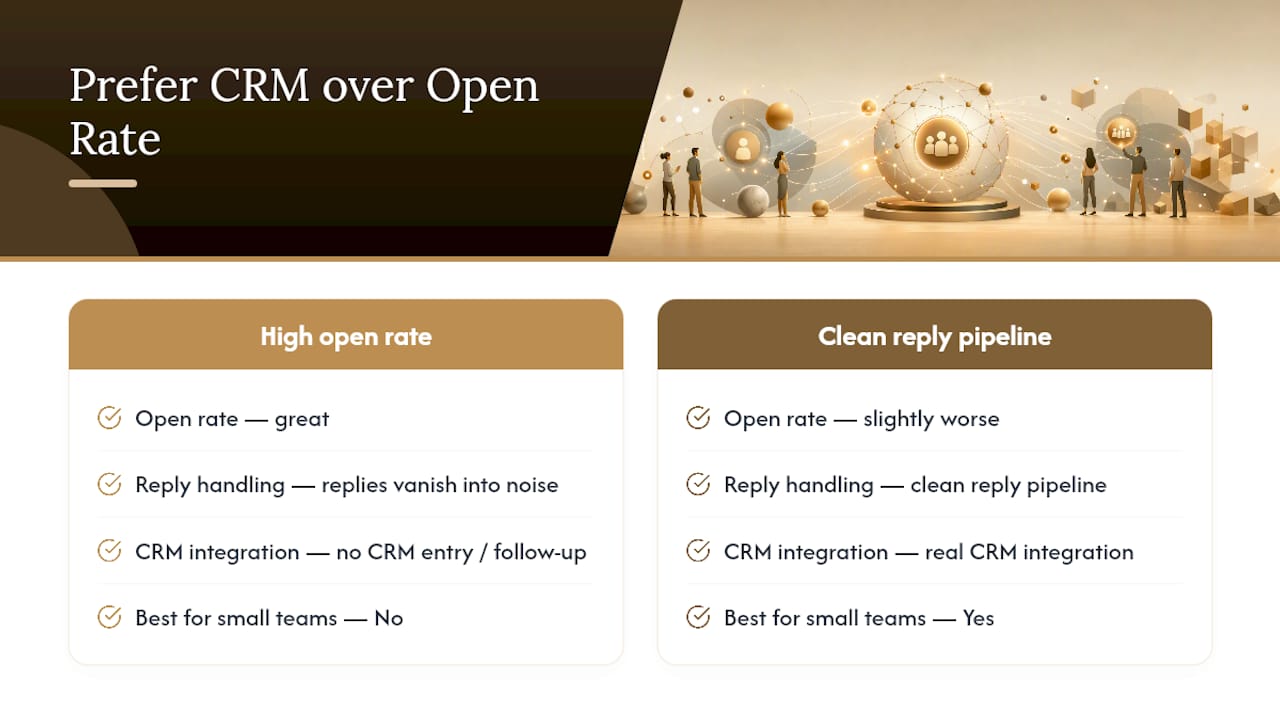
| Reply handling is the real bottleneck | Choose a tool with CRM sync first; a clean reply pipeline matters more than a polished sequence builder. |
| Red flags to cut fast | No warm-up, shared datacenter IPs, no per-send personalization, and slow or hidden support. |
| Yoursolobusiness AI Toolkit | Gives solopreneurs prompt libraries, pilot checklists, and outreach templates to automate safely without a hosted platform. |
How do the top LinkedIn automation tools actually compare?
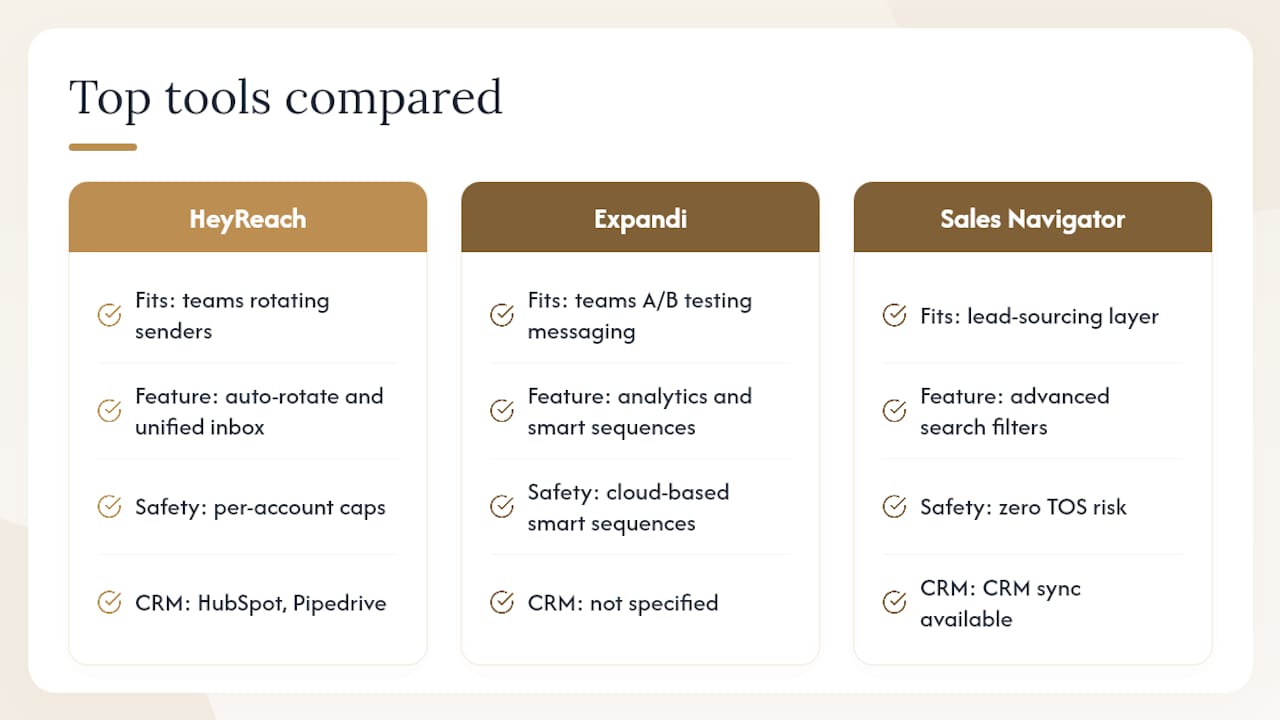
The table below covers the 21 tools this guide evaluated. Columns reflect what actually matters during vendor selection: who it fits, what it does, how safe it is, and what it costs to start.
Trust signals to check before you buy: G2 and Capterra ratings, published case studies, a clear security/data-handling statement, and whether the vendor lists LinkedIn as a formal partner or integration. G2 reviews for HeyReach and Dripify’s G2 page are good starting points for real user sentiment on sequence performance and support quality.
A few tools deserve a closer look. HeyReach is the strongest pick for teams that need to rotate multiple sender accounts: its auto-rotate architecture and unified inbox mean replies from five senders land in one place and push straight to HubSpot or Pipedrive. Multi-sender rotation with per-account caps is the dominant safe-scaling pattern for teams that need more volume than a single account allows.
Expandi leans into analytics and multi-channel follow-ups. Its sequence builder feels closer to a marketing automation tool than a cold-outreach blaster, which suits teams that want to A/B test messaging and track reply rates by campaign. Expandi’s cloud-based smart sequences are designed for teams that want to scale meetings without manually managing each step.
PhantomBuster is the wildcard. It can scrape, enrich, and send, but it requires real technical comfort to set up safely. If you’re not comfortable with APIs and workflow logic, the other tools on this list will serve you better.
LinkedIn Sales Navigator sits in a different category: it’s a native LinkedIn product, so there’s zero TOS risk. It doesn’t automate sending, but its advanced search filters and CRM sync make it a powerful lead-sourcing layer you can pair with any sending tool above.
How to choose the right LinkedIn automation tool for your workflow
Selection criteria that actually matter
Before you book a demo, get clear on these five dimensions:
- Account safety architecture — Does the tool use dedicated residential proxies or run locally on your machine? Cloud tools that route through datacenter IPs carry higher detection risk. Local-first tools that run from your own machine advertise fewer proxy risks and cleaner GDPR posture because sessions stay on hardware you control.
- Per-account send limits — Any tool without configurable daily caps is a red flag. Safe defaults are roughly 20–50 connection requests per day per account during warm-up.
- Message personalization at send time — Tools that generate and paste a template once are less effective than those that draft messages with recipient context at the moment of sending. The difference shows up in reply rates.
- CRM sync — Replies that don’t flow into your CRM or a spreadsheet disappear. Confirm the integration is two-way, not just a CSV export.
- Multi-sender support — If you plan to scale beyond one account, confirm the tool supports multiple senders under one workspace and rotates them automatically.
Vendor questions worth asking on a demo call
- “How do you warm up a new account before full-volume sending?”
- “Do you use dedicated residential proxies, datacenter IPs, or local machine sessions?”
- “How are replies routed — do they land in a unified inbox or back in LinkedIn?”
- “What’s the maximum daily action limit per account, and can I set it lower?”
- “How does your tool handle LinkedIn’s rate-limiting signals?”
Red flags during trials
- No warm-up period or warm-up is optional rather than default
- Sends from a shared datacenter IP pool with no option for local or residential routing
- Messages are templated at campaign creation with no per-send personalization
- Support contact details are blurred, hidden behind a chat bot, or response time is measured in days
Pro Tip: Run a 7-day pilot on a secondary account before touching your primary profile. Set daily limits to 20 connection requests and 10 messages, and track reply rate and connection acceptance rate daily. If either metric drops sharply mid-week, pause and review the send schedule before scaling.
A practical checklist for solopreneurs: run safe LinkedIn automation
The safest path to LinkedIn outreach automation for a solo operator is a short, low-volume pilot before you commit to any tool or volume level. Here’s a 7–14 day framework that works:
Days 1–3 (warm-up): Set connection requests to 10–15 per day. No automated messages yet. Let the account activity normalize before adding message steps.
Days 4–7 (first sequences): Add one message step to accepted connections. Keep total weekly actions under 150. Review reply rate at the end of the week.
Days 8–14 (scale decision): If reply rate is healthy and no warnings have appeared on the account, increase to 30–50 connection requests per day. Add a follow-up step at day 5 post-connection.
A few operational rules that save headaches:
- Use your personal IP or a dedicated residential proxy, not a shared datacenter pool
- Route replies into a CRM or at minimum a Google Sheet with date, sender, and reply text
- Add a second sender account only after the first has run cleanly for 30 days
- Keep your LinkedIn profile polished before you run any automation: a strong profile lifts acceptance rates without touching send volume. The guide on building your personal brand on LinkedIn covers exactly what to fix first.
For context on how LinkedIn automation fits into a broader solo-business workflow, the AI workflow automation guide for solopreneurs walks through how to connect outreach sequences to your CRM, calendar, and follow-up tasks without spinning your wheels on manual handoffs.
The single highest-ROI move for most solopreneurs isn’t automating more messages — it’s automating the reply handling. Getting a connection request accepted is the easy part. The deals die in the inbox because there’s no system for what happens next. Build the reply-to-CRM pipeline first, then scale volume.
Pro Tip: Automate connection requests and first messages first — those are the highest-volume, lowest-creativity tasks. Keep the second and third follow-ups human-written until you have enough reply data to know what’s working. You’ll close more conversations and protect your account at the same time.
What I actually think about LinkedIn automation tools in 2026
The tools on this list are genuinely good at generating connection volume. Where most solo operators and small teams fall down is the handoff. A reply lands in LinkedIn’s inbox, the tool logs it, and then… nothing. No CRM entry, no follow-up task, no context for the next conversation. The automation did its job and the human dropped the ball.
My honest take: pick a tool with a real CRM integration first, even if its sequence builder is slightly less polished than a competitor’s. A slightly worse open rate with a clean reply pipeline beats a great open rate with replies that vanish into the noise. For solopreneurs especially, automating your business with AI means building systems where every step hands off cleanly to the next, not just automating the first touch and hoping for the best.
The safety conversation has also matured. A year ago, “safe LinkedIn automation” mostly meant “don’t send too many messages.” Now the real differentiator is architecture: local-first vs. cloud, residential vs. datacenter IP, per-account caps vs. shared pool limits. Those distinctions matter more than any feature on a pricing page.
Skip the agency retainer and automate outreach yourself
There are solid tools on this list for every budget and team size. But if you want to run LinkedIn outreach without paying for a platform you’ll only half-use, the Yoursolobusiness AI Toolkit gives you a faster on-ramp.

It’s a practical resource built specifically for solopreneurs and independent consultants who want to automate outreach workflows without a six-month agency contract or a steep learning curve. Here’s what’s inside:
- Outreach prompt library — ready-to-use LinkedIn message prompts for connection requests, follow-ups, and re-engagement
- Implementation checklist — a step-by-step pilot guide covering warm-up, send limits, and reply handling
- Safe automation playbook — covers which tasks to automate first and which to keep human
- CRM integration templates — simple setups for routing replies into your existing tools
If you’re serious about getting more clients as a freelancer through LinkedIn, the toolkit gives you the playbook to do it safely and without the overhead. Grab it at Yoursolobusiness.
Sources
- How to Build an Effective Automated Outreach Strategy on LinkedIn
- LinkedIn Automation for B2B Sales Teams | LinkedNav
- Reachy — The Local AI LinkedIn Outreach Agent
- Expandi | #1 LinkedIn Automation Tool